Cardano nodes and operations: Dingo, cardano-up, cDNSd, and container operations
---
# cardano-up
> Install, configure, and manage Cardano node environments with cardano-up.
Command line utility for managing Cardano services. cardano-up allows you to use a command line utility to install Cardano services by using docker images. # Why use cardano-up? Imagine you are a developer and in order to program or test your application you need a Cardano node and maybe Kupo or Ogmios? With cardano-up you can use a single command line to install each of these services as a docker image. Stop wasting time installing and start coding. 💪 ## How do I actually use cardano-up? Docker is required so you can install Docker or Docker Desktop, then simply download the cardano-up file from blinklabs.io. ✅ Get started with cardano-up using Docker Desktop using our [Quick Start](../002-quick-start-docker-desktop) guide.
---
# Dingo
> Run Dingo, a Cardano blockchain node written in Go, and connect it to Cardano tools.
 A Cardano blockchain node written in Go which actively participates in network communications on the Cardano blockchain using the Ouroboros Network Node-to-Node family of mini-protocols. ⚠️ Dingo is a work in progress and is currently under heavy development ## How do I actually use Dingo? In this guide, we will walk you through getting the Dingo binary and how to bootstrap the Dingo node using a Mithril snapshot. We will also explore how to use the Cardano CLI to interact with the Dingo node. Please note that this guide will run the Dingo node using the Cardano Preview network. ✅ Get started with our [Quick Start](../002-quick-start-overview) guide.
---
# Quick Start using Docker Desktop
> How to use cardano-up using Docker Desktop.
# cardano-up using Docker Desktop on Windows cardano-up is a command line utility for managing Cardano services. cardano-up allows you to use a command line utility to install Cardano service by using docker images. This guide will walk you through how to download Docker Desktop, run Ubuntu WSL and download the cardano-up binary on Windows. To get started follow the steps below ## Step 1 - Download Docker Desktop First start by going to [](https://www.docker.com/products/docker-desktop/) and scroll down to `Download Docker Desktop` 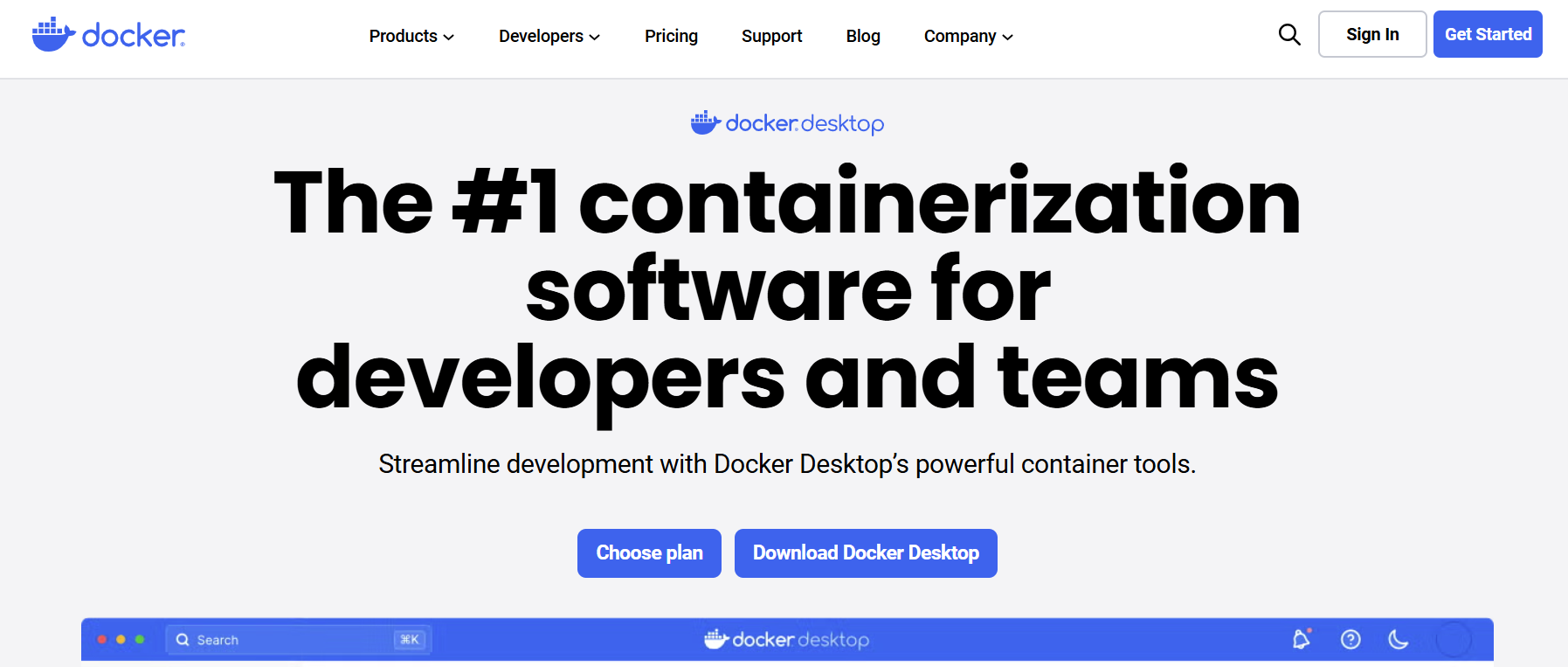 *** ## Step 2 - Select Operating System For this example, we selected Windows - AMD64. Please select your operating system. 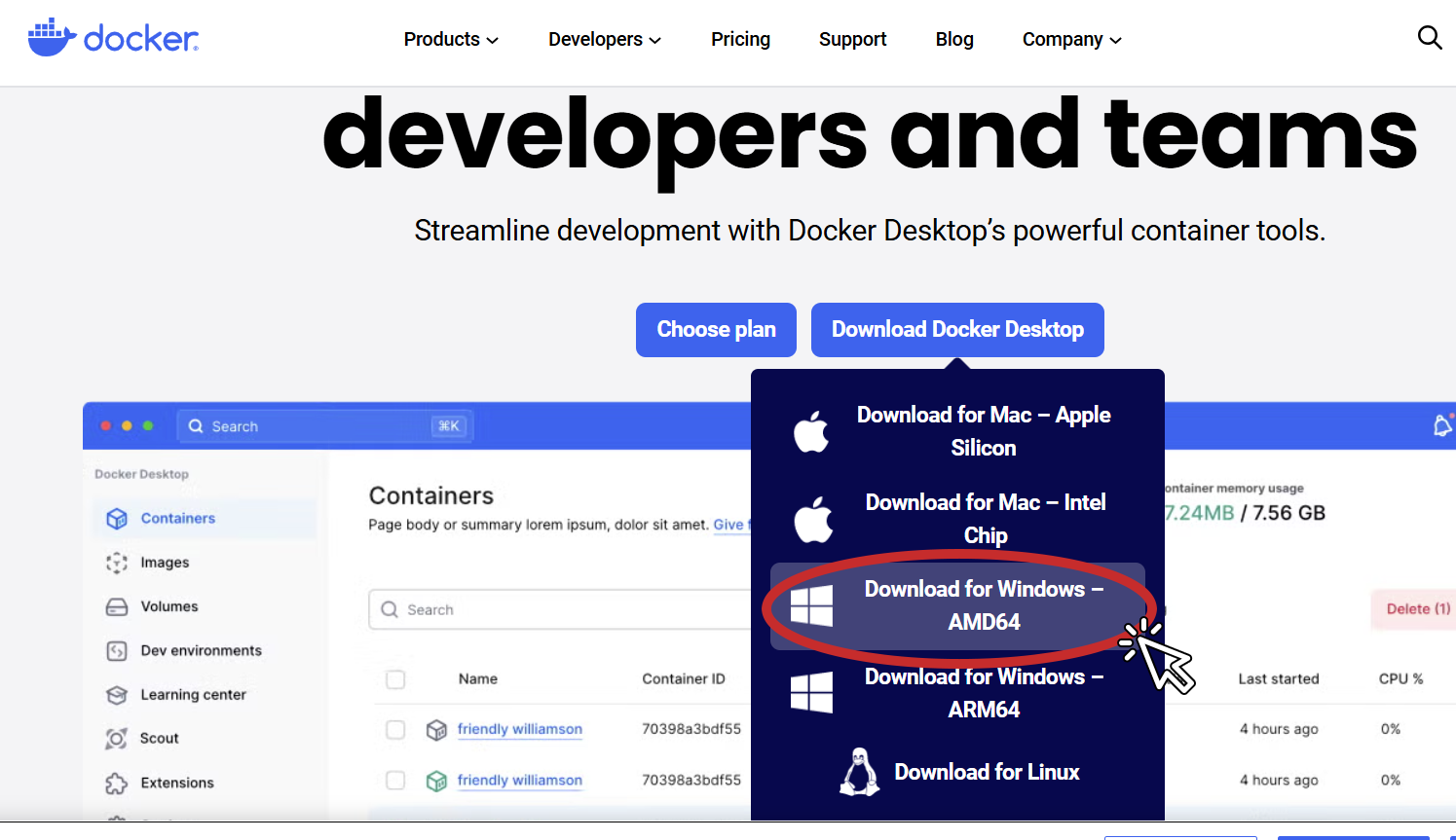 Follow the onscreen directions. 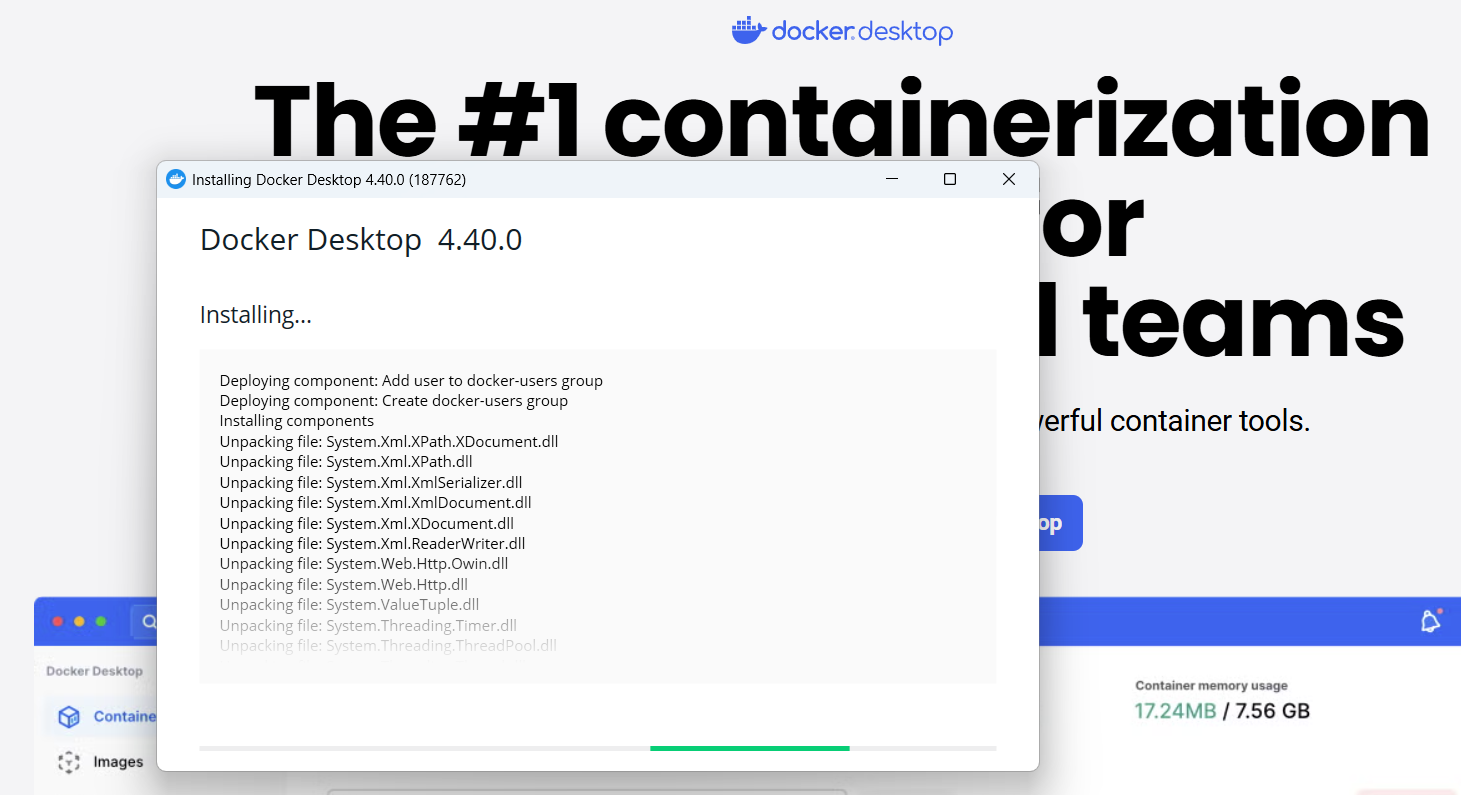 > 💡 Tip: Docker Desktop installs a Windows Subsystem for Linux that docker will run in. > > 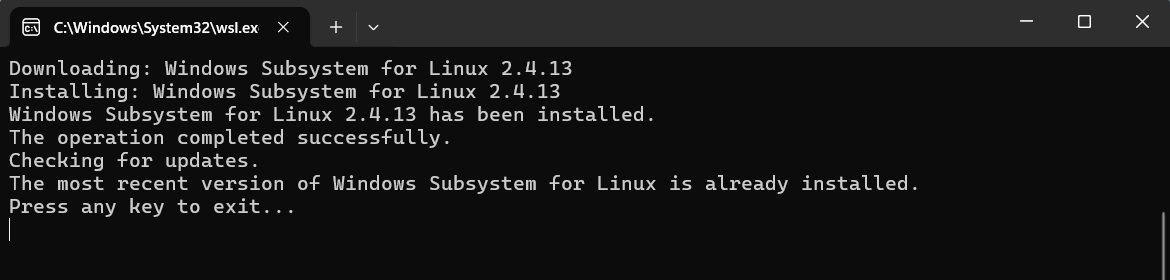 *** ## Step 3 - Open PowerShell as Administrator In your search bar type `powershell` and select run as administrator. 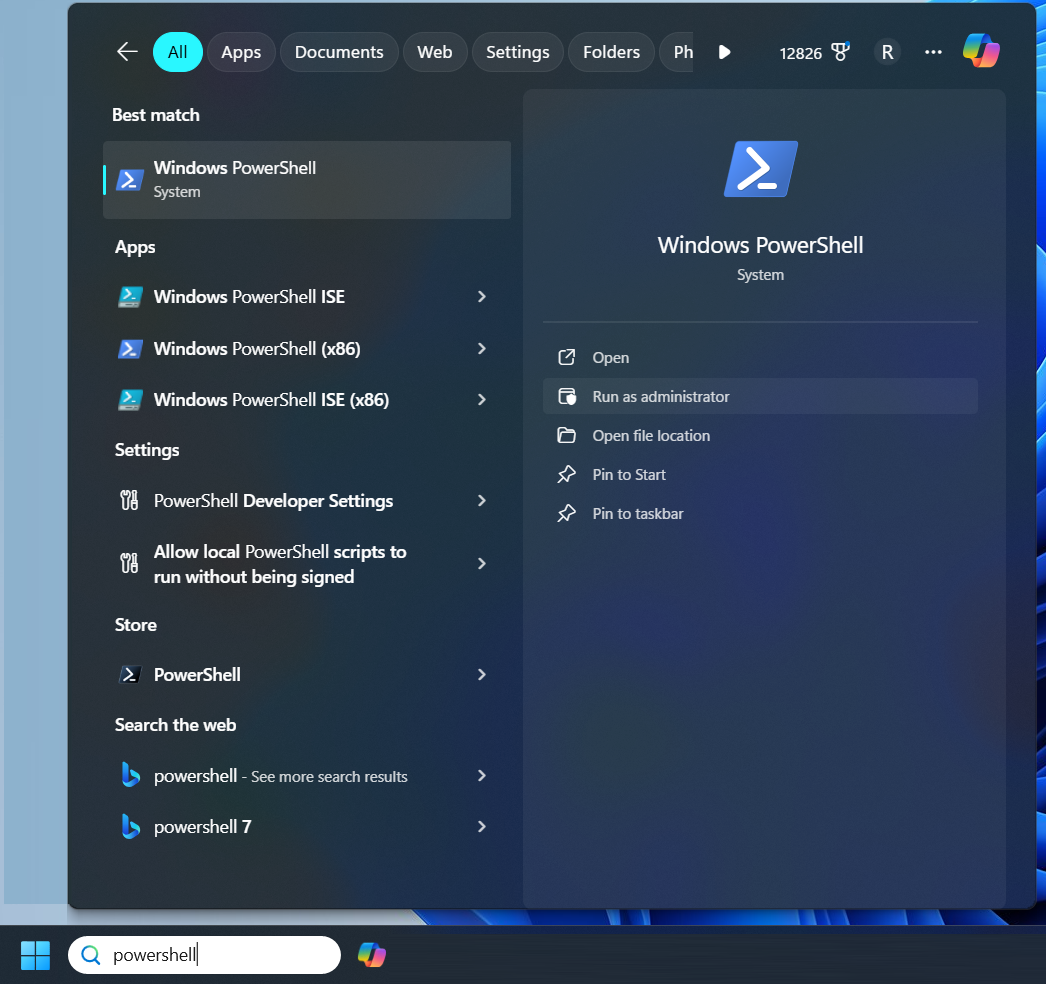 > 💡 Tip: you can verify that docker desktop is running by with the following command in your PowerShell > > ```plaintext > wsl -l -v > ``` > > 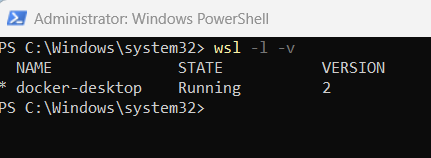 *** ## Step 4 - Install Ubuntu in WSL To install Ubuntu in WSL we run the following command in our PowerShell:
```plaintext
wsl --install -d Ubuntu
```
 *** []() ## Step 5 - Launch WSL and Finish Setup Once Ubuntu is installed, we will run the following command in our PowerShell to finish the setup by creating a user and password. First start the Ubuntu WSL by running:
```plaintext
wsl.exe -d Ubuntu
```
 Now type in a username and password. You will need to type in your password twice. 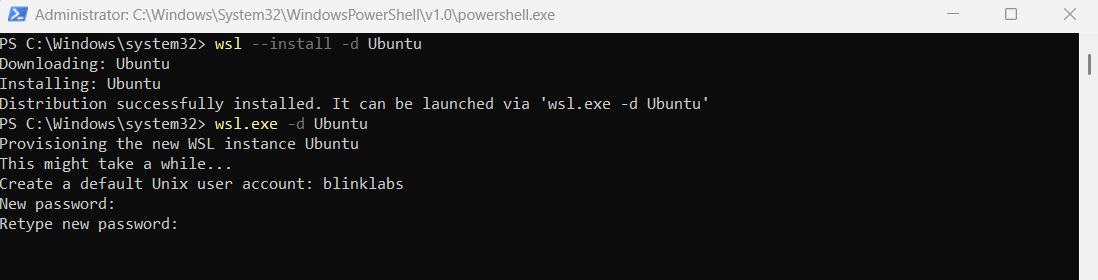 Once you added a username and password you will see a `Welcome to Ubuntu...` message. You can now exit out of your PowerShell by typing `exit` 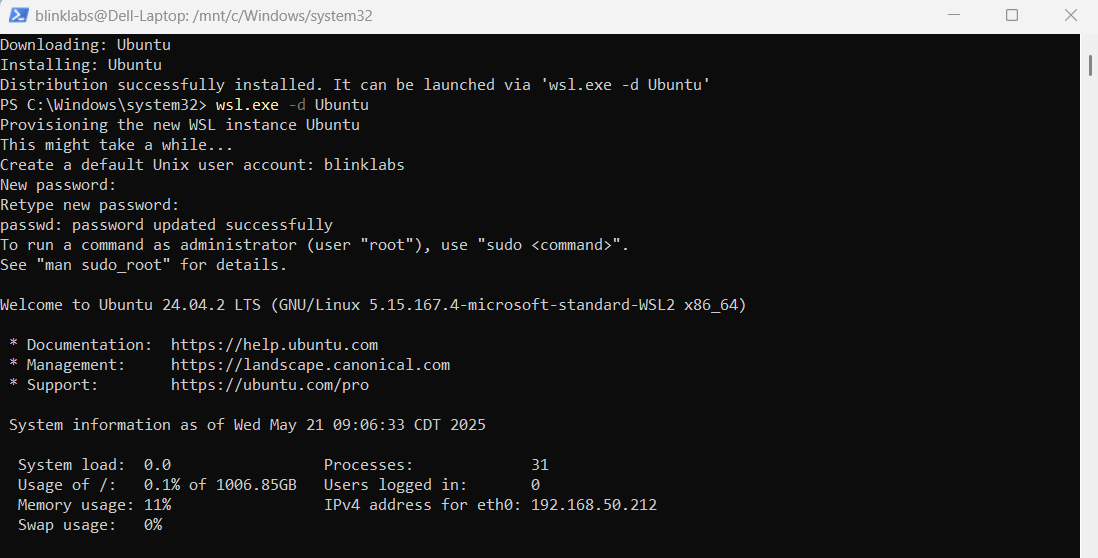 *** ## Step 6 - Enable Ubuntu in Docker Desktop To enable Ubuntu in Docker Desktop, go back into Docker Desktop and select settings. 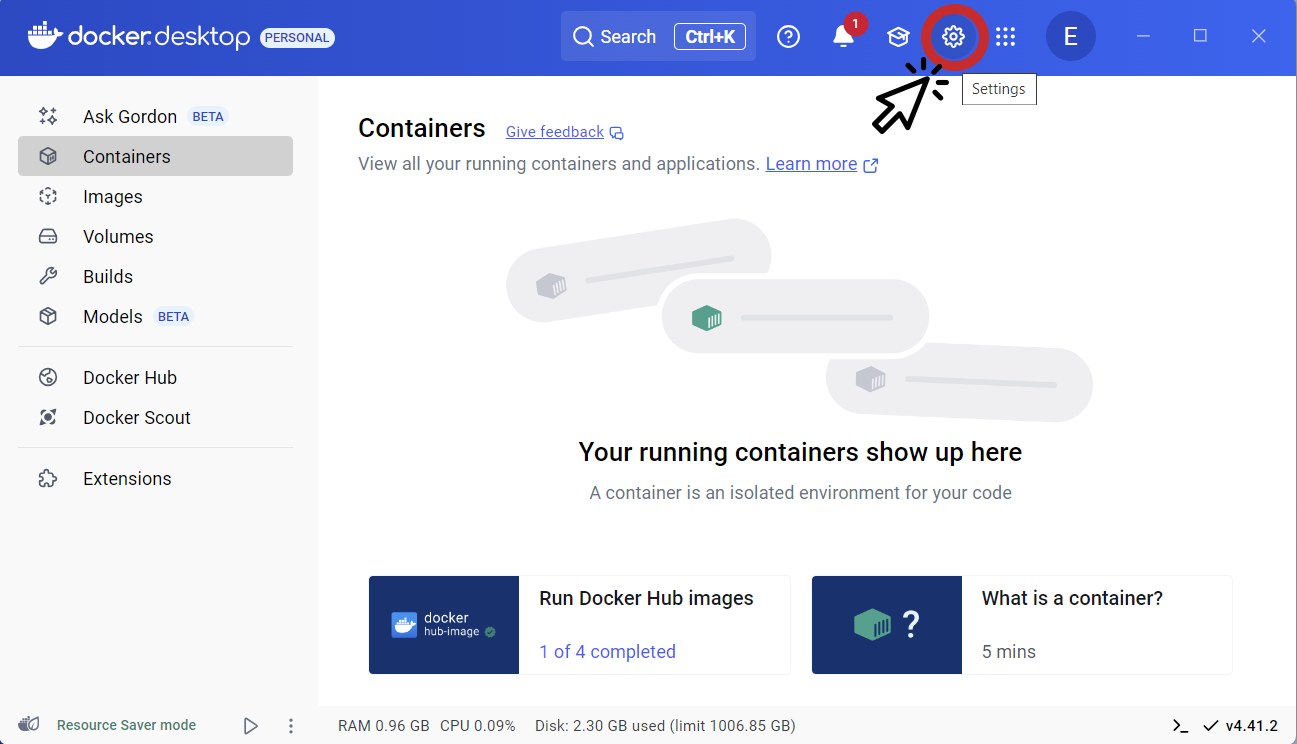 Once in settings select the `Resources` tab on the left side. 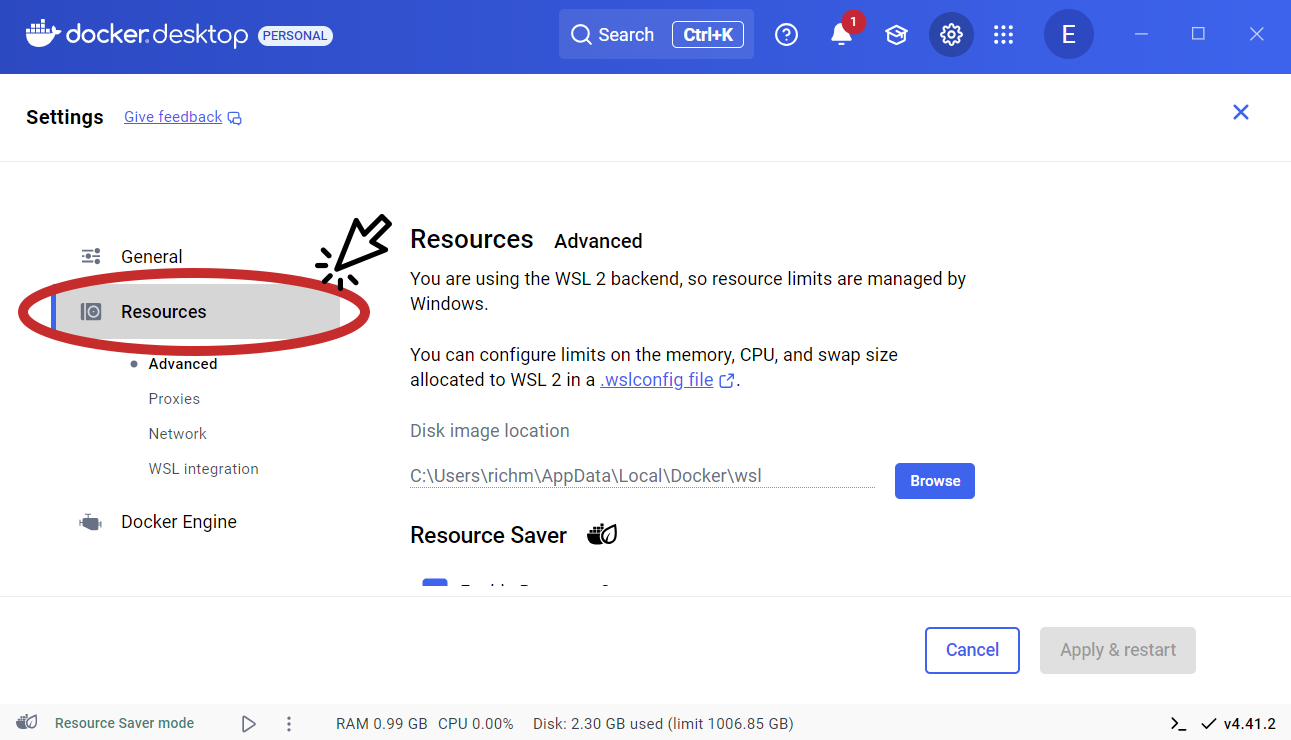 Under the Resources tab select `WSL integration` 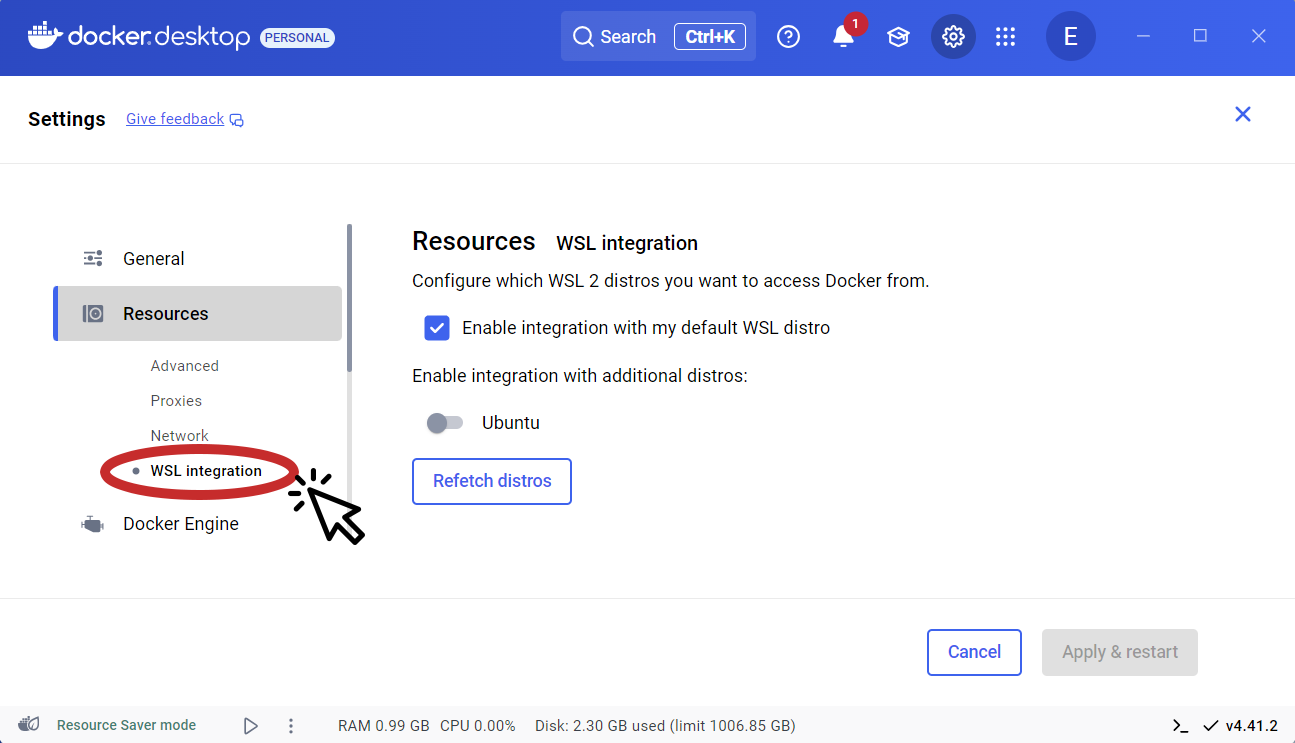 Under WSL integration select `Ubuntu` and click `Apply & restart` 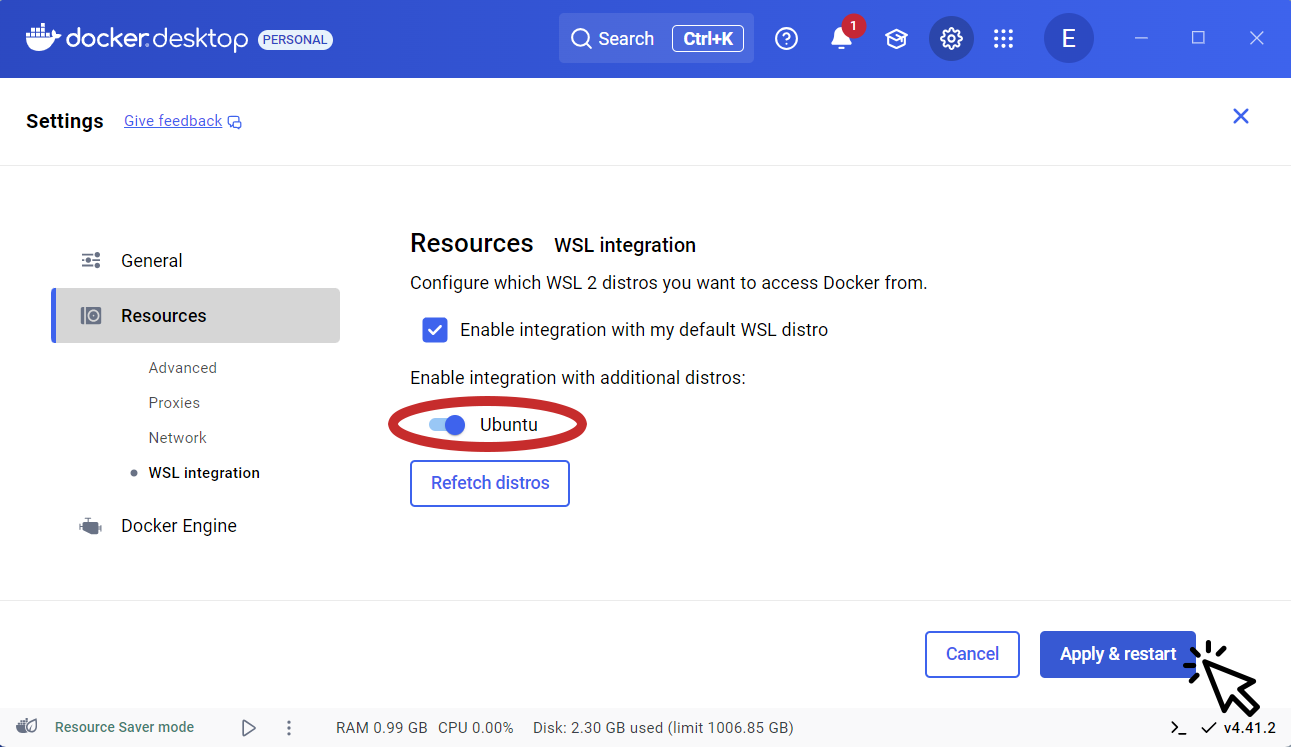 *** ## Step 7 - Launch Ubuntu app In your search bar type `ubuntu`, select ubuntu app and click open. 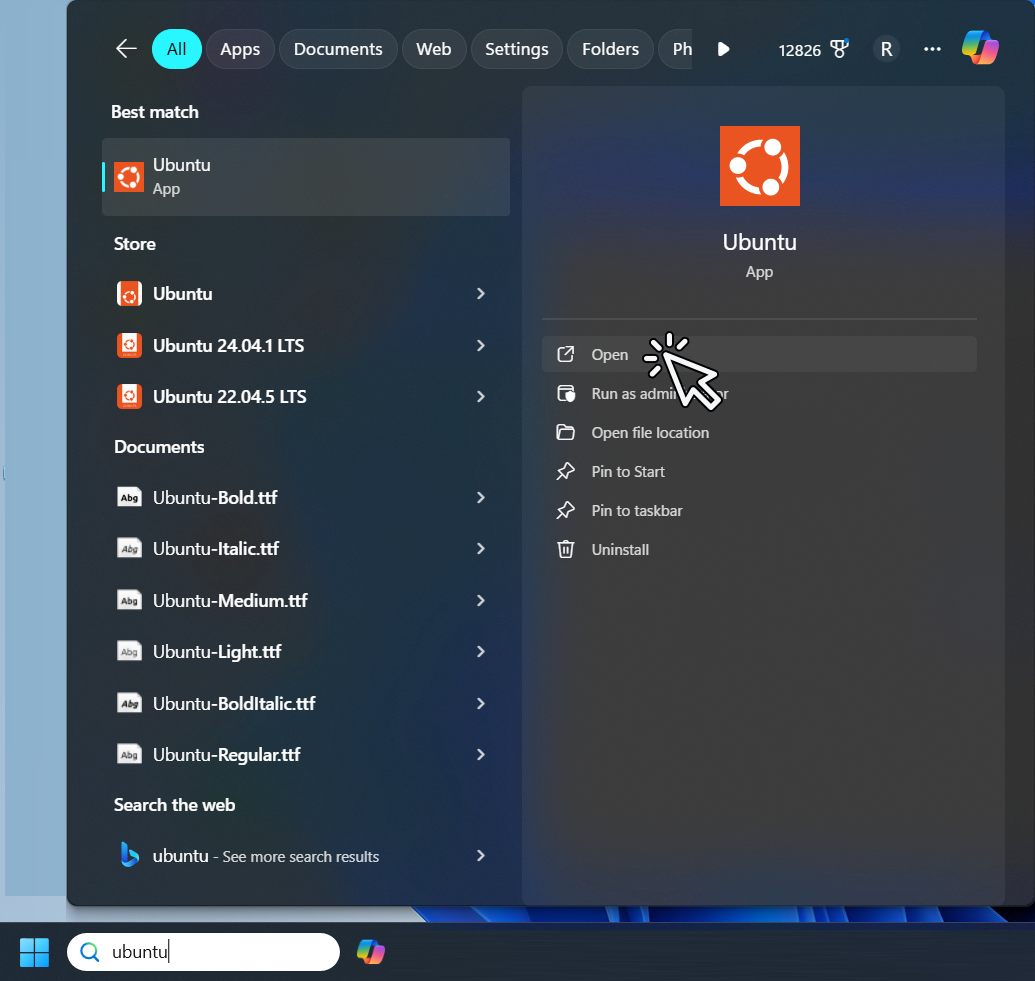 > 💡 TIP: You can check if docker is available by running `docker`. It will show a list of all available docker commands. > > 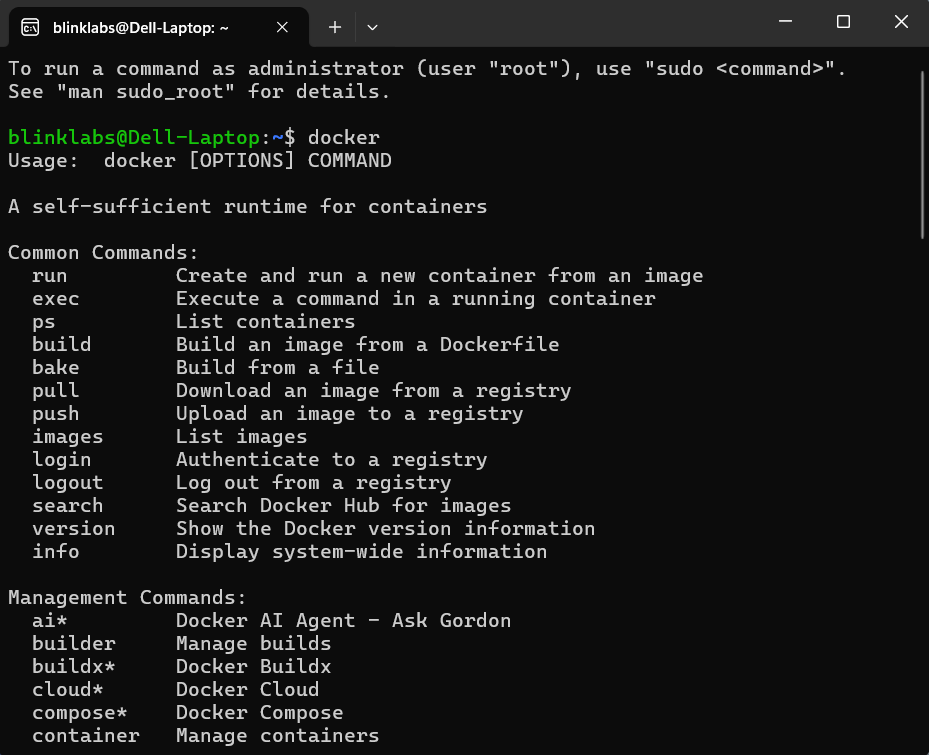 *** ## Step 8 - Download cardano-up binary ⚠️ Adjust download link to the most current version. > 💡 Tip: You can download the latest cardano-up release from the [](https://github.com/blinklabs-io/cardano-up/releases) page. We will download the cardano-up binary by running the following command:
```plaintext
wget -O - https://github.com/blinklabs-io/cardano-up/releases/download/v0.14.2/cardano-up-v0.14.2-linux-amd64 > cardano-up
```
 *** ## Step 9 - Change Permissions For this example, we named the binary file `cardano-up`. To make the file executable run the following command:
```plaintext
chmod +x cardano-up
```
 *** ## Step 10 - Move cardano-up For this example, we are going to put our cardano-up binary in the `/usr/local/bin` to move the cardano-up binary we can run:
```plaintext
sudo mv cardano-up /usr/local/bin/cardano-up
```
 You will need to enter your password that you created in [Step 5](#step-5)  > 💡 TIP: You can run `which cardano-up` to verify the path of where your cardano-up binary is located. > >  *** ### Congratulations! Now we are ready to start using cardano-up. We can now walk through [how to use cardano-up](../003-using-cardano-up) to demonstrate the ease of use and power of using cardano-up to install docker images of the Cardano services you need.
---
# Quick Start Guide
> Dingo Quick Start Overview.
# Dingo A Cardano blockchain node written in Go which actively participates in network communications on the Cardano blockchain using the Ouroboros Network Node-to-Node family of mini-protocols. ⚠️ Dingo is a work in progress and is currently under heavy development *** In this guide, we will walk you through downloading the Dingo binary and all the steps necessary to get the Dingo node running on the Cardano Preview network. To get started follow the steps below. ✅ This guide assumes a typical Linux setup. Please adjust commands and paths as needed. *** ## Step 1 - Download Dingo Binary Download the latest release from the [Dingo releases](https://github.com/blinklabs-io/dingo/releases) page. ⚠️ Adjust the version and architecture to match your system.
```plaintext
mkdir -p ~/dingo
cd ~/dingo
wget https://github.com/blinklabs-io/dingo/releases/download/v0.69.0/dingo-v0.69.0-linux-amd64.tar.gz -O - | tar -xz
```
You can verify the binary works by running:
```plaintext
./dingo version
```
*** ## Step 2 - Create dingo.yaml Configuration File Dingo ships with embedded Cardano network configurations (genesis files, config.json) for preview, preprod, and mainnet. You do not need to download them separately. Create a `dingo.yaml` file in your dingo directory. The `$HOME` variable will automatically expand to your home directory path:
```plaintext
cat < ~/dingo/dingo.yaml
# Shared database path for the local blob and metadata stores.
databasePath: "$HOME/dingo/.dingo"
# Storage
plugins:
storage:
blob:
provider: "badger"
config:
# Optional Badger data directory. When unset, `databasePath` applies.
# dataDir: "$HOME/dingo/.dingo/badger"
metadata:
provider: "sqlite"
config:
# Optional SQLite data directory. When unset, `databasePath` applies.
# dataDir: "$HOME/dingo/.dingo/metadata.db"
api:
blockfrost:
provider: "builtin"
config:
port: 0
mesh:
provider: "builtin"
config:
port: 0
utxorpc:
provider: "builtin"
config:
port: 0
# Mempool
# `plugins.mempool.config.capacity` is an optional override.
# Default: 1 MiB for Praos mode and normal serve mode, and 25 MiB for Musashi mode.
# Leave the key commented or omit it to use the mode default.
# plugins:
# mempool:
# config:
# capacity: 1048576
# Mithril
mithril:
aggregatorUrl: ""
cleanupAfterLoad: true
enabled: true
verifyCertificates: true
# Network
bindAddr: "0.0.0.0"
metricsPort: 12798
debugPort: 0
network: "preview"
privateBindAddr: "127.0.0.1"
privatePort: 3002
relayPort: 3001
socketPath: "$HOME/dingo/dingo.socket"
# Storage
barkBaseUrl: ""
barkPort: 0
storageMode: "core"
EOF
```
> 📝 Leave `debugPort` set to `0` unless profiling is required. `debugPort` controls an optional pprof listener, stays separate from `metricsPort`, and remains disabled at `0`. > 📝 Bark now derives its near tip safety window from the current ledger state. Do not look for or set a manual `barkSecurityWindow` value in this configuration. > 💡 API servers stay inactive outside `storageMode: "api"`, and a port value of `0` disables that API.
```yaml
midnight:
authTokenPolicyId: ""
storageMode: "api"
plugins:
api:
blockfrost:
provider: "builtin"
config:
port: 3000
mesh:
provider: "builtin"
config:
port: 8080
utxorpc:
provider: "builtin"
config:
port: 9090
```
> 📝 `midnight.authTokenPolicyId` only applies in API storage mode with Midnight indexing. Leaving it empty keeps the broader default auth token matching behavior. > 💡 Setting `block-cache-size` and `index-cache-size` to 0 with `compression: false` uses OS page cache (mmap) instead of BadgerDB’s internal caches. This dramatically reduces memory usage. *** ## Step 3 - Open Network Ports Configure UFW firewall rules to allow the ports required by Dingo. > 💡 Tip: UFW stands for Uncomplicated Firewall and is used for managing iptables (netfilter) firewall rules. To see which ports are currently open:
```plaintext
sudo ufw status numbered
```
#### Add Port 3001 for Ouroboros Node-to-Node (NtN) Communication
```plaintext
sudo ufw allow 3001/tcp
```
*** ## Step 4 - Bootstrap from Mithril Snapshot Dingo has a built-in Mithril client that downloads and loads a snapshot automatically. This saves hours of sync time compared to replaying the chain from genesis. Run the following command from your `~/dingo` directory:
```plaintext
cd ~/dingo
./dingo mithril sync --config ~/dingo/dingo.yaml
```
> 📝 `mithril.downloadMaxTransientRetries` controls retries for transient bootstrap download failures such as TLS timeouts, HTTP 429 responses, and HTTP 5xx responses. The example uses the default value of `10`. Dingo will: 1. Download the latest Mithril snapshot for your configured network 2. Verify the certificate chain 3. Load the snapshot into the database This takes approximately 20-30 minutes depending on your system and network speed. > 📝 If you skip this step, Dingo will sync from genesis when started, which takes significantly longer. *** ## Step 5 - Start Dingo Once the Mithril snapshot has loaded, start the node:
```plaintext
cd ~/dingo
./dingo serve --config ~/dingo/dingo.yaml
```
You should see log output showing the node connecting to peers and syncing the remaining blocks to reach the chain tip. *** #### Interested in running Dingo as a systemd service? Using a systemd service automatically starts Dingo when your system boots and restarts it if it exits unexpectedly. [See our guide on how to create a startup service for Dingo](../003-create-start-up-service). *** ### Congratulations! Your Dingo node is now running. [Learn how to interact with Dingo using the Cardano CLI](../004-using-dingo-with-cardano-cli).
---
# Using cardano-up
> A guide how to use cardano-up.
# Using cardano-up to install Cardano services cardano up is a command line utility for managing Cardano services. cardano-up allows you to use a command line utility to install Cardano service by using docker images. Let’s walk through how to open cardano-up and see how we can use it to install Cardano services that we might need. > ✅ For this guide we assume you have already downloaded the cardano-up binary and have opened the Ubuntu app. If you have not done that yet, see our [Quick Start](../002-quick-start-docker-desktop) guide. *** ## Contexts Before we start installing packages, we need to understand what `contexts` are and how cardano-up use them. Contexts are used to allow you to install multiple copies of the same package with different network configurations side by side. They allow you to do things such as running a `preprod` and `mainnet` Cardano node on the same machine, or even have multiple `preview` Cardano node instances running different versions of the node. Commands such as `install`, `uninstall`, and `list` work in the active context. You can use the `context` command to change the active context or manage available contexts. The `context` subcommand manages contexts. It has subcommands of its own for the various context-related functions. For this guide we will install into the default context which is set to the prepod network. If you want to see how to create your own context or change the network see our [Reference Guide](../004-reference-guide). *** ## Install a Package > 🛑 In order to install a package and interact with it we need to add `~/.local/bin` to your `$PATH` by adding the following to your shell RC/profile to make any commands/scripts installed readily available > > ```plaintext > export PATH=~/.local/bin:$PATH > ``` ✅ For this example we will install our package into the default context which is set to the prepod network 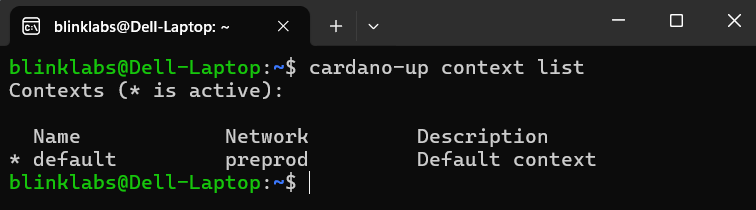 The package we will install is the Cardano Node. To install the Cardano Node using cardano-up we will run the following command:
```plaintext
cardano-up install cardano-node
```
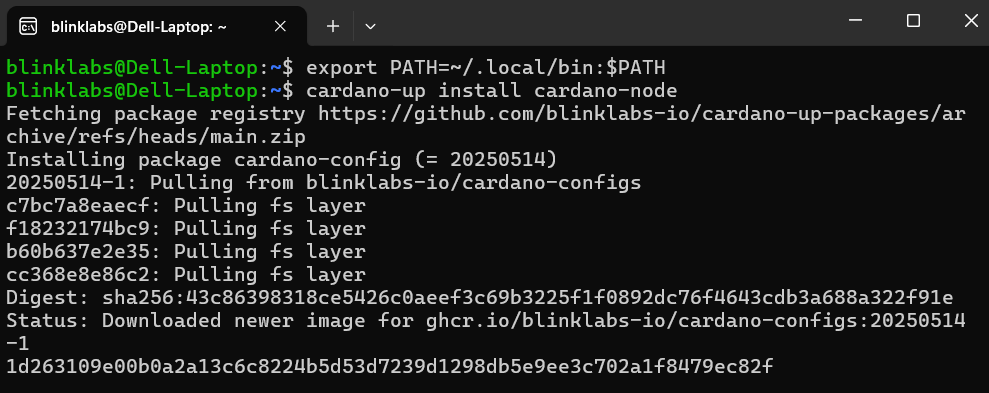 Once the install is complete, we will see the following `successfully installed` message. We can note that it installed the following packages that are needed for Cardano Node: cardano-config, cardano-cli, mithril-client, and the cardano-node.  > 💡 Tip: We can also now see the Cardano Node in Docker Desktop under our containers. > > 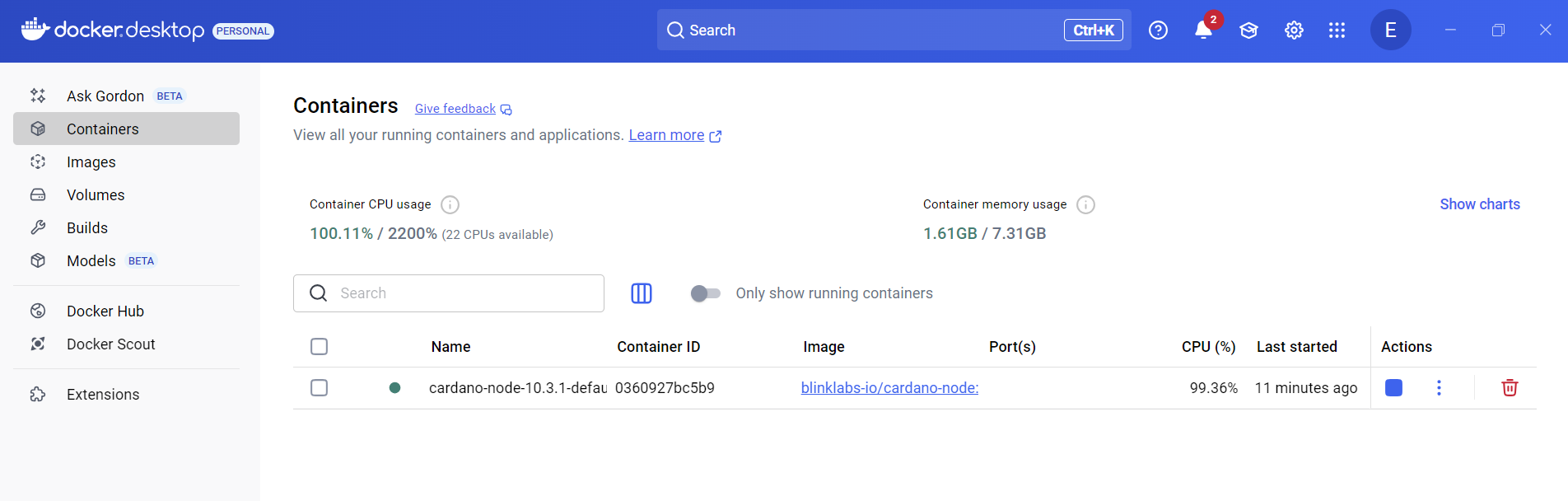 ### Congratulations you have install your first Cardano package with cardano-up and have the docker image ready to use! Let’s view the packages in our context, output our environment variables and test our Cardano node by finding the current blockchain tip using the cardano-cli. We will also see available packages for us to install in case we want to install another package to use with the Cardano Node. ## View Packages in Our Context We can now use the `cardano-up list` command to see the packages installed in our default context.
```plaintext
cardano-up list
```
 *** ## Output Environment Variables We can also add any env vars exported by the installed packages to your env by adding the following to your shell RC/profile:
```plaintext
eval $(cardano-up context env)
```
Now we should be able to run `cardano-cli` normally. We can check the tip of the Cardano node by running:
```plaintext
cardano-cli query tip --testnet-magic 1
```
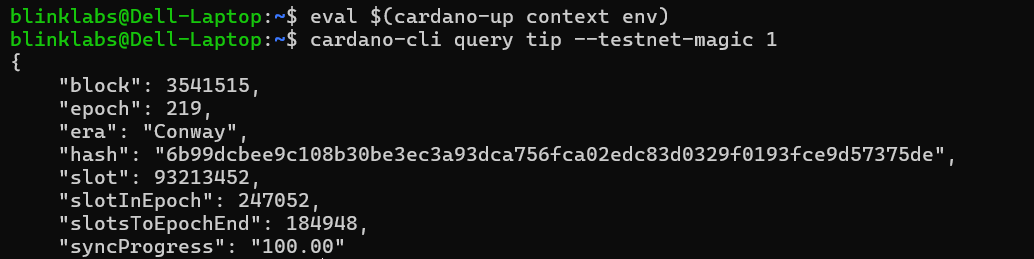 > ⚠️ If you get an error you might have to wait for the Cardano node to finish syncing before running. *** ## View Available Packages to Install Let’s now see what other packages are available that we might need or want to install. We can run the following command to see available packages:
```plaintext
cardano-up list-available
```
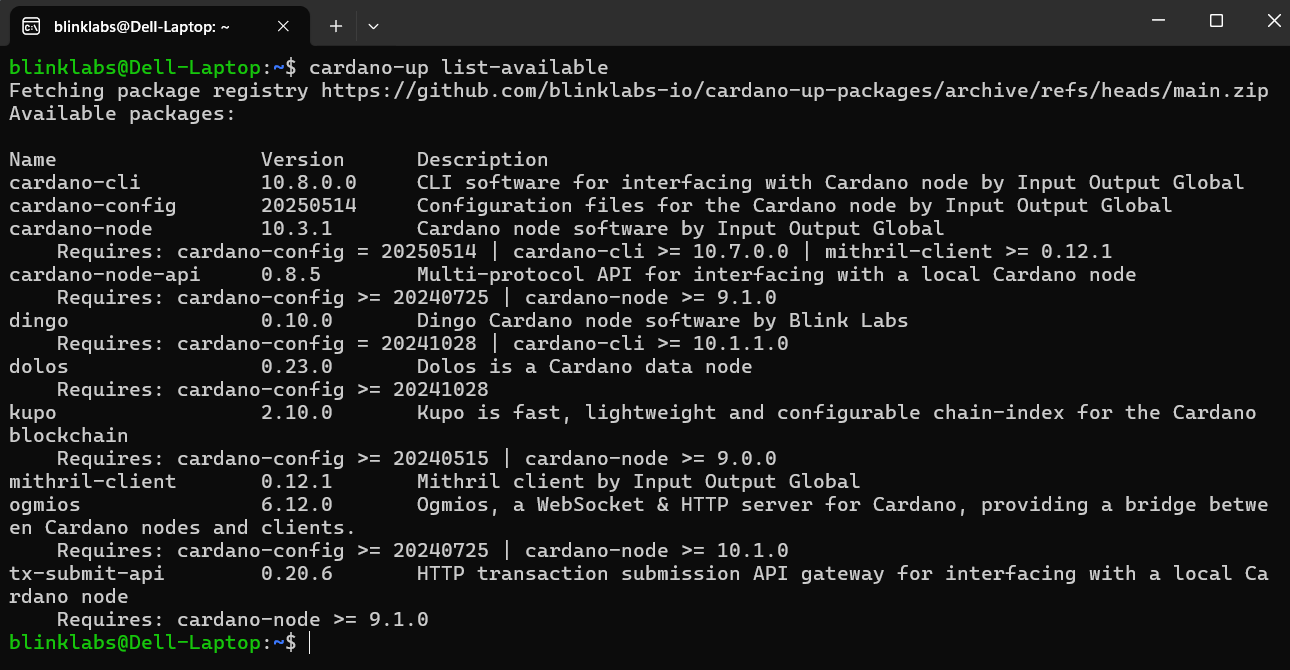 > 💡 Tip: You can see the required packages that will be installed if you install a certain package. For example, you can see if you install the Cardano node it `Requires: cardano-config, cardano-cli and mithril-client`  Want to see what else you can do or how to fine tune your setup, see our [Reference Guide](../004-reference-guide)
---
# Reference Guide
> Reference guide of commands for cardano-up.
# Reference Guide cardano up is a command line utility for managing Cardano services. cardano-up allows you to use a command line utility to install Cardano service by using docker images. This guide further explains how cardano-up works, managing packages and commands you can use. ### Quick Links: [Command Reference](#1) | [General cardano-up Commands](#2) | [Contexts](#3) *** []() ## Command Reference The `cardano-up` command consists of multiple subcommands. You can list all subcommands by running `cardano-up` with no arguments or with the `--help` option.
```plaintext
$ cardano-up
Usage:
cardano-up [command]
Available Commands:
completion Generate the autocompletion script for the specified shell
context Manage the current context
down Stops all Docker containers
help Help about any command
info Show info for an installed package
install Install package
list List installed packages
list-available List available packages
logs Show logs for an installed package
uninstall Uninstall package
up Starts all Docker containers
update Update the package registry cache
upgrade Upgrade package
validate Validate package file(s) in the given directory
version Displays the version
Flags:
-D, --debug enable debug logging
-h, --help help for cardano-up
-v, --verbose Show all available versions of packages
Use "cardano-up [command] --help" for more information about a command.
```
*** []() ## General cardano-up Commands: #### List available packages We can see what available packages or put another way what available Cardano services we can install with cardano-up by running the following command:
```plaintext
cardano-up list-available
```
 #### Install a Package > 🛑 In order to install a package and interact with it we need to add `~/.local/bin` to your `$PATH` by adding the following to your shell RC/profile to make any commands/scripts installed readily available > > ```plaintext > export PATH=~/.local/bin:$PATH > ``` To install a package, we run `cardano-up install (Package Name)` for this example `cardano-node`
```plaintext
cardano-up install cardano-node
```
#### Uninstall a Package To uninstall a package, we run `cardano-up uninstall (Package Name)` for this example `cardano-node`
```plaintext
cardano-up uninstall cardano-node
```
#### `down` Stops all running services for packages in the active context #### `help` Displays usage information for commands and subcommands #### `info` Shows information for an installed package, including the name, version, context name, any post-install notes, etc. #### `list` Lists installed packages in the active context, or all contexts with `-A` #### `logs` Displays logs from a running service for the specified package in the active context #### `up` Starts all services for packages in the active context #### `update` Force a refresh of the package registry cache #### `upgrade` Upgrade the specified package #### `validate` Validates packages defined in specified path #### `version` Displays the version *** []() ## Contexts Contexts are used to allow you to install multiple copies of the same package with different network configurations side by side. They allow you to do things such as running a `preprod` and `mainnet` Cardano node on the same machine, or even have multiple `preview` Cardano node instances running different versions of the node. Commands such as `install`, `uninstall`, and `list` work in the active context. You can use the `context` command to change the active context or manage available contexts. The `context` subcommand manages contexts. It has subcommands of its own for the various context-related functions. #### `context create` Create a new context with a given name, optionally specifying a description and a Cardano network. We use the `-n` flag to specify the Cardano network and the `-d` flag to give it a description ✅ In this sample we name our new context `dev` and set the network to `preview` with description of `preview test`
```plaintext
cardano-up context create dev -n preview -d 'preview test'
```
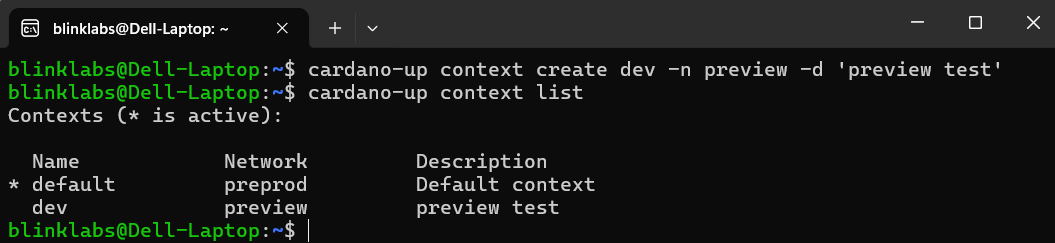 #### `context delete` Delete the context with the given name, if it exists
```plaintext
cardano-up context delete contextName
```
✅ In this sample we name our context `dev` 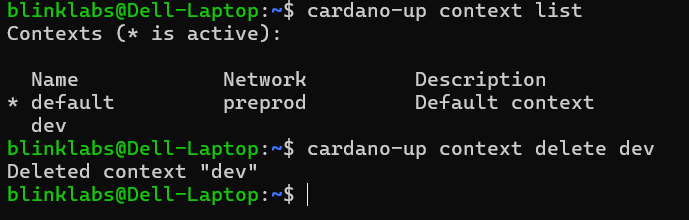 #### `context env` Output environment variables for the active context
```plaintext
cardano-up context env
```
 #### `context list` Lists the available contexts
```plaintext
cardano-up context list
```
 #### `context select` Sets the active context to the given context name. In this example we select the `dev` context.
```plaintext
cardano-up context select dev
```
 ***
---
# Create Startup Service
> Create Startup Service for Dingo.
# Dingo A Cardano blockchain node written in Go which actively participates in network communications on the Cardano blockchain using the Ouroboros Network Node-to-Node family of mini-protocols. ⚠️ Dingo is a work in progress and is currently under heavy development *** In this guide, we will walk you through setting up a `systemd` service. Using a `systemd` service to run a Dingo Node maximizes the uptime by automatically restarting the Dingo node when the computer reboots. To get started follow the steps below. ✅ This guide assumes a typical Linux setup. Please adjust commands and paths as needed. > ⚠️ For this guide we assume you have already completed the [Quick Start](../002-quick-start-overview) guide. *** ## Step 1 - Move the Dingo Binary and Configuration We will move the Dingo binary to `/usr/local/bin/` and the configuration to `/etc/dingo/` so they are accessible system-wide. Copy the binary:
```plaintext
sudo cp ~/dingo/dingo /usr/local/bin/
```
> ✅ You can verify the binary was copied by running `which dingo` Create the config directory and copy the configuration:
```plaintext
sudo mkdir -p /etc/dingo
sudo cp ~/dingo/dingo.yaml /etc/dingo/
```
*** ## Step 2 - Update Paths in `dingo.yaml` Since the service will run as your user but the config is now in `/etc/dingo/`, we need to make sure the database and socket paths use absolute paths. Run the following to regenerate the config with your `$HOME` expanded:
```plaintext
sudo bash -c "cat < /etc/dingo/dingo.yaml
# Global data directory for both blob and metadata storage plugins.
# Can be overridden with CARDANO_DATABASE_PATH or --data-dir.
databasePath: \"$HOME/dingo/.dingo\"
# Plugins
plugins:
storage:
blob:
provider: \"badger\"
config:
# Optional Badger data directory. When unset, databasePath applies.
dataDir: \"$HOME/dingo/.dingo/badger\"
blockCacheSize: 0
compression: false
gc: true
indexCacheSize: 0
metadata:
provider: \"sqlite\"
config:
# Optional SQLite data directory. When unset, databasePath applies.
dataDir: \"$HOME/dingo/.dingo/metadata.db\"
mempool:
provider: \"default\"
config:
# `capacity` is an optional override, not a required setting.
# Default: 1 MiB for Praos mode and normal serve mode, and 25 MiB for Musashi mode.
# Leave the key commented or omit it to use the mode default.
# capacity: 1048576
# `revalidationDeltaCap` is optional. Default: 64. The value must be positive.
# revalidationDeltaCap: 64
api:
blockfrost:
provider: \"builtin\"
config:
port: 3000
mesh:
provider: \"builtin\"
config:
port: 8080
utxorpc:
provider: \"builtin\"
config:
port: 9090
# Mithril
mithril:
aggregatorUrl: \"\"
cleanupAfterLoad: true
enabled: true
verifyCertificates: true
# Network
bindAddr: \"0.0.0.0\"
metricsPort: 12798
debugPort: 0
network: \"preview\"
privateBindAddr: \"127.0.0.1\"
privatePort: 3002
relayPort: 3001
socketPath: \"$HOME/dingo/dingo.socket\"
# Storage
barkBaseUrl: \"\"
barkPort: 0
storageMode: \"core\"
# Database lifecycle
databaseLifecycle:
# Dingo captures automatic database snapshots at epoch boundaries.
# Default: false.
snapshotEnabled: false
# Dingo writes automatic snapshots to this local filesystem directory.
# Set this when snapshotEnabled is true and when Bark mounts the live service.
snapshotDir: \"$HOME/dingo/snapshots\"
# Keep only the most recent automatic snapshots.
# Default: 0.
snapshotRetention: 0
# Optional cloud mirror for snapshots.
# snapshotCloudDestination: \"\"
# snapshotCloudDestinationPrefix: \"\"
# Capture an automatic snapshot every N epoch closes.
# CLI: --db-snapshot-every-n-epochs
snapshotEveryNEpochs: 1
EOF"
```
> 📝 Leave `debugPort` set to `0` unless profiling is required. `debugPort` controls a separate optional pprof listener and should stay disabled unless profiling is needed. > 📝 `databaseLifecycle.snapshotEnabled` controls automatic snapshots, and `dingo database snapshot|restore|truncate` handles offline maintenance. When Bark also serves live restore or truncate operations, set `barkPort`, `databaseLifecycle.snapshotDir`, `barkClientCaFilePath`, and `tlsCertFilePath`/`tlsKeyFilePath`. > 📝 Set `databaseLifecycle.snapshotRetention` to keep only the most recent automatic snapshots. Set `databaseLifecycle.snapshotCloudDestination` to mirror each snapshot to S3 or GCS when Dingo runs with `dingo_extra_plugins`. > 📝 Use `dingo database snapshot`, `dingo database restore `, and `dingo database truncate --slot `, `--hash `, or `--block-number ` on an offline data directory. `restore` also accepts the same cloud URI that `snapshotCloudDestination` uses and downloads it to a temporary directory before restoration. > 📝 When `barkPort` runs together with `databaseLifecycle.snapshotDir`, Bark also exposes live `Restore` and `Truncate` access.
```yaml
storageMode: "api"
plugins:
api:
blockfrost:
provider: "builtin"
config:
port: 3000
mesh:
provider: "builtin"
config:
port: 8080
utxorpc:
provider: "builtin"
config:
port: 9090
midnight:
authTokenPolicyId: ""
```
> 📝 Dingo starts the Blockfrost, Mesh, and UTxO RPC listeners only in API storage mode. Set any listener port to `0` to disable that API. > 📝 `midnight.authTokenPolicyId` only applies in API storage mode with Midnight indexing. Leaving it empty keeps the broader default auth token matching behavior. 💡 Tip: The `network` setting supports the following values:
```yaml
# Musashi (Leios) testnet
network: musashi
# Preview testnet
network: preview
# Pre-production testnet
network: preprod
# Mainnet - NOT CURRENTLY RECOMMENDED
network: mainnet
```
*** You can view and verify our `dingo.yaml` file by running:
```plaintext
cd /etc/dingo/
sudo nano dingo.yaml
```
## Step 3 - Bootstrap from Mithril (First Run Only) Before starting the service for the first time, bootstrap the database from a Mithril snapshot:
```plaintext
dingo mithril sync --config /etc/dingo/dingo.yaml
```
> 📝 `mithril.downloadMaxTransientRetries` controls retries for transient bootstrap download failures such as TLS timeouts, HTTP 429 responses, and HTTP 5xx responses. The example uses the default value of `10`. This downloads and loads a snapshot, saving hours of sync time. See [Step 4 of the Quick Start guide](../002-quick-start-overview#step-4---bootstrap-from-mithril-snapshot) for details. > 📝 You only need to do this once. After the initial bootstrap, the systemd service will keep the node synced. *** ## Step 4 - Create `dingo.service` Unit File Create the systemd service file. Replace `YOUR_USER` with your username (`echo $USER`):
```plaintext
cat < /dev/null
[Unit]
Description=Dingo Node
After=network-online.target
[Service]
Type=simple
Restart=on-failure
RestartSec=10
User=YOUR_USER
ExecStart=/usr/local/bin/dingo serve --config /etc/dingo/dingo.yaml
SyslogIdentifier=dingo
TimeoutStopSec=5
[Install]
WantedBy=multi-user.target
ENDFILE
```
*** We can view and verify our `dingo.service` file by running:
```plaintext
sudo nano /etc/systemd/system/dingo.service
```
## Step 5 - Enable and Start the Service Enable the service to start on boot and start it now:
```bash
sudo systemctl daemon-reload
sudo systemctl enable dingo.service
sudo systemctl start dingo.service
```
*** ## Step 6 - Check Status Verify the service is running:
```plaintext
sudo systemctl status dingo.service
```
To follow the logs in real time:
```plaintext
sudo journalctl -u dingo -f
```
To see recent logs if there is an error:
```plaintext
sudo journalctl -u dingo -n 50 --no-pager
```
*** ### Congratulations! You have successfully set up a `systemd` service for Dingo.
---
# Using Dingo with Cardano CLI
> Dingo - How to use Dingo with Cardano CLI.
Dingo is a Cardano blockchain node written in Go which actively participates in network communications on the Cardano blockchain using the Ouroboros Network Node-to-Node family of mini-protocols. ⚠️ Dingo is a work in progress and is currently under heavy development *** In this guide, we will walk you through downloading and running the Cardano CLI binary, then demonstrate several Cardano CLI commands. To get started follow the steps below. > ✅ This guide we assumes you have already downloaded Dingo and synced the blockchain. If not, see our [Quick Start](../002-quick-start-overview) guide. *** ## Step 1 - Download the latest Cardano CLI binary First, go to the Cardano CLI repo [](https://github.com/IntersectMBO/cardano-cli/releases) page. You can either download the binary and move the file to your preferred location or… Copy the download URL for the latest Cardano CLI binary and run the following command: ⚠️ For this example we place the `cardano-cli` binary in our `~/dingo` directory. Adjust the link path to the correct path for the version you want to download.
```plaintext
cd ~/dingo
wget https://github.com/IntersectMBO/cardano-cli/releases/download/cardano-cli-11.0.0.0/cardano-cli-11.0.0.0-x86_64-linux.tar.gz -O - | tar -xz
```
*** ## Step 2 - Rename the Cardano CLI Binary and Set Execute Permissions To make the file executable run the following command:
```plaintext
chmod +x cardano-cli-x86_64-linux
```
For this example, we will rename the binary to `cardano-cli` and move it to `/usr/local/bin/`: ⚠️ Adjust the file path and file name if needed.
```plaintext
sudo mv cardano-cli-x86_64-linux /usr/local/bin/cardano-cli
```
*** #### Congratulations! You can now use cardano-cli to communicate with your Dingo node. ## Step 3 - Run Cardano CLI Command to Query Tip Let’s run our first Cardano CLI command to query the tip of the Preview network using the Dingo node. Run the following command to query the tip:
```plaintext
./cardano-cli query tip \
--testnet-magic 2 \
--socket-path dingo.socket
```
> ⚠️ Please note: The `--socket-path` shown above assumes you downloaded cardano-cli into your `~/dingo` directory. If you installed cardano-cli elsewhere, adjust the path accordingly. You can use `realpath dingo.socket` to determine the absolute path to `dingo.socket`. 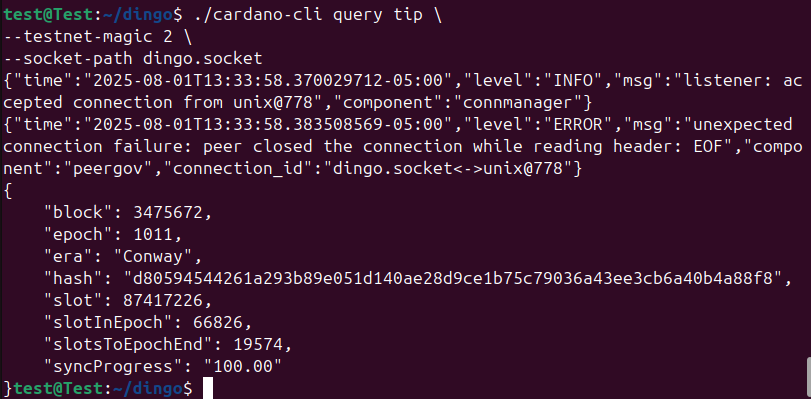 *** ## Step 4 - Using Environment Variables (Optional) Instead of specifying the Cardano network and node socket each time you run a cardano-cli command, you can use environment variables. ### Setting Environment Variables for Current Session (Option 1) Run the following commands to export the variable for our current session. Socket Path:
```plaintext
export CARDANO_NODE_SOCKET_PATH=~/dingo/dingo.socket
```
Node Network:
```plaintext
export CARDANO_NODE_NETWORK_ID=2
```
### Setting Environment Variables Permanently (Option 2) To make an environment variable persistent across sessions, you need to add it to your shell’s configuration file. Socket Path:
```plaintext
echo export CARDANO_NODE_SOCKET_PATH=~/dingo/dingo.socket >> ~/.bashrc
```
Node Network:
```plaintext
echo export CARDANO_NODE_NETWORK_ID=2 >> ~/.bashrc
```
*** > 💡 Tip: Below are the current Network IDs > > ```plaintext > # SanchoNet testnet > export CARDANO_NODE_NETWORK_ID=4 > > > # Preview testnet > export CARDANO_NODE_NETWORK_ID=2 > > > # Pre-production testnet > export CARDANO_NODE_NETWORK_ID=1 > > > # Mainnet > export CARDANO_NODE_NETWORK_ID=mainnet > ``` *** ### Congratulations! You are now ready to use your Dingo node with the Cardano CLI! Learn more about the Cardano CLI at [https://developers.cardano.org](https://developers.cardano.org/docs/get-started/cli-operations/basic-operations/get-started/)
---
# SPO Guide Overview
> SPO Guide for Dingo Pools.
# Dingo Node ## This guide walks you through the steps required to set up a test pool on the Preview network using the Dingo Node. ⚠️ The Dingo Node is a work in progress and is currently under heavy development, as such Dingo Block production is currently recommended for testnets only. > 📝 Note: See the Release Notes to see the recommended Network Compatibility chart. > > ### Recommended Network Compatibility ⚠️ > > | Network | Compatible | > | --------------- | ---------- | > | mainnet | ⛔ | > | preprod-testnet | ✅ | > | preview-testnet | ✅ | > | musashi | ✅ | There are 7 main steps that we will cover to get a Dingo Node registered and running on the Preview Network. * [x] 1\. Complete the [Quick Start](../../002-quick-start-overview) guide. * [x] 2\. [Create Start Up Service](../../003-create-start-up-service) * [x] 3\. [Install Cardano CLI](../../004-using-dingo-with-cardano-cli) * [x] 4\. Generate Pool Keys * [x] 5\. Generate Payment and Stake Keys * [x] 6\. Register Your Stake Address * [x] 7\. Register Your Stake Pool *** 📝 This guide assumes you have hardened your server security. For information on hardening your Server [see Coincashew guide](https://www.coincashew.com/coins/overview-ada/guide-how-to-build-a-haskell-stakepool-node/part-i-installation/hardening-an-ubuntu-server) ⚠️ This guide also omits Air-Gapped setup and assumes you secured files as necessary.
---
# Generate Pool Keys
> SPO Guide for Dingo Pools - Generate Pool Keys.
# Dingo Node - Block Production Keys We will now generate the pool keys needed for block production on the Preview network. | Key | Purpose | Where it lives | | ----------------------------------- | --------------------------------------------- | ------------------------------------------- | | Cold key (node.skey / node.vkey) | Authorizes pool registration and KES rotation | Air-gapped machine only — never transferred | | KES key (kes.skey / kes.vkey) | Signs blocks; rotated before KES expiration | kes.skey - Block producer | | VRF key (vrf.skey / vrf.vkey) | Proves slot leadership | vrf.skey - Block producer | | Operational certificate (node.cert) | Binds KES key to cold key for the node | Block producer | For background on what these keys do, see [Cardano Key Pairs](https://developers.cardano.org/docs/operate-a-stake-pool/basics/cardano-key-pairs/). *** > ⚠️ The following guide assumes you have already completed the following 3 steps. If not please complete them first and return here when you are done. > > * [x] 1\. Complete the [Quick Start](../../002-quick-start-overview) guide. > * [x] 2\. [Create Startup Service](../../003-create-start-up-service) > * [x] 3\. [Install Cardano CLI](../../004-using-dingo-with-cardano-cli) *** ✅ This guide assumes your files are in the $HOME/dingo folder. Adjust paths below if necessary. ## Step 1 - Generate KES key pair
```plaintext
cd ~/dingo
cardano-cli conway node key-gen-KES \
--verification-key-file kes.vkey \
--signing-key-file kes.skey
```
*** ## Step 2 - Make a directory to store your cold keys ⚠️ On an air-gapped machine
```plaintext
mkdir $HOME/dingo/cold-keys
pushd $HOME/dingo/cold-keys
```
*** ## Step 3 - Generate a set of cold keys and create the cold counter file ⚠️ On an air-gapped machine
```plaintext
cardano-cli conway node key-gen \
--cold-verification-key-file node.vkey \
--cold-signing-key-file node.skey \
--operational-certificate-issue-counter node.counter
```
*** ## Step 4 - Find the starting KES period We need the Shelley Genesis json file to run our CLI command We will create a directory to store our Cardano configuration files. For this example, we will use the following directory structure `/config/cardano/preview/` by running the following command in our `dingo` directory:
```plaintext
cd ~/dingo
mkdir -p config/cardano/preview
```
Next, navigate to the `config/cardano/preview` folder and download the Cardano Shelley Genesis file.
```plaintext
cd config/cardano/preview
```
To download the Shelley Genesis file, run:
```plaintext
wget https://book.play.dev.cardano.org/environments/preview/shelley-genesis.json
```
> 💡 Tip: Cardano Configuration Files can be found at [](https://book.play.dev.cardano.org/environments.html) *** Now we can find the starting KES period by running:
```plaintext
slotNo=$(cardano-cli conway query tip --testnet-magic 2 | jq -r '.slot')
slotsPerKESPeriod=$(cat $HOME/dingo/config/cardano/preview/shelley-genesis.json | jq -r '.slotsPerKESPeriod')
kesPeriod=$((${slotNo} / ${slotsPerKESPeriod}))
startKesPeriod=${kesPeriod}
echo startKesPeriod: ${startKesPeriod}
```
📝 WRITE DOWN THIS NUMBER *** ## Step 5 - Generate the operational certificate for your pool ✅ Change the value you wrote down in the previous step. ⚠️ On an air-gapped machine once you have copied `kes.vkey` to your cold environment.
```plaintext
cd ~/dingo
cardano-cli conway node issue-op-cert \
--kes-verification-key-file kes.vkey \
--cold-signing-key-file $HOME/dingo/cold-keys/node.skey \
--operational-certificate-issue-counter $HOME/dingo/cold-keys/node.counter \
--kes-period \
--out-file node.cert
```
*** ## Step 6 - Copy node.cert to your hot environment Copy your `node.cert` file to your Block Producer. *** ## Step 7 - Generate a VRF key pair
```plaintext
cd ~/dingo
cardano-cli conway node key-gen-VRF \
--verification-key-file vrf.vkey \
--signing-key-file vrf.skey
```
*** ## Step 8 - Update VRF key permissions to read-only. You must also copy vrf.vkey to your cold environment.
```plaintext
chmod 400 vrf.skey
```
*** > ### Reminder > > **Block-producing Node** The only stake pool keys and certs that should be stored on the block producer, are the following three files: > > ```plaintext > ### > ### On block producer node > ### > KES = kes.skey > VRF = vrf.skey > CERT = node.cert > ``` > > **All other keys must remain offline in your air-gapped cold environment.** > > **Relay Nodes** Relay nodes must NOT store any operational certificates, VRF keys, signing keys or cold keys.
---
# Generate Payment and Stake Keys
> SPO Guide for Dingo Pools - Generate Payment and Stake Keys.
# Dingo - Generate Payment and Stake Keys ✅ This guide assumes your files are in the $HOME/dingo folder. Adjust paths below if necessary. ## Step 1 - Obtain the protocol parameters
```plaintext
cd ~/dingo
cardano-cli conway query protocol-parameters \
--testnet-magic 2 \
--out-file params.json
```
*** ## Step 2 - Generate a new payment key pair Generate a new payment key pair (`payment.skey` and `payment.vkey`) ⚠️ On an air-gapped machine
```plaintext
cd ~/dingo
cardano-cli conway address key-gen \
--verification-key-file payment.vkey \
--signing-key-file payment.skey
```
*** ## Step 3 - Generate a new stake address key pair Generate a new stake address key pair (`stake.skey` and `stake.vkey`) ⚠️ On an air-gapped machine
```plaintext
cardano-cli conway stake-address key-gen \
--verification-key-file stake.vkey \
--signing-key-file stake.skey
```
*** ## Step 4 - Generate your stake address Generate a stake address from the stake address verification key and store it in `stake.addr` ⚠️ On an air-gapped machine
```plaintext
cardano-cli conway stake-address build \
--stake-verification-key-file stake.vkey \
--out-file stake.addr \
--testnet-magic 2
```
*** ## Step 5 - Generate payment address Generate a payment address for the payment key (`payment.vkey`) and stake key (`stake.vkey`) and store it in `payment.addr`
```plaintext
cardano-cli conway address build \
--payment-verification-key-file payment.vkey \
--stake-verification-key-file stake.vkey \
--out-file payment.addr \
--testnet-magic 2
```
Display your payment address by running:
```plaintext
cat payment.addr
```
✅ **Copy only `payment.addr` to your hot environment. Keep `payment.skey` on your air-gapped machine.** *** ## Step 6 - Fund your payment address On testnets you can use the [Cardano faucet](https://docs.cardano.org/cardano-testnets/tools/faucet) to get test ADA. Select the Preview testnet and paste your payment.addr. After funding your account, check your payment address balance.
```plaintext
cardano-cli conway query utxo \
--address $(cat payment.addr) \
--testnet-magic 2
```
---
# Register Stake Address
> SPO Guide for Dingo Pools - Registering Your Stake Address.
# Dingo - Register Stake Address > The stake address must be registered on-chain before it can be used. This costs transaction fees plus a deposit (currently 2 ADA, as defined by the network protocol parameters). The deposit is returned when the stake address is deregistered. ✅ This guide assumes your files are in the $HOME/dingo folder. Adjust paths below if necessary. ## Step 1 - Generate stake registration certificate ⚠️ On an air-gapped machine
```plaintext
cd ~/dingo
cardano-cli conway stake-address registration-certificate \
--stake-verification-key-file stake.vkey \
--key-reg-deposit-amt "$(jq -r '.stakeAddressDeposit' params.json)" \
--out-file stake.cert
```
*** ## Step 2 - Build Transaction Copy `stake.cert` to the `~/dingo` directory on your hot environment. Query the current slot (used for `--invalid-hereafter`):
```plaintext
currentSlot=$(cardano-cli conway query tip --testnet-magic 2 | jq -r '.slot')
echo Current Slot: $currentSlot
```
Next build the transaction. The `transaction build` calculates fees and change automatically:
```plaintext
cd ~/dingo
cardano-cli conway transaction build \
--tx-in $(cardano-cli query utxo --address $(cat payment.addr) --out-file /dev/stdout | jq -r 'keys[0]') \
--change-address $(cat payment.addr) \
--certificate-file stake.cert \
--invalid-hereafter $(( ${currentSlot} + 1000 )) \
--witness-override 2 \
--out-file tx.raw
```
> `--witness-override 2` tells the fee estimator that two keys will sign (payment + stake). *** ## Step 3 - Sign Transaction Copy `tx.raw` to the `~/dingo` directory on your air-gapped machine. Sign transaction using both the payment and stake signing keys: ⚠️ On an air-gapped machine
```plaintext
cd ~/dingo
cardano-cli conway transaction sign \
--tx-body-file tx.raw \
--signing-key-file payment.skey \
--signing-key-file stake.skey \
--out-file tx.signed
```
*** ## Step 4 - Submit Transaction Copy `tx.signed` to the `~/dingo` directory on your hot environment.
```plaintext
cd ~/dingo
cardano-cli conway transaction submit --tx-file tx.signed
```
---
# Registering Stake Pool
> SPO Guide for Dingo Pools - Registering Your Stake Pool.
# Dingo - Registering Your Stake Pool ✅ This guide assumes your files are in the $HOME/dingo folder. Adjust paths below if necessary. ## Step 1 - Create your pool’s metadata JSON file Update the values below with your pool’s information. 📝 **ticker** must be between 3-5 characters in length 📝 **description** cannot exceed 255 characters in length.
```plaintext
cd ~/dingo
cat > preview-pool-metadata.json << EOF
{
"name": "MyPoolName",
"description": "My pool description",
"ticker": "ABC",
"homepage": "https://pool-Website.com"
}
EOF
```
*** ## Step 2 - Calculate the metadata hash Calculate the hash of your metadata file. The hash is saved to `previewPoolMetaDataHash.txt`
```plaintext
cardano-cli conway stake-pool metadata-hash \
--pool-metadata-file preview-pool-metadata.json \
--out-file previewPoolMetaDataHash.txt
```
Copy `previewPoolMetaDataHash.txt` to your air-gapped machine. *** ## Step 3 - Upload `preview-pool-metadata.json` to a public website Upload your `preview-pool-metadata.json` file to a website that you administer or a public Web site. For example, you can upload your pool metadata to GitHub. [See Coincashew guide here for uploading to GitHub.](https://www.coincashew.com/coins/overview-ada/guide-how-to-build-a-haskell-stakepool-node/part-v-tips/uploading-pool-metadata-to-github) *** ## Step 4 - Verify the metadata hashes First retrieve the metadata hash from your metadata JSON URL. Replace with your actual URL from Step 3.
```plaintext
cardano-cli conway stake-pool metadata-hash --pool-metadata-file <(curl -s -L )
```
Verify that this hash matches the value here:
```plaintext
cat previewPoolMetaDataHash.txt
```
*** ## Step 5 - Create a registration certificate for your stake pool To simplify future updates to your pool registration certificate, create an environment (`env`) file containing your pool configuration and a script to generate `pool.cert`. ### Step 5.1 - Create a pool-scripts folder ⚠️ On an air-gapped machine
```plaintext
cd ~/dingo
mkdir pool-scripts
```
### Step 5.2 - Create an env file Create an environment (`env`) file for our pool in the pool-scripts folder. ✅ Update the values below with your metadata URL, your relay node IP and port, pool pledge amount and cost (min pool fee) and margin.
```plaintext
cat > $HOME/dingo/pool-scripts/env << 'EOF'
#!/bin/bash
PLEDGE=25000000000 # 25,000 ADA
COST=170000000 # 170 ADA
MARGIN=0.01 # 1 %
NET="--testnet-magic 2" #preview
RELAY1_HOST=55.209.117.58
RELAY1_PORT=6000
RELAY2_HOST=55.23.123.206
RELAY2_PORT=6000
METADATA_URL=https://website.com/preview-pool-metadata.json
METADATA_HASH=$(cat $HOME/dingo/previewPoolMetaDataHash.txt)
EOF
```
> The example above uses IP addresses. If your relay nodes use DNS names instead, use the following options: > > ```plaintext > --single-host-pool-relay \ > --pool-relay-port 6000 \ > --single-host-pool-relay \ > --pool-relay-port 6000 \ > ``` 💡 Tip: Make sure the `RELAY_PORT` you use on your relays is open in firewall rules. To see which ports are currently open:
```plaintext
sudo ufw status numbered
```
### Step 5.3 - Create `pool-registration.sh` script Create pool-registration.sh script in the pool-scripts folder:
```plaintext
cat > $HOME/dingo/pool-scripts/pool-registration.sh << EOF
#!/bin/bash
source ./env
cardano-cli conway stake-pool registration-certificate \
--cold-verification-key-file $HOME/dingo/cold-keys/node.vkey \
--vrf-verification-key-file $HOME/dingo/vrf.vkey \
--pool-pledge \${PLEDGE} \
--pool-cost \${COST} \
--pool-margin \${MARGIN} \
--pool-reward-account-verification-key-file $HOME/dingo/stake.vkey \
--pool-owner-stake-verification-key-file $HOME/dingo/stake.vkey \
\${NET} \
--pool-relay-ipv4 \${RELAY1_HOST} \
--pool-relay-port \${RELAY1_PORT} \
--pool-relay-ipv4 \${RELAY2_HOST} \
--pool-relay-port \${RELAY2_PORT} \
--metadata-url \${METADATA_URL} \
--metadata-hash \${METADATA_HASH} \
--out-file $HOME/dingo/pool.cert
EOF
```
### Step 5.4 - Add execute permissions Add execute permissions to the `pool-registration.sh` script.
```plaintext
chmod +x $HOME/dingo/pool-scripts/pool-registration.sh
```
### Step 5.5 - Execute the Script The script must be executed in order to generate the new stake pool registration certificate, which will need to be submitted with a transaction.
```plaintext
cd $HOME/dingo/pool-scripts
./pool-registration.sh
```
### Step 5.6 - Copy pool.cert to your hot environment Copy `pool.cert` to the `~/dingo` directory on your hot environment (block producer or relay node). *** ## Step 6 - Pledge stake to your stake pool ⚠️ On an air-gapped machine
```plaintext
cd ~/dingo
cardano-cli conway stake-address stake-delegation-certificate \
--stake-verification-key-file stake.vkey \
--cold-verification-key-file $HOME/dingo/cold-keys/node.vkey \
--out-file deleg.cert
```
*** ## Step 7 - Submit the certificates Build and sign the transaction to submit both the `pool.cert` and the `deleg.cert`. ### Step 7.1 - Query the current slot
```plaintext
currentSlot=$(cardano-cli conway query tip --testnet-magic 2 | jq -r '.slot')
echo Current Slot: $currentSlot
```
### Step 7.2 - Build the transaction
```plaintext
cd ~/dingo
cardano-cli conway transaction build \
--tx-in $(cardano-cli query utxo --address $(cat payment.addr) --out-file /dev/stdout | jq -r 'keys[0]') \
--change-address $(cat payment.addr) \
--certificate-file pool.cert \
--certificate-file deleg.cert \
--invalid-hereafter $(( ${currentSlot} + 1000 )) \
--witness-override 3 \
--out-file tx.raw
```
### Step 7.3 - Sign the transaction Copy `tx.raw` to the `~/dingo` directory on your air-gapped machine. ⚠️ On an air-gapped machine
```plaintext
cd ~/dingo
cardano-cli conway transaction sign \
--tx-body-file tx.raw \
--signing-key-file payment.skey \
--signing-key-file $HOME/dingo/cold-keys/node.skey \
--signing-key-file stake.skey \
--out-file tx.signed
```
### Step 7.4 - Submit transaction Copy `tx.signed` to the `~/dingo` directory on your hot environment (block producer or relay node).
```plaintext
cd ~/dingo
cardano-cli conway transaction submit --tx-file tx.signed
```
*** ## Step 8 - Verify registration ### Step 8.1 - Create `stakepoolid.txt` file ⚠️ On an air-gapped machine
```plaintext
cardano-cli conway stake-pool id \
--cold-verification-key-file $HOME/dingo/cold-keys/node.vkey \
--output-format hex \
> stakepoolid.txt
cat stakepoolid.txt
```
### Step 8.2 - Copy `stakepoolid.txt` to your hot environment Copy `stakepoolid.txt` to the `~/dingo` directory on your hot environment (block producer or relay node). ### Step 8.3 - Verify that the pool has appeared on-chain:
```plaintext
cd ~/dingo
cardano-cli query stake-snapshot --stake-pool-id $(cat stakepoolid.txt)
```
*** ## Step 9 - Update your `dingo.yaml` with the new KES key, VRF key and operation certificate ⚠️ On Block Producer Stop the Dingo node by running:
```plaintext
sudo systemctl stop dingo
```
Add the following lines to your `dingo.yaml` file by running:
```plaintext
sudo bash -c "cat <> /etc/dingo/dingo.yaml
# Validator / block producer (core storage, API ports ignored):
blockProducer: true
shelleyVrfKey: \"$HOME/dingo/vrf.skey\"
shelleyKesKey: \"$HOME/dingo/kes.skey\"
shelleyOperationalCertificate: \"$HOME/dingo/node.cert\"
EOF"
```
You can view and verify our `dingo.yaml` file by running:
```plaintext
sudo nano /etc/dingo/dingo.yaml
```
*** ## Step 10 - Start Dingo Node
```plaintext
sudo systemctl start dingo
```
*** ## Step 11 - Check Status Verify that Dingo is running:
```plaintext
sudo systemctl status dingo
```
To follow the logs in real time:
```plaintext
sudo journalctl -u dingo -f
```
To see recent logs if there is an error:
```plaintext
sudo journalctl -u dingo -n 50 --no-pager
```
*** > 💡 Tip: You can use the [Cardano faucet](https://docs.cardano.org/cardano-testnets/tools/faucet) to request some test ADA be delegated to your pool. Select the Preview testnet and select `receive pool delegation`. Then paste your pool id which you can copy from your favorite Cardano Explorer. *** ### Congratulations! You are now running a Dingo stake pool on the Preview network.
---
# Operational Tips and Maintenance
> SPO Guide for Dingo Pools - Operational Tips and Maintenance.
## Additional guides for Dingo SPOs [How to Update Your Dingo Node](../007-update-dingo-node) [How to Set Up Grafana Dashboard](../008-grafana-dashboard) [Updating Your Pool Pledge, Fee or Other Data on Your pool.cert](../009-update-pool-cert) [Using nview to Monitor Your Dingo Nodes](../010-using-nview-to-monitor-dingo-node) More Coming Soon!
---
# Update Dingo Node
> SPO Guide for Dingo Pools - How to update your Dingo Node.
## How to Update Your Dingo Node ## Step 1 - Download Latest Release Download the latest release from the [Dingo releases](https://github.com/blinklabs-io/dingo/releases) page. ⚠️ Adjust the version and architecture to match your system.
```plaintext
cd ~/dingo
wget https://github.com/blinklabs-io/dingo/releases/download/v0.69.0/dingo-v0.69.0-linux-amd64.tar.gz -O - | tar -xz
```
*** ## Step 2 - Stop the Dingo Node
```plaintext
sudo systemctl stop dingo
```
*** ## Step 3 - Copy Dingo Binary to `/usr/local/bin/`
```plaintext
sudo cp ~/dingo/dingo /usr/local/bin/
```
Verify it has been copied by `which dingo` *** ## Step 4 - Check for Configuration File Updates Check to make sure no config updates are required. Refer to the [Dingo Release Notes](https://docs.blinklabs.io/guides/dingo/releases/001-release-notes/) and the [Quick Start](../../002-quick-start-overview) guide. > 💡 To view and edit `dingo.yaml` file run: > > ```plaintext > sudo nano /etc/dingo/dingo.yaml > ``` > > ⚠️ Adjust path as needed *** ## Step 5 - RECOMMENDED - Remove the `.dingo` Database and Resync Mithril Snapshot Since Dingo is under active development it is recommended during upgrading to delete database and start fresh. ### Step 5.1 - Delete the `.dingo` Database > 💡 To view hidden files and double-check path run: > > ```plaintext > cd ~/dingo > ls -a > ``` > > You should see `.dingo`. If not, check your `dingo.yaml` file for the database path you configured. Delete the `.dingo` database directory by running:
```plaintext
cd ~/dingo
rm -r .dingo
```
### Step 5.2 - Mithril Sync Dingo has a built-in Mithril client that downloads and loads a snapshot automatically. This saves hours of sync time compared to replaying the chain from genesis. Run the following command from your `~/dingo` directory:
```plaintext
dingo sync --mithril
```
Dingo will: 1. Download the latest Mithril snapshot for your configured network 2. Verify the certificate chain 3. Load the snapshot into the database This takes approximately 20-30 minutes depending on your system and network speed. > 📝 If you skip this step, Dingo will sync from genesis when started, which takes significantly longer. ### Step 5.3 - Start Dingo Once the Mithril snapshot has finished loading, start the node:
```plaintext
cd ~/dingo
sudo systemctl start dingo
```
*** ## Step 6 - Verify the Update Verify that the new version is installed:
```plaintext
dingo version
```
*** ## Step 7 - Check the Service Status Verify the service is running:
```plaintext
sudo systemctl status dingo.service
```
To follow the logs in real time:
```plaintext
sudo journalctl -u dingo -f
```
To see recent logs if there is an error:
```plaintext
sudo journalctl -u dingo -n 50 --no-pager
```
---
# Grafana Dashboards
> SPO Guide for Dingo Pools - Grafana Dashboards.
# Dingo Grafana Dashboards Monitoring dashboards for [Dingo](https://github.com/blinklabs-io/dingo), the Go implementation of a Cardano node developed by Blink Labs. Additional dashboard documentation and resources are available in the Dingo repository: [](https://github.com/blinklabs-io/dingo/tree/main/docs/dashboards) ## Dashboards | Dashboard | File | Description | | -------------------- | ----------------------- | -------------------------------------------------------------------------------------------------------------------------------------------------- | | **Node Overview** | `node-overview.json` | At-a-glance header (epoch, slot, tip gap, density, blockfetch, mempool, KES, peers, storage, runtime), block height, epoch progress, forging stats | | **Block Production** | `block-production.json` | Forge latency heatmap, block delay CDFs, forge rates, KES lifecycle | | **Peer Health** | `peer-health.json` | Hot/warm/cold peers, connection types, peer state timeseries, promotions/demotions, network I/O | | **Mempool** | `mempool.json` | Pending TXs, mempool size, TX lifecycle, CBOR cache, event bus | | **Resource Usage** | `resources.json` | CPU, memory, GC heatmap, disk I/O, IOPS, PSI pressure, Badger, file descriptors | `full-panel.json` contains the standalone Business Text header panel for embedding into custom dashboards. ## Prerequisites Before you begin, make sure you have: * **Grafana 12+** (tested on 12.4) — [install guide](https://grafana.com/docs/grafana/latest/setup-grafana/installation/) * **Prometheus** scraping your Dingo node on port `12798` (configured in step 2 below) * **Dingo** node with metrics enabled (default port `12798`) * **[Business Text plugin](https://grafana.com/grafana/plugins/marcusolsson-dynamictext-panel/)** — required by all dashboards for the header panel * **[prometheus-node-exporter](https://github.com/prometheus/node_exporter)** — required only by the Resource Usage dashboard for host-level CPU, memory, and disk metrics ## Quick start ### 1. Install the Business Text plugin Open a terminal on the machine running Grafana and run:
```bash
grafana-cli plugins install marcusolsson-dynamictext-panel
sudo systemctl restart grafana-server
```
If you are running Grafana in Docker or Kubernetes, set the environment variable instead:
```text
GF_INSTALL_PLUGINS=marcusolsson-dynamictext-panel
```
### 2. Configure Prometheus scrape targets Prometheus needs to know where to find your Dingo node. Add the following to your `prometheus.yml` under `scrape_configs`:
```yaml
- job_name: dingo
scrape_interval: 15s
static_configs:
- targets: ['localhost:12798']
# Optional: required for Resource Usage dashboard
- job_name: node
scrape_interval: 15s
static_configs:
- targets: ['localhost:9100']
```
Then reload Prometheus to apply the change:
```bash
sudo systemctl reload prometheus
```
### 3. Import dashboards There are two ways to get the dashboards into Grafana. **Option A: Provisioning (recommended)** Provisioning automatically loads dashboards from files on disk. Grafana will pick them up on startup or within about 30 seconds if already running.
```bash
sudo cp https://github.com/blinklabs-io/dingo/tree/main/docs/dashboards/provisioning.yaml /etc/grafana/provisioning/dashboards/dingo.yaml
sudo mkdir -p /var/lib/grafana/dashboards/dingo
sudo cp https://github.com/blinklabs-io/dingo/tree/main/docs/dashboards/*.json /var/lib/grafana/dashboards/dingo/
sudo chown -R grafana:grafana /var/lib/grafana/dashboards/dingo/
sudo systemctl restart grafana-server
```
After restarting, go to **Dashboards → Browse** in the Grafana UI and search for “Dingo”. All five dashboards appear in a **Dingo** folder automatically. **Note:** `allowUiUpdates: true` lets you edit dashboards in the Grafana UI, but changes will be overwritten on the next provision cycle (every 30 seconds). To make permanent edits, modify the JSON files directly. **Option B: Manual import** 1. Open Grafana in your browser 2. Go to **Dashboards → New → Import** 3. Upload each JSON file 4. Select your Prometheus datasource when prompted ### 4. Alert rules (optional) The alert rules file is ready to use as-is — no editing required. Copy the file to your Prometheus rules directory:
```bash
sudo cp https://github.com/blinklabs-io/dingo/tree/main/docs/dashboards/alerts.yaml /etc/prometheus/rules/dingo.yaml
```
Then add it to `prometheus.yml`:
```yaml
rule_files:
- /etc/prometheus/rules/dingo.yaml
```
Reload Prometheus:
```bash
sudo systemctl reload prometheus
```
## Datasource All dashboards expect a Prometheus datasource with UID `prometheus`. If your datasource has a different UID, update it before importing or recreate the datasource with UID `prometheus`. ## Template variables All dashboards include two template variables that auto-discover dingo instances: | Variable | Query | Purpose | | ----------- | -------------------------------------------------------------- | -------------------------------------------------------------------- | | `$network` | `label_values(dingo_build_info, network)` | Selects the Cardano network (`preview`, `preprod`, `mainnet`). | | `$instance` | `label_values(dingo_build_info{network="$network"}, instance)` | Selects specific dingo instance(s). Multi-select with “All” default. | `dingo_build_info` is a metric only dingo exposes (includes `network`, `version`, `commit` labels). This ensures dropdowns show only dingo targets, never Haskell cardano-node. All panel queries use `{network="$network", instance=~"$instance"}` as their selector. The **Resource Usage** dashboard adds a third variable: | Variable | Query | Purpose | | ---------------- | ----------------------------------------- | ------------------------------------------------------------------------------------------------------------------------------------------------------------------------------------------------------------------- | | `$node_instance` | `label_values(node_uname_info, instance)` | Selects the node\_exporter target for host-level metrics (CPU, memory, disk, network). node\_exporter runs on a different port (default `9100`) from the dingo metrics port, so it needs its own instance dropdown. | Set `$node_instance` to the hostname/port reported by your node\_exporter scrape target (typically `localhost:9100` or the host IP). ## Navigation Dashboard-level links at the top of each dashboard connect all 5 dashboards. Links preserve the selected time range and template variables. ## Dormant metrics Some metrics only emit when their feature is active. Panels display “No data” until activated: | Metric | Activates when | | -------------------------------------------------- | ------------------------------- | | `cardano_node_metrics_Forge_node_is_leader_int` | Forging is enabled | | `cardano_node_metrics_Forge_adopted_int` | Block is forged and adopted | | `dingo_metrics_blockForgingLatency_seconds_bucket` | Block is forged | | `cardano_node_metrics_remainingKESPeriods_int` | KES key is configured | | `dingo_forge_tip_gap_slots` | Forging is enabled | | `dingo_database_size_bytes` | Database stores are initialized | | `database_blob_*` | Badger blob store is active | ## File listing
```text
https://github.com/blinklabs-io/dingo/tree/main/docs/dashboards
node-overview.json Node Overview dashboard
block-production.json Block Production dashboard
peer-health.json Peer Health dashboard
mempool.json Mempool dashboard
resources.json Resource Usage dashboard
full-panel.json Business Text header panel (standalone)
provisioning.yaml Grafana provisioning config
prometheus.yaml Prometheus scrape config snippet
alerts.yaml Prometheus alert rules
README.md Source for this page
```
## Troubleshooting **Business Text plugin not found / panels show “Panel plugin not found: marcusolsson-dynamictext-panel”** Install the plugin (step 1 above) and restart Grafana. If running in a managed environment, add `marcusolsson-dynamictext-panel` to your `GF_INSTALL_PLUGINS` list. **Panels show “No data”** Check that Prometheus is scraping your Dingo node: open Prometheus in the browser, go to **Status → Targets**, and confirm the `dingo` job is up. Also verify the `$network` and `$instance` template variables at the top of the dashboard are set to the correct values. **Datasource UID mismatch (“datasource not found”)** All JSON files use the datasource UID `prometheus`. If your Prometheus datasource has a different UID, either rename it to `prometheus` in **Connections → Data sources**, or do a find-and-replace of `"prometheus"` with your actual UID in the JSON files before importing. **Dashboards not appearing after provisioning** Confirm `/etc/grafana/provisioning/dashboards/dingo.yaml` references the correct path. Grafana auto-reloads provisioned dashboards every 30 seconds; if it hasn’t appeared after a minute, check the Grafana log (`journalctl -u grafana-server`) for errors.
---
# Update Pool Cert
> SPO Guide for Dingo Pools - Update Pool Certificate.
# Dingo - Updating the Pool Certificate Over time, you may need to update your pool certificate (`pool.cert`) to change your pledge amount, fees or relay information. This guide will walk you through the process. > ✅ This guide assumes you generated your original `pool.cert` by following the [Register Your Stake Pool](../005-register-pool) guide. > > ⚠️ If you’re changing your preview-pool-metadata.json, recalculate the metadata hash and upload the updated file before continuing. Follow steps listed in [Register Your Stake Pool](../005-register-pool) guide. *** ## Step 1 - Edit the `env` file Update the values in your `env` file with the updated information for your pool. ⚠️ On an air-gapped machine
```plaintext
sudo nano $HOME/dingo/pool-scripts/env
```
Sample `env` file:
```plaintext
PLEDGE=25000000000 # 25,000 ADA
COST=170000000 # 170 ADA
MARGIN=0.01 # 1 %
NET="--testnet-magic 2" #preview
RELAY1_HOST=55.209.117.58
RELAY1_PORT=6000
RELAY2_HOST=55.23.123.206
RELAY2_PORT=6000
METADATA_URL=https://website.com/preview-pool-metadata.json
METADATA_HASH=$(cat $HOME/dingo/previewPoolMetaDataHash.txt)
```
*** ## Step 2 - Execute the Script The script must be executed in order to generate the new stake pool registration certificate, which will need to be submitted with a transaction.
```plaintext
cd $HOME/dingo/pool-scripts
./pool-registration.sh
```
*** ## Step 3 - Copy pool.cert to your hot environment Copy `pool.cert` to the `~/dingo` directory on your hot environment (block producer or relay node). *** ## Step 4 - Submit the Pool Certificate Build and sign the transaction to submit the updated `pool.cert` on-chain. ### Step 4.1 - Query the current slot
```plaintext
currentSlot=$(cardano-cli conway query tip --testnet-magic 2 | jq -r '.slot')
echo Current Slot: $currentSlot
```
### Step 4.2 - Build the Transaction
```plaintext
cd ~/dingo
cardano-cli conway transaction build \
--tx-in $(cardano-cli query utxo --address $(cat payment.addr) --out-file /dev/stdout | jq -r 'keys[0]') \
--change-address $(cat payment.addr) \
--certificate-file pool.cert \
--invalid-hereafter $(( ${currentSlot} + 1000 )) \
--witness-override 2 \
--out-file tx.raw
```
> 💡 Tip: OPTIONAL - To double-check that you have the correct values for your pool.cert run: > > ```plaintext > cardano-cli debug transaction view \ > --tx-body-file tx.raw > ``` ### Step 4.3 - Sign the Transaction Copy `tx.raw` to your cold environment in your `~dingo` directory ⚠️ On an air-gapped machine
```plaintext
cd ~/dingo
cardano-cli conway transaction sign \
--tx-body-file tx.raw \
--signing-key-file payment.skey \
--signing-key-file $HOME/dingo/cold-keys/node.skey \
--out-file tx.signed
```
### Step 4.4 - Submit the Transaction Copy `tx.signed` to the `~/dingo` directory on your hot environment (block producer or relay node).
```plaintext
cd ~/dingo
cardano-cli conway transaction submit --tx-file tx.signed
```
*** ## Step 5 - Verify the Registration Changes take effect in two epochs. After the next epoch transition, verify that your pool settings are correct. Wait a few minutes for the transaction to reach the chain, then you can use your preferred Cardano explorer to see if transaction was successful like:
---
# Using nview to Monitor Your Dingo Nodes
> SPO Guide for Dingo Pools - How to Use nview to Monitor Your Dingo Nodes.
nview is a local monitoring tool for a Cardano Node meant to complement remote monitoring tools by providing a local view of a running node from the command line. It is a TUI (terminal user interface) designed to fit most screens. Simply download the `nview` binary file from blinklabs.io on to your node server. Then run nview in the server command line. It’s that simple to use and you will get monitoring right out of the box! To get started, follow the steps below. ## Step 1 - Download the nview binary from Blink Labs Copy the download URL from the Blink Labs GitHub releases page and run the following command on your node server. ⚠️ Adjust the download URL to match the version and architecture you want to download. > 💡 Tip: You can download the latest nview release from the [](https://github.com/blinklabs-io/nview/releases) page.
```plaintext
cd ~/dingo
wget -O - https://github.com/blinklabs-io/nview/releases/download/v0.15.0/nview-v0.15.0-linux-amd64 > nview
```
*** ## Step 2 - Change Permissions For this example, we named the binary file `nview` and saved the file to our `~/dingo` directory. To make the binary executable, run: ⚠️ Adjust the file path and file name if needed.
```plaintext
chmod +x ~/dingo/nview
```
*** ## Step 3 - Run `nview` Run `nview` ⚠️ For this example, the `nview` binary is located in the `~/dingo` directory.
```plaintext
cd ~/dingo
./nview
```
*** ### Congratulations! You are now ready to monitor your Dingo node using nview. Running `nview` against a Dingo Node works out of the box with the default node configuration. However, if you need to make changes, you can run nview with a configuration file. Want to customize the `nview` configuration? See our guide on using an [nview configuration file](../../../nview/003-using-config-file).
---
# Blink Labs container images
> Choose, run, and configure Blink Labs container images for Cardano, Hydra, and Mithril.
Blink Labs publishes container images that package upstream Cardano ecosystem software into reproducible Debian or Alpine images. The software remains the upstream project’s software; Blink Labs maintains the Dockerfiles, build inputs, entrypoints, and release automation. Read the upstream license and release notes before deploying an image in production. Images are published to both the [GitHub Container Registry](https://github.com/orgs/blinklabs-io/packages?repo_name=docker-cardano-node) as `ghcr.io/blinklabs-io/` and [Docker Hub](https://hub.docker.com/u/blinklabs) as `blinklabs/`. Use a release tag when you need reproducibility; use `:latest` only when you intentionally track the newest published build. ## Image catalog | Image | Use it for | Upstream project | Guide | | ----------------- | --------------------------------------------------------------------- | ----------------------------------------------------------------------------------------- | ----------------------------------------------- | | `cardano-cli` | Cardano command-line queries, transaction construction, and signing. | [IntersectMBO/cardano-cli](https://github.com/IntersectMBO/cardano-cli) | [Guide](/guides/docker-images/cardano-cli/) | | `cardano-configs` | Supplying network configuration files to another container or volume. | [Cardano environment configs](https://book.play.dev.cardano.org/environments/) | [Guide](/guides/docker-images/cardano-configs/) | | `cardano-db-sync` | Indexing a Cardano chain into PostgreSQL. | [IntersectMBO/cardano-db-sync](https://github.com/IntersectMBO/cardano-db-sync) | [Guide](/guides/docker-images/cardano-db-sync/) | | `cardano-node` | Running a Cardano full node, tracer, or submit API. | [IntersectMBO/cardano-node](https://github.com/IntersectMBO/cardano-node) | [Guide](/guides/docker-images/cardano-node/) | | `cardano-wallet` | Running the Cardano wallet HTTP service. | [cardano-foundation/cardano-wallet](https://github.com/cardano-foundation/cardano-wallet) | [Guide](/guides/docker-images/cardano-wallet/) | | `hydra-node` | Running a Hydra head node. | [cardano-scaling/hydra](https://github.com/cardano-scaling/hydra) | [Guide](/guides/docker-images/hydra-node/) | | `mithril-client` | Downloading and verifying Mithril snapshots. | [input-output-hk/mithril](https://github.com/input-output-hk/mithril) | [Guide](/guides/docker-images/mithril-client/) | | `mithril-signer` | Running the Mithril signer service. | [input-output-hk/mithril](https://github.com/input-output-hk/mithril) | [Guide](/guides/docker-images/mithril-signer/) | The image repositories contain the exact Dockerfiles and build versions for each release. The links above are the source of truth when an image tag and this page get out of sync. ## Common Docker patterns Use a named volume for state that must survive container replacement, publish only the ports that other services need, and pass secrets through Docker secrets or a secret manager instead of putting them in a shell history.
```sh
docker pull ghcr.io/blinklabs-io/cardano-node:
docker pull blinklabs/cardano-node:
docker image inspect ghcr.io/blinklabs-io/cardano-node:
docker logs -f cardano-node
```
The individual guides use GHCR and `:latest` for readability. Substitute `blinklabs/` for Docker Hub, and pin the tag in scripts and deployment manifests. ## Choose an image * Need a full node and optional bundled tools? Start with [cardano-node](/guides/docker-images/cardano-node/). * Need only transaction and query commands? Use [cardano-cli](/guides/docker-images/cardano-cli/). * Need configs to mount into another service? Use [cardano-configs](/guides/docker-images/cardano-configs/). * Need a PostgreSQL index? Use [cardano-db-sync](/guides/docker-images/cardano-db-sync/). * Need a wallet API, Hydra head, or Mithril service? Open the corresponding focused guide above. ## Troubleshooting * **The command exits immediately:** check the image’s entrypoint and pass a command where the image expects one. `cardano-configs` requires a target directory; `cardano-node` requires `NETWORK` or `run`. * **The node cannot find its socket:** mount the same named volume into the node and client containers, and use `/ipc/node.socket` (managed mode) or the value of `CARDANO_SOCKET_PATH` (configurable mode). * **The node starts from genesis:** keep `/data/db` persistent or leave `RESTORE_SNAPSHOT=true` so the entrypoint can download a Mithril snapshot. * **db-sync cannot connect to PostgreSQL:** check `POSTGRES_*` values and the generated `/configuration/pgpass`; ensure the database is reachable from the container network. * **A configuration file is missing:** run `cardano-configs` with the desired network argument and mount its output where the consuming image expects `/opt/cardano/config`. Report image-specific problems in that image’s repository so maintainers can reproduce the exact build tag.
---
# Latest Releases
> Dingo Release Notes
## Keep your Dingo Node current to ensure you’re always running the latest performance boosts💪, new features✨, and critical fixes🔧. ☑️ Select a version below to view the full release notes. The latest release appears first. * Version: v0.69.0 - *[View Release Notes](../v0-69-0)* * Version: v0.68.0 - *[View Release Notes](../v0-68-0)* * Version: v0.67.1 - *[View Release Notes](../v0-67-1)* * Version: v0.67.0 - *[View Release Notes](../v0-67-0)* * Version: v0.66.2 - *[View Release Notes](../v0-66-2)* * Version: v0.66.1 - *[View Release Notes](../v0-66-1)* * Version: v0.66.0 - *[View Release Notes](../v0-66-0)* * Version: v0.65.1 - *[View Release Notes](../v0-65-1)* * Version: v0.65.0 - *[View Release Notes](../v0-65-0)* * Version: v0.64.0 - *[View Release Notes](../v0-64-0)* * Version: v0.63.1 - *[View Release Notes](../v0-63-1)* * Version: v0.63.0 - *[View Release Notes](../v0-63-0)* * Version: v0.62.0 - *[View Release Notes](../v0-62-0)* * Version: v0.61.4 - *[View Release Notes](../v0-61-4)* * Version: v0.61.3 - *[View Release Notes](../v0-61-3)* * Version: v0.61.2 - *[View Release Notes](../v0-61-2)* * Version: v0.61.1 - *[View Release Notes](../v0-61-1)* * Version: v0.61.0 - *[View Release Notes](../v0-61-0)* * Version: v0.60.1 - *[View Release Notes](../v0-60-1)* * Version: v0.60.0 - *[View Release Notes](../v0-60-0)* * Version: v0.59.1 - *[View Release Notes](../v0-59-1)* * Version: v0.59.0 - *[View Release Notes](../v0-59-0)* * Version: v0.58.0 - *[View Release Notes](../v0-58-0)* * Version: v0.57.0 - *[View Release Notes](../v0-57-0)* * Version: v0.56.0 - *[View Release Notes](../v0-56-0)* * Version: v0.55.0 - *[View Release Notes](../v0-55-0)* * Version: v0.54.0 - *[View Release Notes](../v0-54-0)* * Version: v0.53.0 - *[View Release Notes](../v0-53-0)* * Version: v0.52.1 - *[View Release Notes](../v0-52-1)* * Version: v0.52.0 - *[View Release Notes](../v0-52-0)* * Version: v0.51.0 - *[View Release Notes](../v0-51-0)* * Version: v0.50.2 - *[View Release Notes](../v0-50-2)* * Version: v0.50.1 - *[View Release Notes](../v0-50-1)* * Version: v0.50.0 - *[View Release Notes](../v0-50-0)* * Version: v0.49.1 - *[View Release Notes](../v0-49-1)* * Version: v0.49.0 - *[View Release Notes](../v0-49-0)* * Version: v0.48.0 - *[View Release Notes](../v0-48-0)* * Version: v0.47.1 - *[View Release Notes](../v0-47-1)* * Version: v0.47.0 - *[View Release Notes](../v0-47-0)* * Version: v0.46.4 - *[View Release Notes](../v0-46-4)* * Version: v0.46.3 - *[View Release Notes](../v0-46-3)* * Version: v0.46.2 - *[View Release Notes](../v0-46-2)* * Version: v0.46.1 - *[View Release Notes](../v0-46-1)* * Version: v0.39.1 - *[View Release Notes](../v0-39-1)*
---
# Release Notes - v0.39.1
> Dingo Release Notes - v0.39.1
## v0.39.1 (May 1, 2026) **Title:** Safer pruning, rollback recovery, and snapshot nonces **Date:** May 1, 2026 **Version:** v0.39.1 Hi folks! Here’s what we shipped in v0.39.1. ### ✨ What’s New * Noted **no new features:** This patch release focuses on improvements and fixes. ### 💪 Improvements * Refined **archive aware Bark cleanup behavior:** Archived blocks now remain resolvable during prune and cleanup work because Bark leaves archive aware tombstones in place and reads honor them. ### 🔧 Fixes * Preserved **safer rollback cleanup near the Mithril boundary:** Rollback cleanup now keeps gap UTxOs intact near the Mithril boundary, which makes rollback recovery safer. * Hardened **archive aware Bark cleanup handling:** Bark pruning and archival handling now preserve the resolvability of archived blocks during cleanup. * Corrected **snapshot bootstrap nonce handling across state layouts:** Snapshot bootstrap now reads epoch and snapshot nonces correctly across supported state layouts, which keeps epoch boundary validation correct after bootstrap. ### 📋 What You Need to Know * Clarified **patch release upgrade guidance:** This is a patch release, and normal upgrade procedures are sufficient for most operators and users. * Highlighted **safer pruning and rollback recovery:** Bark pruning now preserves resolvable live UTxOs, and Mithril boundary rollback recovery now preserves the required gap block state for safe recovery. * Corrected **snapshot nonce handling after bootstrap:** Snapshot bootstrapped nodes now read the right nonce data across supported snapshot layouts so epoch boundary header and VRF validation continue correctly after bootstrap. ### Recommended Network Compatibility ⚠️ | Network | Compatible | | --------------- | ---------- | | mainnet | ⛔ | | preprod-testnet | ⛔ | | preview-testnet | ✅ | ### 🙏 Thank You Thank you for trying! ***
---
# Release Notes - v0.46.1
> Dingo Release Notes - v0.46.1
## v0.46.1 (May 14, 2026) **Title:** Safer startup recovery, genesis governance loading, and leader-scheduling fixes **Date:** May 14, 2026 **Version:** v0.46.1 Hi folks! Here’s what we shipped in v0.46.1. ### ✨ What’s New * Added **load Conway genesis governance at startup:** Preview testnet nodes now load initial DReps and delegations from Conway genesis, which gives governance aware networks the right starting state from first startup. ### 💪 Improvements * Improved **honor peer sharing settings more accurately:** Nodes now follow peer sharing settings more consistently, which makes peer discovery behavior easier to control. * Refined **surface unreadable governance proposals more clearly:** Governance stability checks now report unreadable governance proposals through clearer signals, which makes investigation easier. * Enhanced **keep devnet configurator changes in sync:** Devnet validation now rebuilds the configurator image when setup scripts change, which keeps test environments aligned with the latest startup behavior. * Updated **clarify mempool and UTxO RPC package guidance:** Embedded package guidance now explains mempool and UTxO RPC behavior more clearly for library users. * Modernized **publish the v0.46.0 release notes page:** The release history now includes a dedicated v0.46.0 page, which keeps recent release guidance easier to find. * Refreshed **remove self references from release pages:** Release pages now focus more cleanly on shipped behavior, which makes recent changes easier to scan. ### 🔧 Fixes * Fixed **stop block producers when genesis snapshot capture fails:** Block producing nodes now fail fast when the initial genesis snapshot cannot be captured, which avoids unsafe startup with incomplete leader data. * Corrected **recover from missing primary chain ancestors at startup:** Startup recovery now rolls back to a valid common ancestor when the stored ledger tip is no longer on the primary chain, which helps nodes resume cleanly after fork changes. * Strengthened **return setup errors instead of crashing:** Startup now returns actionable errors when required services are missing, which makes failures easier to diagnose without abrupt crashes. * Stabilized **use schedule-aware epoch lookup for leader checks:** Leader scheduling now uses the correct epoch for each slot across era boundaries, which avoids missed or incorrect production decisions. * Hardened **restore pool state details more reliably:** Pool state parsing now finds the correct active pool map and deposit data more reliably, which keeps pool information accurate. * Repaired **skip offset indexing for Byron boundary blocks:** Block indexing now skips Byron epoch boundary blocks that contain no transactions, which avoids false parsing during startup and backfill. * Secured **keep UTxO RPC TLS certificates in memory:** UTxO RPC TLS startup now loads certificates into memory before serving, which makes secure startup more reliable. * Advanced **wait for fresh hard fork evaluation after rollback:** Rollback handling now waits for stale hard fork stability work to clear before trusting new results, which keeps era readiness signals safer. ### 📋 What You Need to Know * Clarified **preview governance bootstrap starts in the right state:** Preview testnet nodes now begin with Conway governance delegations and DRep data loaded from genesis. * Highlighted **startup recovery is safer for producers and recovering nodes:** Block producers stop on missing genesis snapshots, and nodes can rewind to a safe ancestor when stored chain state no longer matches the primary chain. * Emphasized **leader and pool decisions now follow chain data more accurately:** Leader scheduling respects real epoch boundaries, and pool state restoration keeps operator data more dependable. * Summarized **secure and diagnosable startup behavior improved:** TLS serving, dependency checks, peer sharing behavior, and governance observability now fail or report issues more cleanly. ### Recommended Network Compatibility ⚠️ | Network | Compatible | | --------------- | ---------- | | mainnet | ⛔ | | preprod-testnet | ⛔ | | preview-testnet | ✅ | ### 🙏 Thank You Thank you for trying! ***
---
# Release Notes - v0.46.2
> Dingo Release Notes - v0.46.2
## v0.46.2 (May 15, 2026) **Title:** Safer Mithril restore boundaries, rollback recovery, and peer stability **Date:** May 15, 2026 **Version:** v0.46.2 Hi folks! Here’s what we shipped in v0.46.2. ### ✨ What’s New * Noted **no new end user features:** This patch release focuses on fixes and day to day operational improvements. ### 💪 Improvements * Improved **dependency freshness for supporting services:** Dingo updated Plutigo from v0.1.11 to v0.1.13, which keeps connected tooling current.[PR #2327](https://github.com/blinklabs-io/dingo/pull/2327) * Streamlined **default validation runs for routine checks:** Default validation now skips the vanRossem scenario unless an explicit `-run` selection includes it, which keeps routine checks more focused.[PR #2325](https://github.com/blinklabs-io/dingo/pull/2325) * Refined **network compatibility upkeep:** Dingo updated Gouroboros from v0.170.0 to v0.170.1, which keeps network handling aligned with current dependencies.[PR #2321](https://github.com/blinklabs-io/dingo/pull/2321) * Modernized **release validation coverage:** CI linting migrated from `gomodguard` to `gomodguard_v2`, which keeps release checks current.[PR #2320](https://github.com/blinklabs-io/dingo/pull/2320) * Documented **the previous patch release in source:** The repository now includes release notes for v0.46.1 in source, which keeps release history easier to review.[PR #2314](https://github.com/blinklabs-io/dingo/pull/2314) ### 🔧 Fixes * Hardened **restore safety at trusted boundaries:** Dingo now rejects rollbacks below the trusted snapshot boundary, bypasses covered header only checks when the snapshot already includes them, and replays later stored blocks to rebuild transaction metadata after restore.[PR #2326](https://github.com/blinklabs-io/dingo/pull/2326) * Stabilized **peer handling during divergence:** Dingo now temporarily denies peers that follow a conflicting sync path, closes denied inbound peers immediately, and applies deny list checks consistently across connection flows.[PR #2324](https://github.com/blinklabs-io/dingo/pull/2324) * Recorded **forge activity earlier in block handling:** Dingo now records forged block counters, latency metrics, and forged block events as soon as it builds a block, even when later adoption fails.[PR #2323](https://github.com/blinklabs-io/dingo/pull/2323) * Reconciled **live rollback recovery after deep divergence:** Over-K live rollback and fork recovery now reconcile ledger and primary-chain divergence to a common ancestor and resume syncing.[PR #2322](https://github.com/blinklabs-io/dingo/pull/2322) * Corrected **peer timing and timeout handling:** Outbound peer backoff and `ConnectedAt` tracking now behave correctly, negative timing glitches clamp safely, and configurable chainsync block timeouts apply without mutating shared protocol globals.[PR #2316](https://github.com/blinklabs-io/dingo/pull/2316) * Safeguarded **repeated database shutdown paths:** Database shutdown now handles repeated close paths safely so resource cleanup no longer double closes handles or triggers a panic.[PR #2315](https://github.com/blinklabs-io/dingo/pull/2315) ### 📋 What You Need to Know * Clarified **safer restore recovery after snapshot use:** Snapshot restore now enforces trusted boundaries more carefully and rebuilds the data needed for safer replay and rollback handling after restore. * Strengthened **peer stability through difficult sync conditions:** Dingo now recovers more reliably from rollback divergence, handles unstable peers more decisively, and keeps sync progress steadier on sparse networks. * Sharpened **operational visibility and release upkeep:** Forge activity now reports more accurately, while dependency updates, validation coverage, CI checks, and release documentation stay current in this patch release. ### Recommended Network Compatibility ⚠️ | Network | Compatible | | --------------- | ---------- | | mainnet | ⛔ | | preprod-testnet | ⛔ | | preview-testnet | ✅ | ### 🙏 Thank You Thank you for trying! ***
---
# Release Notes - v0.46.3
> Dingo Release Notes - v0.46.3
## v0.46.3 (May 17, 2026) **Title:** Stronger ChainSync recovery, faster database queries, and broader rollback test coverage **Date:** May 17, 2026 **Version:** v0.46.3 Hi folks! Here’s what we shipped in v0.46.3. ### ✨ What’s New * Highlighted **no brand new end user features:** This patch release focuses on reliability, performance, testing coverage, and release note upkeep. ### 💪 Improvements * Expanded **rollback coverage with `ouroboros-mock` v0.11.0:** The `ouroboros-mock` v0.11.0 update broadens synthetic rollback conformance coverage, which gives operators stronger confidence when nodes need to roll back. * Accelerated **governance lookups across account and UTxO data:** New database indexes help governance related reads return more quickly when workflows depend on account and UTxO information. * Streamlined **stake by pool lookups on account data:** A new database index helps pool focused account reads respond more quickly. * Documented **the previous patch release more clearly:** The repository now includes v0.46.2 release notes, which makes recent upgrade history easier to review. ### 🔧 Fixes * Restored **safer post plateau peer recovery:** Node recovery now starts on a fresh connection after peers fall out of alignment, which makes recovery safer after plateau events. * Updated **clearer runtime metrics guidance:** The runtime metrics note now explains the mapping directly, which removes an outdated local file reference. ### 📋 What You Need to Know * Clarified **safer recovery after plateau events:** Recovery now begins on a fresh connection after peers fall out of alignment, which reduces recovery risk. * Emphasized **more responsive governance and pool reads:** Governance and pool oriented database reads should be more responsive because of the new indexes. * Reinforced **broader rollback confidence and clearer release history:** Rollback focused coverage improved in this patch release, and the documented v0.46.2 notes make recent release history easier to review. ### Recommended Network Compatibility ⚠️ | Network | Compatible | | --------------- | ---------- | | mainnet | ⛔ | | preprod-testnet | ⛔ | | preview-testnet | ✅ | ### 🙏 Thank You Thank you for trying! ***
---
# Release Notes - v0.46.4
> Dingo Release Notes - v0.46.4
## v0.46.4 (May 18, 2026) **Title:** Broader genesis bootstrap support, richer Mithril sync visibility, and sturdier database handling **Date:** May 18, 2026 **Version:** v0.46.4 Hi folks! Here’s what we shipped in v0.46.4. ### ✨ What’s New * Expanded **startup support beyond SQLite deployments:** Initial chain startup from genesis data now works with MySQL and Postgres database setups, which gives more operators flexibility when they bring up new nodes. * Enhanced **Mithril sync visibility during recovery work:** Mithril sync now exposes clear progress and stage reporting through monitoring, which makes it easier to track each major step of recovery. ### 💪 Improvements * Improved **faster SQLite work on output heavy activity:** SQLite now uses a more efficient lookup path, which helps output heavy processing complete more smoothly. * Refined **keep S3 integrations current:** The AWS S3 library update keeps object storage support aligned with the latest maintained dependency set. * Updated **keep Google API integrations current:** The Google API library update refreshes supporting integrations and maintenance coverage. * Strengthened **keep Bitcoin utility support current:** The `btcutil` update refreshes supporting components that depend on Bitcoin utility handling. * Clarified **keep recent release history easier to review:** The repository release notes now include the v0.46.3 entry, which makes recent patch history easier to follow. ### 🔧 Fixes * Corrected **keep genesis startup state consistent across database backends:** Initial chain state now stays aligned more reliably across supported database backends, which reduces the chance of inconsistent recovery behavior after startup. * Stabilized **prevent large transaction label overflows in SQLite:** SQLite now handles very large transaction labels correctly, which avoids failures when labels use high value ranges. ### 📋 What You Need to Know * Highlighted **use broader database choices for startup:** Operators can now start from genesis data with MySQL and Postgres as well as SQLite. * Emphasized **monitor Mithril sync progress more clearly:** Monitoring now exposes Mithril sync stages and progress so operators can see where sync time is going. * Accelerated **expect faster SQLite handling for output heavy workloads:** SQLite spends less time on transaction output lookups during heavy output processing. * Summarized **benefit from steadier maintenance fixes in this patch:** This release also improves startup consistency, keeps key dependencies current, preserves recent release history, and fixes large metadata label handling in SQLite. ### Recommended Network Compatibility ⚠️ | Network | Compatible | | --------------- | ---------- | | mainnet | ⛔ | | preprod-testnet | ⛔ | | preview-testnet | ✅ | ### 🙏 Thank You Thank you for trying! ***
---
# Release Notes - v0.47.0
> Dingo Release Notes - v0.47.0
## v0.47.0 (May 21, 2026) **Title:** Reverse chain iteration, sturdier Mithril backfill, and safer sync recovery **Date:** May 21, 2026 **Version:** v0.47.0 Hi folks! Here’s what we shipped in v0.47.0. ### ✨ What’s New * Added **walk backward from a selected chain point:** Workflows that need to trace history in reverse can now step backward from a chosen chain point toward origin instead of rebuilding that view manually. * Introduced **configure chain sync stall detection:** Operators can now set how long chain sync can stay quiet before Dingo treats the connection as stalled, which makes recovery tuning safer on slower or lower density networks. ### 💪 Improvements * Improved **speed historical API backfill address lookups:** Historical API backfill now does less work when resolving address keys, which helps long catch up runs move more smoothly. * Refined **keep SQLite query planning current before and after backfill work:** SQLite now refreshes its query planning data before API backfill and after Mithril import or resume, which helps heavy historical processing choose steadier read paths. * Enhanced **expand governance tally and enactment coverage:** Governance processing now has stronger verification around treasury withdrawals, proposal expiry, and enactment handling, which increases confidence in those results. * Updated **publish the v0.46.4 release history entry:** The published release history now includes the v0.46.4 notes, which makes recent patch release context easier to review. ### 🔧 Fixes * Fixed **resume Mithril downloads after idle stalls:** Mithril snapshot downloads can now detect long idle periods, retry, and continue from the point already reached, which makes interrupted backfill work sturdier. * Corrected **end WaitForTx streams with a server time limit:** WaitForTx requests now close with a server time limit instead of hanging indefinitely when a transaction never appears. * Strengthened **anchor sync recovery to the Mithril trust boundary:** Sync point selection now includes the Mithril trust boundary, which gives Mithril restored nodes a safer recovery anchor. * Stabilized **avoid duplicate historical offset writes during Mithril backfill:** Mithril API backfill now skips redundant offset writes that already exist, which keeps historical processing cleaner and more reliable. * Preserved **keep spent outputs available for historical API queries:** API storage mode now retains spent outputs needed for historical lookups, which keeps older transaction context available after cleanup and pruning work. * Hardened **deliver ordering critical chain sync events without dropping them:** Ordering critical chain sync events now apply backpressure instead of dropping buffered updates, which keeps event driven sync behavior in the right order. ### 📋 What You Need to Know * Clarified **follow normal patch release upgrade steps:** Normal patch release upgrade procedures are generally sufficient for this release. * Highlighted **expect sturdier Mithril and API mode backfill behavior:** Mithril and API mode backfill now recover more smoothly because retry and resume handling, SQLite query planning maintenance, lighter historical address lookups, duplicate offset write avoidance, and retained spent output support keep historical queries steadier. * Emphasized **trust safer sync and event delivery controls:** Operators can configure the chain sync stall timeout, Dingo now uses a Mithril trust boundary intersect point, ordering critical chain sync events are delivered blocking, and WaitForTx streams now end with a server time limit. * Summarized **review release history and new reverse iteration support:** The release history now includes the v0.46.4 notes, and reverse chain iteration is now available for workflows that need to walk backward from a chain point. ### Recommended Network Compatibility ⚠️ | Network | Compatible | | --------------- | ---------- | | mainnet | ⛔ | | preprod-testnet | ⛔ | | preview-testnet | ✅ | ### 🙏 Thank You Thank you for trying! ***
---
# Release Notes - v0.47.1
> Dingo Release Notes - v0.47.1
## v0.47.1 (May 22, 2026) **Title:** Automatic plateau recovery, safer governance refunds, and snapshot provenance fixes **Date:** May 22, 2026 **Version:** v0.47.1 Hi folks! Here’s what we shipped in v0.47.1. ### ✨ What’s New * Noted **no new features in this patch release:** This patch release focuses on reliability fixes and recent release history updates. ### 💪 Improvements * Modernized **review recent release history more easily:** The repository now includes the v0.47.0 release notes entry, which keeps recent release history easier to review. ### 🔧 Fixes * Fixed **recover from silent fork stalls without a restart:** Nodes can now repair some silent chain stalls during a plateau and resume progress without restarting. * Corrected **keep restored and backfilled transaction history in the right order:** Nodes that restore from a snapshot and later replay chain history now keep transaction provenance and ordering accurate. * Strengthened **protect treasury funds when reward accounts are unavailable:** Governance withdrawals and proposal refunds now credit only registered reward accounts while unclaimed funds stay in or return to treasury and still respect withdrawal limits. ### 📋 What You Need to Know * Clarified **expect self recovery from some stalled sync plateaus:** Operators can expect some plateau stalls to clear without a restart. * Highlighted **retain accurate restored transaction history after replay:** Snapshot restored and backfilled nodes now keep transaction provenance and ordering accurate after replay. * Emphasized **avoid epoch rollover blocks from unavailable reward accounts:** Governance refunds and withdrawals no longer block epoch rollover when a reward account is missing or inactive, and treasury accounting remains safe. * Summarized **review the newly published v0.47.0 notes in recent history:** Recent release history now includes the published v0.47.0 notes entry. ### Recommended Network Compatibility ⚠️ | Network | Compatible | | --------------- | ---------- | | mainnet | ⛔ | | preprod-testnet | ⛔ | | preview-testnet | ✅ | ### 🙏 Thank You Thank you for trying! ***
---
# Release Notes - v0.48.0
> Dingo Release Notes - v0.48.0
## v0.48.0 (May 26, 2026) **Title:** More resilient Mithril downloads, tunable backfill behavior, and safer live sync near the chain tip **Date:** May 26, 2026 **Version:** v0.48.0 Hi folks! Here’s what we shipped in v0.48.0. ### ✨ What’s New * Added **inspect Mithril sync with a dedicated debug endpoint:** Operators can expose a separate debug endpoint during Mithril sync to investigate node activity more easily. ### 💪 Improvements * Improved **tune history import pacing to fit each deployment more precisely:** Operators can set the backfill batch size through configuration or flags to better match local storage and workload needs. * Enhanced **recover stalled Mithril downloads with less wasted progress:** Dingo now detects paused snapshot downloads, validates retry settings early, and resumes partial transfers instead of starting over. * Refined **reduce memory pressure during dense history imports:** Dingo now writes accumulated history data sooner during heavy imports, which keeps large catch up runs steadier. ### 🔧 Fixes * Corrected **keep live sync moving when the node reaches the latest block:** Nodes now avoid a timing issue at the latest known block that could leave progress waiting for a later update. ### 📋 What You Need to Know * Clarified **configure backfill batch size when history import needs different pacing:** Operators can use the new backfill batch size setting in configuration or flags when a smaller or larger block window fits the environment better. * Highlighted **use Mithril idle retry controls when downloads pause without finishing:** Mithril sync now supports settings that detect paused downloads, control retry behavior, and continue from partial archive data. * Emphasized **open a separate debug endpoint during Mithril troubleshooting:** Mithril sync can expose a debug endpoint on a separate port when deeper inspection is needed. * Summarized **expect steadier history import behavior during dense catch up work:** Dingo now writes accumulated history data earlier during heavy batches to reduce memory pressure. * Noted **expect smoother live follow behavior at the latest known block:** Nodes now continue waiting for the next block more reliably when sync reaches the current tip. ### Recommended Network Compatibility ⚠️ | Network | Compatible | | --------------- | ---------- | | mainnet | ⛔ | | preprod-testnet | ⛔ | | preview-testnet | ✅ | ### 🙏 Thank You Thank you for trying! ***
---
# Release Notes - v0.49.0
> Dingo Release Notes - v0.49.0
## v0.49.0 (May 27, 2026) **Title:** Leios N2C delivery, persisted reward state, and sturdier chainsync handling **Date:** May 27, 2026 **Version:** v0.49.0 Hi folks! Here’s what we shipped in v0.49.0. ### ✨ What’s New * Added **use the new DingoSwap example through UTxO RPC:** Operators can use a local Preview example that builds SundaeSwap orders through Dingo without relying on a separate hosted chain API. ([#2390](https://github.com/blinklabs-io/dingo/pull/2390)) * Introduced **serve merged Leios blocks over node-to-client connections:** Node-to-client consumers can now receive ranking and endorsement data together, which makes Leios-aware downstream processing easier to follow. ([#2392](https://github.com/blinklabs-io/dingo/pull/2392)) * Expanded **keep reward state available across restarts and rollbacks:** Reward tracking now survives node restarts and rollback recovery, which makes reward calculations steadier over long running operation. ([#2426](https://github.com/blinklabs-io/dingo/pull/2426)) * Enabled **follow CIP-1694 stake-pool reward-account delegation semantics:** Stake pool reward handling now follows the expected governance delegation behavior at snapshot time, which keeps pool voting outcomes aligned with reward-account intent. ([#2378](https://github.com/blinklabs-io/dingo/pull/2378)) ### 💪 Improvements * Refined **keep the published release history current:** The release documentation now includes the v0.48.0 entry, which keeps recent upgrade context easier to review. ([#2423](https://github.com/blinklabs-io/dingo/pull/2423)) * Updated **refresh the DingoSwap example toolchain:** The Preview example now uses a newer frontend toolchain, which keeps local evaluation and testing smoother. ([#2431](https://github.com/blinklabs-io/dingo/pull/2431)) ### 🔧 Fixes * Corrected **return transaction-submission rejection details in the expected format:** Transaction submission clients now receive rejection details in the structure current tooling expects, which makes failed submissions easier to understand. ([#2427](https://github.com/blinklabs-io/dingo/pull/2427)) * Strengthened **keep chainsync header tracking bounded during normal operation:** Long running nodes now trim old header tracking state as sync advances, which helps chainsync stay steadier over time. ([#2428](https://github.com/blinklabs-io/dingo/pull/2428)) * Stabilized **surface async chainsync delivery failures instead of dropping them:** Chainsync now reports asynchronous send failures directly, which makes downstream connection problems easier to detect and recover. ([#2419](https://github.com/blinklabs-io/dingo/pull/2419)) ### 📋 What You Need to Know * Clarified **follow normal upgrade steps for this release:** Normal upgrade steps are generally sufficient for this release. * Highlighted **use the new DingoSwap example with the refreshed example toolchain:** The new local Preview example runs through Dingo UTxO RPC, and the supporting frontend toolchain is now refreshed for smoother setup and testing. * Emphasized **expect merged Leios ranking and endorsement delivery over node-to-client:** Node-to-client consumers can now receive merged Leios data, which gives downstream tooling a more complete view through the same connection. * Summarized **trust reward-state persistence and CIP-1694 reward-account delegation handling:** Reward tracking now survives restarts and rollbacks, and stake pool reward-account delegation semantics now stay aligned with the expected governance snapshot behavior. * Noted **expect steadier chainsync and transaction-submission reliability:** Chainsync now bounds old header tracking and surfaces asynchronous send failures more clearly, while transaction submission returns rejection details in the expected format. ### Recommended Network Compatibility ⚠️ | Network | Compatible | | --------------- | ---------- | | mainnet | ⛔ | | preprod-testnet | ⛔ | | preview-testnet | ✅ | ### 🙏 Thank You Thank you for trying! ***
---
# Release Notes - v0.49.1
> Dingo Release Notes - v0.49.1
## v0.49.1 (May 28, 2026) **Title:** Clarify Preview swap guidance, expand Leios coverage, and improve database reliability **Date:** May 28, 2026 **Version:** v0.49.1 Hi folks! Here’s what we shipped in v0.49.1. ### ✨ What’s New * Added **clarify SQL database guidance:** The database guide now maps storage behavior and common query paths so database work is easier to understand and maintain. * Introduced **show Preview swap flows more clearly:** The DingoSwap example now shows how applications can read pool data, manage assets, build swap orders, and connect a browser wallet for SundaeSwap V3 activity on Preview. * Expanded **broaden Leios coverage for connected applications:** Dingo now returns merged Leios ranking and endorser information so downstream services and testing tools can work with a fuller view of chain activity. * Enabled **apply reward voting rules automatically:** Dingo now applies reward account delegation rules automatically when governance voting follows CIP 1694. ### 💪 Improvements * Improved **keep reward tracking more complete:** Dingo now preserves reward state across runs, which improves continuity for reward tracking and treasury views. * Enhanced **keep Preview swap setup aligned with current browser tooling:** The DingoSwap example now fits current browser build tools more cleanly, which makes local setup and wallet connection behavior more reliable. * Updated **keep the runtime foundation steady:** Dingo now aligns build, test, publish, and module tooling on current supported components so day to day operation stays more consistent. ### 🔧 Fixes * Corrected **stop chain reads when callers cancel work:** Dingo now stops these reads promptly when the calling process cancels the request, which makes long running work easier to control. * Fixed **keep database state aligned with the selected network:** Database operations now carry the active network setting more consistently, which helps nodes avoid mismatched database behavior. * Resolved **preserve Postgres epoch summaries during database activity:** Postgres installations now keep epoch summary readiness intact more consistently, which makes snapshot state more dependable. * Strengthened **retain missing transaction results during recovery:** Database imports now preserve missing transaction results and collateral returns more reliably during recovery. * Refined **return clearer transaction submission failures:** Dingo now preserves valid rejection details so transaction failures are easier to understand and handle. * Stabilized **surface chain sync send failures sooner:** Dingo now reports send failures through connection close events so broken sessions are easier to detect. * Streamlined **trim retained header history during sync:** Dingo now removes excess retained header history during normal sync work, which helps long running nodes stay steadier over time. ### Recommended Network Compatibility ⚠️ | Network | Compatible | | --------------- | ---------- | | mainnet | ⛔ | | preprod-testnet | ⛔ | | preview-testnet | ✅ | ### 🙏 Thank You Thank you for trying!
---
# Release Notes - v0.50.0
> Dingo Release Notes - v0.50.0
## v0.50.0 (June 1, 2026) **Title:** Enable browser-ready APIs, add Gov Lens, and improve Mithril bulk-load resilience **Date:** June 1, 2026 **Version:** v0.50.0 Hi folks! Here’s what we shipped in v0.50.0. ### ✨ What’s New * Enabled **use Dingo APIs from browser based applications:** Bark, Blockfrost, Mesh, and UTXORPC endpoints now accept browser based requests more easily, which simplifies direct web integrations. * Introduced **explore governance activity with Gov Lens:** The new Gov Lens example provides a governance dashboard with deployment assets for bringing it online. ### 💪 Improvements * Improved **keep Mithril bulk loads more resilient:** Dingo now delays some metadata lookups during bulk imports and restores them safely after a restart, which helps large imports continue more reliably. * Expanded **track Mithril backfill progress more clearly:** Dingo now reports fuller backfill progress and timing details so operators can follow sync work more closely. * Streamlined **start Gov Lens only after Mithril sync is ready:** The compose example now waits for Mithril sync automatically, which makes startup behavior more dependable. * Clarified **choose archive and pruning modes with more confidence:** The documentation now gives broader deployment guidance for archive and pruning setups. ### 🔧 Fixes * Strengthened **recover Badger databases more safely:** Dingo now recovers from database issues more safely and avoids failures when database reads close unexpectedly. * Detailed **understand forged block decode failures faster:** Dingo now records clearer diagnostics when forged blocks fail another decode attempt. * Corrected **keep Plutus validation results accurate:** Dingo now keeps smart contract validation results and replay checks aligned more consistently. * Preserved **defer asset policy queries without losing import protection:** Dingo now delays one asset lookup path during bulk loads without weakening protections against duplicate imports. ### 🧪 Examples, Docs, and Release Tooling * Refreshed **keep the Dingo Sundae Preview example current:** The example now uses newer package dependencies for a smoother local setup path. * Removed **simplify release publishing steps:** The release workflow no longer runs npm package publishing. ### 📦 Dependency Updates * Updated **adopt blinklabs-io/nview v0.14.0:** Dingo now uses `blinklabs-io/nview` v0.14.0. * Advanced **move to blinklabs-io/go 1.26.3-1:** Dingo now uses `blinklabs-io/go` 1.26.3-1. * Upgraded **refresh the AWS SDK dependency:** Dingo now includes a newer AWS SDK release. * Modernized **refresh the smithy-go dependency:** Dingo now includes a newer `smithy-go` release. * Raised **refresh the google.golang.org/api dependency:** Dingo now includes a newer `google.golang.org/api` release. * Aligned **refresh the OTLP HTTP exporter dependency:** Dingo now includes a newer OpenTelemetry HTTP trace exporter release. * Renewed **refresh the stdout trace exporter dependency:** Dingo now includes a newer OpenTelemetry stdout trace exporter release. ### Recommended Network Compatibility ⚠️ | Network | Compatible | | --------------- | ---------- | | mainnet | ⛔ | | preprod-testnet | ⛔ | | preview-testnet | ✅ | ### 🙏 Thank You Thank you for trying!
---
# Release Notes - v0.50.1
> Dingo Release Notes - v0.50.1
## v0.50.1 (June 2, 2026) **Title:** Strengthen blockfetch peer recovery, correct chain density, and reduce ledger recomputation **Date:** June 2, 2026 **Version:** v0.50.1 Hi folks! Here’s what we shipped in v0.50.1. ### 💪 Improvements * Improved **keep local checkout files out of routine build scans:** Dingo now ignores files from sibling local checkouts during routine formatting and build checks, which makes local maintenance work more dependable. ### 🔧 Fixes * Strengthened **recover from stalled block delivery more safely:** Dingo now closes or slows peers that repeatedly fail to provide requested blocks, which helps sync work continue more reliably. * Corrected **align chain density calculation more closely with cardano-node behavior:** Dingo now corrects the chain density calculation to align more closely with cardano-node behavior, which makes health signals more dependable. * Reduced **avoid repeated next epoch nonce recomputation during slot ticks:** Dingo now avoids repeated next-epoch nonce recomputation during slot ticks to reduce unnecessary ledger work. ### 🧪 Examples, Docs, and Release Tooling * Documented **publish the v0.50.0 release notes in the repository:** The repository release notes now include the previous version page, which makes recent release history easier to review. ### Recommended Network Compatibility ⚠️ | Network | Compatible | | --------------- | ---------- | | mainnet | ⛔ | | preprod-testnet | ⛔ | | preview-testnet | ✅ | ### 🙏 Thank You Thank you for trying!
---
# Release Notes - v0.50.2
> Dingo Release Notes - v0.50.2
## v0.50.2 (June 3, 2026) **Title:** Faster leader scheduling, safer backfill recovery, and stronger ChainSync safeguards **Date:** June 3, 2026 **Version:** v0.50.2 Hi folks! Here’s what we shipped in v0.50.2. ### 💪 Improvements * Improved **speed up leader eligibility checks:** Dingo now finds eligible leader slots faster and keeps recovered schedules in the right order, which makes slot leadership checks more dependable. ### 🔧 Fixes * Strengthened **recover same batch backfills more reliably:** Dingo now uses outputs created during the current backfill run and still repairs partially written spent records after a restart, which keeps backfill recovery more accurate. * Limited **reject oversized ChainSync intersection requests sooner:** Dingo now caps excessively large intersection point lists, which helps it reject malformed or abusive requests quickly. ### 🧪 Examples, Docs, and Release Tooling * Expanded **replay consensus checks through real ingestion paths:** Dingo now runs consensus conformance scenarios through real ingestion and chain selection flows, which makes release validation closer to live behavior. * Documented **publish the v0.50.1 release notes in the repository:** The repository release notes now include the previous version page, which makes recent release history easier to review. ### Recommended Network Compatibility ⚠️ | Network | Compatible | | --------------- | ---------- | | mainnet | ⛔ | | preprod-testnet | ⛔ | | preview-testnet | ✅ | ### 🙏 Thank You Thank you for trying!
---
# Release Notes - v0.51.0
> Dingo Release Notes - v0.51.0
## v0.51.0 (June 7, 2026) **Title:** Configurable storage tuning, ledger peer snapshots, and Leios-era groundwork **Date:** June 7, 2026 **Version:** v0.51.0 Hi folks! Here’s what we shipped in v0.51.0. ### 💪 Improvements * Improved **give storage compression more control:** Dingo now lets operators tune compression settings, including compression levels, which makes storage behavior easier to match to different workloads. * Expanded **show ledger peer snapshots directly:** Dingo now returns ledger peer snapshots through local queries, which makes current peer data easier to inspect during network operations. * Refined **speed up backfill writes for API data:** Dingo now uses more consistent database writes during API backfills, which improves write efficiency when large backfills run. * Enhanced **choose log output and verbosity levels:** Dingo now lets deployments choose text or JSON logs and set log levels, while keeping text as the default unless JSON is configured explicitly. * Advanced **prepare for Dijkstra and Leios voting:** Dingo now includes early groundwork for upcoming era support and vote handling, which broadens readiness for future network changes. * Strengthened **share and serve Leios votes across node flows:** Dingo now handles Leios vote sharing and serving, which improves support for emerging vote traffic. * Embedded **bundle the Leios testnet settings:** Dingo now includes the Leios testnet configuration bundle in the release, which makes testnet setup easier and more consistent. * Broadened **show Conway era settings in epoch responses:** Epoch responses now include Conway era protocol settings, which gives API consumers a clearer view of current network behavior. * Refreshed **improve peer snapshot and topology data:** Dingo now updates snapshot based Genesis seeding and refreshes bundled snapshot and topology data, which improves network bootstrapping and peer selection. ### 🔧 Fixes * Optimized **reduce deferred index rebuild work after backfills:** Dingo now splits urgent and lazy rebuild work after API backfills, which lowers rebuild cost and helps recovery finish sooner. * Updated **align the bundled devnet with version 11:** The bundled devnet now uses the newer minimum supported version, which keeps local testing aligned with current expectations. * Stabilized **prevent sync stalls close to the chain tip:** Dingo now avoids getting stranded close to the chain tip during sync and bootstrap flows, which keeps nodes moving forward more reliably. ### 🧪 Examples, Docs, and Release Tooling * Added **show a local explorer example:** The repository now includes an example for running the explorer against a local API service, which makes local exploration setups easier to follow. * Documented **publish the v0.50.2 release notes:** The repository release notes now include the previous version page, which keeps recent release history complete. ### Recommended Network Compatibility ⚠️ | Network | Compatible | | --------------- | ---------- | | mainnet | ⛔ | | preprod-testnet | ⛔ | | preview-testnet | ✅ | ### 🙏 Thank You Thank you for trying!
---
# Release Notes - v0.52.0
> Dingo Release Notes - v0.52.0
## v0.52.0 (June 8, 2026) **Title:** Standalone history expiry and more accurate ledger fee validation **Date:** June 8, 2026 **Version:** v0.52.0 Hi folks! Here’s what we shipped in v0.52.0. ### 💪 Improvements * Improved **run history expiry as a standalone storage option:** Dingo now lets operators expire older local block history without archive fallback, while still keeping Bark archive access available as a separate deployment choice. ### 🔧 Fixes * Corrected **validate ledger fees more accurately for Conway transactions:** Dingo now checks minimum fees more accurately, including reference script costs and required redeemer handling, which reduces unnecessary transaction validation failures. ### 📦 Dependency Updates * Refined **update `github.com/aws/smithy-go` to v1.27.2:** This release updates the bundled `github.com/aws/smithy-go` dependency to v1.27.2. * Refreshed **update `google.golang.org/api` to v0.283.0:** This release updates the bundled `google.golang.org/api` dependency to v0.283.0. * Modernized **update `github.com/aws/aws-sdk-go-v2` to v1.42.0:** This release updates the bundled `github.com/aws/aws-sdk-go-v2` dependency to v1.42.0. * Strengthened **update `github.com/aws/aws-sdk-go-v2/credentials` to v1.19.23:** This release updates the bundled `github.com/aws/aws-sdk-go-v2/credentials` dependency to v1.19.23. ### 🧪 Docs and Release Tooling * Documented **publish the repository v0.51.0 release notes:** The repository release notes now include the v0.51.0 page, which keeps recent release history complete. ### 🙏 Thank You Thank you for trying!
---
# Release Notes - v0.52.1
> Dingo Release Notes - v0.52.1
## v0.52.1 (June 9, 2026) **Title:** Improve node stability and expand release coverage **Date:** June 9, 2026 **Version:** v0.52.1 Hi folks! Here’s what we shipped in v0.52.1. ### Recommended Network Compatibility ⚠️ | Network | Compatible | | --------------- | ---------- | | mainnet | ⛔ | | preprod-testnet | ⛔ | | preview-testnet | ✅ | ### 💪 Improvements * Improved **reuse the existing snapshot window after bootstrap:** Dingo now keeps the current snapshot window after bootstrap, which shortens recovery time and avoids extra work before normal operation resumes. ### 🔧 Fixes * Stabilized **restore epoch clock progress after network tip changes:** Dingo now keeps epoch timing moving when the network tip changes, which helps the node stay in sync with network progress without stalling. ### 📦 Dependency Updates * Refined **update `gouroboros` to v0.182.0 and `plutigo` to v0.1.15:** This release refreshes key bundled components and tightens validation for cached endorsement data, which improves consistency while Dingo processes current network activity. ### 🧪 Examples, Testing, and Release Tooling * Expanded **improve the Blockfrost explorer example:** The example now includes richer guidance, broader API access, Docker Compose support, and smoother explorer behavior, which makes evaluation and setup easier. * Accelerated **isolate metadata tests for parallel runs:** Metadata test coverage now runs safely in parallel with isolated in memory databases, which improves release verification reliability. * Documented **publish the repository v0.52.0 release notes:** The repository release history now includes the v0.52.0 release notes page, which keeps the published record current. ### 🙏 Thank You Thank you for trying!
---
# Release Notes - v0.53.0
> Dingo Release Notes - v0.53.0
## v0.53.0 (June 10, 2026) **Title:** Expand Mithril sync access, introduce experimental Leios voting, and fix network supply reporting **Date:** June 10, 2026 **Version:** v0.53.0 Hi folks! Here’s what we shipped in v0.53.0. ### Recommended Network Compatibility ⚠️ | Network | Compatible | | --------------- | ---------- | | mainnet | ⛔ | | preprod-testnet | ⛔ | | preview-testnet | ✅ | ### ✨ Highlights * Expanded **reuse Mithril sync outside the command line flow:** Dingo now lets operators and integrators run Mithril sync from other Dingo based workflows while still tracking progress through download, import, backfill, and completion. * Introduced **enable experimental Leios committee voting with stake based quorum:** Dingo now supports experimental Leios committee voting that selects committee members from stake, shares votes across connected nodes, confirms quorum from verified stake, and accepts configured voting keys. ### 💪 Improvements * Improved **speed up fresh Mithril backfills by skipping redundant input recovery:** Dingo now skips repeated input recovery checks during fresh Mithril backfills, which reduces extra work while keeping the safer recovery path for resumed backfills. ### 🔧 Fixes * Corrected **report locked and circulating network supply accurately in Blockfrost responses:** Dingo now reports locked and circulating supply more accurately and returns `/network/eras` responses without the extra `era` field. * Stabilized **handle Leios endorser and ranking blocks correctly:** Dingo now handles Leios endorser blocks and ranking blocks correctly, which keeps vote handling and merged block delivery aligned with expected network behavior. * Hardened **resolve broad correctness checks across storage, Mithril, ledger, and protocol paths:** Dingo now tightens error handling and validation across critical runtime paths. ### 🧪 Testing, CI, Docs, and Release Tooling * Streamlined **reduce publish jobs by dropping ancillary image builds:** Release publishing now skips ancillary image builds that were not required for the main release flow. * Relaxed **keep publish runs moving when attestations fail outside tagged releases:** Release publishing now allows attestation failures on non release tag runs so routine publish work can continue. * Improved **load genesis funding data correctly in the txpump test environment:** The txpump test environment now loads genesis funding data from the generated genesis configuration more reliably, which keeps automated traffic generation working in the test setup. * Corrected **count expired mempool transactions accurately in test coverage:** Test coverage now checks expired mempool transaction counting correctly, which keeps validation aligned with reported metrics. * Strengthened **guard test coverage against nil handling regressions:** Test coverage now adds extra nil handling guards, which improves routine validation stability. * Documented **record the published v0.52.1 release notes in release history:** The release history now records the published v0.52.1 release notes as a documentation history update. ### 🙏 Thank You Thank you for trying!
---
# Release Notes - v0.54.0
> Dingo Release Notes - v0.54.0
## v0.54.0 (June 12, 2026) **Title:** Make Mithril v2 the default, add offline metadata fetching, and strengthen experimental Leios and chainsync recovery **Date:** June 12, 2026 **Version:** v0.54.0 Hi folks! Here’s what we shipped in v0.54.0. ### Recommended Network Compatibility ⚠️ | Network | Compatible | | --------------- | ---------- | | mainnet | ⛔ | | preprod-testnet | ⛔ | | preview-testnet | ✅ | ### ✨ Highlights * Updated **make Mithril v2 the default backend for snapshot sync:** Dingo now uses the Mithril v2 backend by default, and operators who need legacy behavior must explicitly select v1. * Expanded **fetch Mithril metadata without an active online session:** Dingo now supports offline metadata fetching, which helps operators inspect sync metadata before starting a full retrieval flow. * Refined **improve the experimental Leios pipeline for Dijkstra flows:** Dingo now manages pipeline timing and stage progression more reliably in experimental Leios and Dijkstra flows, which improves consistency during experimental test runs. * Enhanced **improve experimental Leios endorser block forging:** Dingo now integrates experimental Leios endorser block forging into the Praos slot leader in Dijkstra flows, which improves experimental testing for those network modes. ### 💪 Improvements * Strengthened **reduce sync stalls when a chainsync peer goes stale:** Dingo now detects stale chainsync peers more effectively and advances recovery sooner, which reduces sync stalls after peer problems. * Improved **recover more safely after reconnect and peer churn events:** Dingo now reconnects more safely and recovers better after peer churn, which helps sync resume cleanly when peers drop or rotate. * Streamlined **refresh Midnight service bindings more consistently:** Dingo now vendors the Acropolis `midnight_state.proto` definition and adds gRPC code generation, which keeps Midnight service integrations aligned for teams that depend on it. * Clarified **move API packages under the `api/` namespace without changing runtime endpoints:** Dingo keeps the same runtime endpoints, and it now places library import paths under `api/`, which simplifies package organization for library consumers. ### 🔧 Fixes * Corrected **reject experimental Leios endorser blocks with slot mismatches:** Dingo now rejects experimental Leios endorser blocks when their slot values do not match expected timing, which prevents bad data from moving further through those flows. ### 🧪 Testing, CI, Docs, and Release Tooling * Documented **publish the finalized v0.53.0 release notes:** The release history now includes the finalized v0.53.0 notes so the published record stays current. ### 🙏 Thank You Thank you for trying!
---
# Release Notes - v0.55.0
> Dingo Release Notes - v0.55.0
## v0.55.0 (June 22, 2026) **Title:** Add multi-active header sync, complete cardano-cli transaction builds, and tighten ledger accounting across treasury, pool, and credential workflows **Date:** June 22, 2026 **Version:** v0.55.0 Hi folks! Here’s what we shipped in v0.55.0. ### Recommended Network Compatibility ⚠️ | Network | Compatible | | --------------- | ---------- | | mainnet | ⛔ | | preprod-testnet | ⛔ | | preview-testnet | ✅ | ### ✨ Highlights * Improved **add a configurable multi active header sync strategy:** Dingo can now sync headers through a configurable multi peer strategy, which gives operators more control over how header sync progresses. * Expanded **complete transaction builds with node state queries:** Dingo now completes more transaction build flows through node state queries, which improves support for locally assembled transactions. * Refined **add dedicated configuration and startup support for related services:** Dingo now exposes dedicated configuration and startup handling for related services, which makes them easier to configure and start. * Enhanced **recognize credential tags across stake and governance identities:** Dingo now handles tagged stake and governance identities more accurately, which keeps identity driven actions aligned with the intended credentials. * Strengthened **apply pool reap refunds at epoch boundaries:** Dingo now returns pool reap refunds at the correct epoch boundaries, which keeps pool related ledger accounting aligned with network events. * Improved **sync governance era transaction donations into treasury:** Dingo now moves supported transaction donations into treasury accounting, which keeps treasury totals aligned with donation activity. * Expanded **apply certificate transfer effects to rewards and accounting pools:** Dingo now applies certificate driven balance transfers across rewards and accounting pools, which keeps ledger balances aligned with those changes. * Refined **remove orphaned governance actions after enactment:** Dingo now removes orphaned governance actions after enactment and returns their deposits, which keeps governance state and related accounting accurate. * Enhanced **align transaction detail responses with current client expectations:** Dingo now returns transaction detail data in a shape that matches current client expectations more closely, which improves compatibility for applications that read detailed transaction records. * Strengthened **surface hard misses when looking up blocks by hash:** Dingo now reports block by hash misses more clearly and records them in metrics, which makes lookup failures easier to detect and monitor. * Improved **speed up block cache access with sharded storage:** Dingo now serves cached blocks through sharded storage, which improves cache responsiveness under heavier access patterns. * Expanded **recover from stale peers with steadier reconnect behavior:** Dingo now handles stale peers with steadier reconnect timing, which helps sync recover more cleanly after peer health drops. ### 💪 Improvements * Refined **keep header sync behavior configurable across active peers:** Dingo now lets operators tune how active peers participate in header sync, which makes sync behavior easier to adapt to different environments. * Enhanced **cover more transaction build data through node queries:** Dingo now resolves more transaction build inputs through node queries, which reduces gaps in transaction construction workflows. * Strengthened **prepare related services through a dedicated configuration section:** Dingo now groups related service settings in a dedicated configuration section, which makes setup easier to manage. * Improved **start related services through the main startup flow:** Dingo now starts related services through the main startup flow, which keeps service initialization more consistent. * Expanded **preserve stake identity behavior across credential forms:** Dingo now keeps stake identity handling consistent across supported credential forms, which improves reliability for stake based operations. * Refined **preserve governance identity handling across credential forms:** Dingo now keeps governance identity handling consistent across supported credential forms, which improves reliability for governance related actions. * Enhanced **return pool deposits through the expected refund path:** Dingo now routes pool deposit refunds through the expected ledger path, which keeps refund handling easier to reconcile. * Strengthened **record treasury changes from donations during transaction processing:** Dingo now records donation driven treasury changes during transaction processing, which keeps treasury tracking more complete. * Improved **reflect certificate transfer adjustments in reward balances:** Dingo now reflects certificate driven adjustments directly in reward balances, which keeps reward totals more accurate. * Expanded **reflect certificate transfer adjustments across accounting pools:** Dingo now reflects certificate driven adjustments across accounting pools, which keeps pool balances aligned with ledger events. * Refined **clear enacted governance actions that no longer remain active:** Dingo now clears enacted governance actions that no longer remain active, which keeps governance state easier to interpret. * Enhanced **return deposits from orphaned governance actions:** Dingo now returns deposits from orphaned governance actions when they fall out of use, which keeps related balances accurate. * Strengthened **align transaction detail fields across response data:** Dingo now aligns more transaction detail fields across response data, which reduces mismatches for applications that depend on exact field values. * Improved **make missing block lookups easier to observe:** Dingo now makes missing block lookups easier to observe through clearer reporting and metrics, which improves operational visibility. * Expanded **scale cache lookups more evenly under concurrent access:** Dingo now spreads cache lookups more evenly under concurrent access, which helps block retrieval stay responsive. * Refined **pace reconnect attempts after peer staleness:** Dingo now spaces reconnect attempts more effectively after peer staleness, which reduces avoidable churn during recovery. * Enhanced **recover sync progress after stale peer disconnects:** Dingo now restores sync progress more reliably after stale peer disconnects, which helps the node resume forward progress sooner. * Strengthened **keep reconnect backoff behavior more consistent across retries:** Dingo now keeps reconnect backoff behavior more consistent across retries, which makes peer recovery steadier. ### 🔧 Fixes * Corrected **apply refund timing at the proper epoch boundary:** Dingo now applies refund timing at the proper epoch boundary, which prevents pool related refunds from landing at the wrong point in ledger processing. * Fixed **carry treasury donations into ledger totals:** Dingo now carries treasury donations into ledger totals correctly, which prevents treasury balances from missing donation activity. * Resolved **apply certificate transfer effects to the correct balances:** Dingo now applies certificate transfer effects to the correct balances, which prevents reward and pool totals from drifting from ledger events. * Repaired **remove obsolete governance actions after enactment:** Dingo now removes obsolete governance actions after enactment, which prevents outdated governance records from lingering. * Corrected **match transaction detail responses more closely to expected output:** Dingo now matches transaction detail responses more closely to expected output, which prevents clients from handling unexpected response differences. ### 🧪 Testing, CI, Docs, and Release Tooling * Updated **add test coverage for multi peer header sync behavior:** Validation now covers multi peer header sync behavior more thoroughly, which improves confidence in configurable sync flows. * Expanded **verify transaction build node query behavior in tests:** Validation now verifies node query behavior across transaction build flows, which improves confidence in transaction construction results. * Refined **cover related service configuration and startup paths in validation work:** Validation work now covers related service configuration and startup paths more directly, which helps catch setup regressions earlier. * Enhanced **test tagged identity handling across supported cases:** The test suite now exercises tagged identity handling across more supported cases, which improves confidence in stake and governance identity behavior. * Strengthened **test pool refund handling around epoch transitions:** The test suite now checks pool refund handling around epoch transitions, which improves confidence in ledger accounting at boundary events. * Improved **test treasury donation accounting during transaction processing:** The test suite now checks treasury donation accounting during transaction processing, which improves confidence in treasury totals. * Expanded **test certificate transfer effects across rewards and accounting pools:** The test suite now checks certificate transfer effects across rewards and accounting pools, which improves confidence in balance updates. * Refined **test governance cleanup after enactment:** The test suite now checks governance cleanup after enactment, which improves confidence that inactive actions and deposits clear correctly. * Enhanced **publish the v0.55.0 release notes page:** The release history now includes the v0.55.0 notes, which keeps the published record current. ### 🙏 Thank You Thank you for trying!
---
# Release Notes - v0.56.0
> Dingo Release Notes - v0.56.0
## v0.56.0 (June 23, 2026) **Title:** Improve Leios and Musashi compatibility, add checkpoint-based chain validation, and harden Mithril-assisted catch-up **Date:** June 23, 2026 **Version:** v0.56.0 Hi folks! Here’s what we shipped in v0.56.0. ### Recommended Network Compatibility ⚠️ | Network | Compatible | | --------------- | ---------- | | mainnet | ⛔ | | preprod-testnet | ⛔ | | preview-testnet | ✅ | ### ✨ Highlights * Improved **keep Dingo aligned with newer Leios behavior:** Dingo now follows newer Leios behavior more closely, which helps operators keep preview network sync aligned with current network activity. * Expanded **process newer Leios endorsement data during sync:** Dingo now processes newer Leios endorsement data during sync, which improves compatibility with current preview network block flows. * Refined **validate chain progress against configured checkpoints:** Dingo now validates chain progress against checkpoints, which gives operators a clearer way to catch invalid chain history during sync. * Enhanced **recognize Musashi naming consistently across the product:** Dingo now uses Musashi naming consistently, which makes preview network configuration and operation clearer. ### 💪 Improvements * Strengthened **show Mithril based catch up progress more clearly:** Dingo now reports Mithril based catch up progress more clearly, which makes recovery progress easier to follow during sync. * Improved **check network start times for consistent configuration:** Dingo now checks network start times for consistency, which helps operators catch mismatched configuration earlier. * Expanded **reduce repeated peer skip logging during governance updates:** Dingo now reduces repeated peer skip logging during governance updates, which makes operational logs easier to read. * Refined **prepare optional storage support builds more cleanly:** Dingo now includes optional storage build support, which makes tailored deployments easier to prepare when that support is needed. ### 🔧 Fixes * Fixed **avoid unnecessary Mithril based rewinds during catch up:** Dingo now avoids unnecessary rewinds during Mithril based catch up when the ledger tip is already on the primary chain, which preserves forward replay and supports cleaner recovery. * Corrected **skip waits for outdated Leios endorsement data:** Dingo now skips waits for outdated Leios endorsement data, which helps chain progress continue when older data no longer matters. ### 🧪 Testing, CI, Docs, and Release Tooling * Updated **keep example Node.js type support current in the Sundae preview example:** The Sundae preview example now tracks newer Node.js type definitions, which keeps that example easier to maintain. * Advanced **keep TypeScript support current in the Blockfrost explorer example:** The Blockfrost explorer example now tracks a newer TypeScript release, which keeps that example aligned with current tooling. * Polished **keep TypeScript support current in the Sundae preview example:** The Sundae preview example now tracks a newer TypeScript release, which keeps that example aligned with current tooling. * Sharpened **enforce architecture boundaries during validation:** Validation now enforces architecture boundaries between packages, which helps keep ongoing development organized. * Streamlined **publish the v0.55.0 release notes page:** The published release history now includes the v0.55.0 notes, which keeps the release record current and easier to review. * Cleaned **polish release note wording for the prior release page:** The published v0.55.0 notes now use clearer improvement wording, which makes the release record easier to scan. ### 🙏 Thank You Thank you for trying!
---
# Release Notes - v0.57.0
> Dingo Release Notes - v0.57.0
## v0.57.0 (June 24, 2026) **Title:** Expand MidnightState service support, improve governance recovery, and keep network sync moving reliably **Date:** June 24, 2026 **Version:** v0.57.0 Hi folks! Here’s what we shipped in v0.57.0. ### Recommended Network Compatibility ⚠️ | Network | Compatible | | --------------- | ---------- | | mainnet | ⛔ | | preprod-testnet | ⛔ | | preview-testnet | ✅ | ### ✨ Highlights * Expanded **run the MidnightState service with stronger operational controls:** Dingo now runs the MidnightState service with built in health reporting, service discovery support, optional secure connections, and a bounded shutdown path, which makes operations easier to manage. * Enhanced **serve complete forged endorsement data to peers:** Dingo now serves complete forged endorsement data to connected peers, which helps network peers retrieve the full data they need. ### 💪 Improvements * Improved **restore governance voting state after recovery:** Dingo now restores reward account voting state after recovery, which keeps automatic governance voting consistent after a restore. * Refined **reduce repeated work during governance proposal tallies:** Dingo now reuses proposal tally results within each voting period, which improves tally performance and makes slower tally activity easier to spot. ### 🔧 Fixes * Corrected **keep sync moving past outdated endorsement backlog data:** Dingo now skips waits on outdated endorsement backlog data, which helps sync continue when older endorsement data no longer affects chain progress. ### 🧪 Testing, CI, Docs, and Release Tooling * Updated **keep shared test fixtures aligned across tooling:** Dingo now uses shared test fixture generation from shared mock tooling, which keeps test infrastructure aligned across related projects. ### 🙏 Thank You Thank you for trying!
---
# Release Notes - v0.58.0
> Dingo Release Notes - v0.58.0
## v0.58.0 (June 25, 2026) **Title:** Improve forged-block safety, Leios catch-up completeness, and governance/database reliability **Date:** June 25, 2026 **Version:** v0.58.0 Hi folks! Here’s what we shipped in v0.58.0. ### Recommended Network Compatibility ⚠️ | Network | Compatible | | --------------- | ---------- | | mainnet | ⛔ | | preprod-testnet | ⛔ | | preview-testnet | ✅ | ### ✨ Highlights * Improved **validate newly created blocks before use and sharing:** Dingo now checks newly created blocks before it uses and shares them, which helps operators catch invalid blocks earlier and improves node safety. * Expanded **complete Leios recovery with older endorsement data:** Dingo now fills in older Leios endorsement data during recovery, which helps nodes rebuild a more complete history when they fall behind the network. ### 💪 Improvements * Refined **speed up pool stake snapshot lookups:** Dingo now routes pool stake snapshot lookups through the intended live balance path, which improves reliability during stake related processing. * Enhanced **improve Conway delegate vote tally accuracy:** Dingo now counts delegate voting power across the full stake record and follows a better data lookup path, which improves governance reporting accuracy. ### 🔧 Fixes * Fixed **prevent reward collisions during recovery:** Dingo now keeps governance, treasury transfer, and pool cleanup reward credits distinct during recovery, which prevents duplicate reward changes when nodes rebuild state. * Corrected **store empty genesis balance links consistently:** Dingo now records empty genesis balance link values consistently during database initialization, which keeps repeated setup runs reliable. * Restored **recover from single peer governance stalls:** Dingo now reconnects a stalled single peer session after a cooldown, which helps nodes resume progress when governance updates stop advancing. ### 🙏 Thank You Thank you for trying!
---
# Release Notes - v0.59.0
> Dingo Release Notes - v0.59.0
## v0.59.0 (June 26, 2026) **Title:** Stabilize chain selection, add Midnight indexing, and improve API and ledger compatibility **Date:** June 26, 2026 **Version:** v0.59.0 Hi folks! Here’s what we shipped in v0.59.0. ### Recommended Network Compatibility ⚠️ | Network | Compatible | | --------------- | ---------- | | mainnet | ⛔ | | preprod-testnet | ⛔ | | preview-testnet | ✅ | ### ✨ Highlights * Expanded **index Midnight activity with restart safe recovery:** Dingo now tracks Midnight cNIGHT activity and registration events when it stores API data, backfills earlier history, restores tracked state after restart, and can limit Midnight auth token matching to a specific policy for tighter integration control. * Stabilized **keep a healthy peer pinned during tiny head forks:** Dingo now keeps a healthy connected peer active during same tip and small head fork situations, which reduces peer flapping and helps sync stay steadier during catch up and near the tip. * Refined **match Blockfrost stake account responses more closely:** Blockfrost compatible stake account endpoints now return richer account status, total balances, delegation details, registration history, and governance delegation fields that match current published response definitions more closely. ### 💪 Improvements * Strengthened **retry Mithril downloads through short lived failures:** Mithril snapshot and immutable archive downloads now retry short lived connection, rate limit, and server failures, and operators can configure the retry limit to fit their environment. ### 🔧 Fixes * Corrected **accept valid transactions under restrictive validation:** Restrictive validation no longer over rejects transactions that the network accepts when temporary script accounting moves briefly past the declared budget during execution. * Secured **keep chainsync state transitions thread safe:** Concurrent chainsync state handling now uses thread safe state transitions and snapshots, which improves sync reliability under simultaneous ledger activity. * Fixed **return representative state in the expected governance format:** Governance representative state queries now use the expected 4 element format, which lets standard governance queries and related transaction building decode correctly. * Repaired **verify header proofs from original header bytes:** Header proof verification now uses the original header bytes, which prevents valid headers from being rejected because of stale decoded header fields. ### 🧪 Testing, CI, Docs, and Release Tooling * Updated **keep the repository release history in sync:** The repository’s internal v0.58.0 release notes record now stays aligned as part of ongoing release tooling and documentation upkeep. ### 🙏 Thank You Thank you for trying!
---
# Release Notes - v0.59.1
> Dingo Release Notes - v0.59.1
## v0.59.1 **Title:** Faster Mithril bootstrap downloads and steadier Leios backfill recovery **Date:** June 27, 2026 **Version:** v0.59.1 Hi folks! Here’s what we shipped in v0.59.1. ### Recommended Network Compatibility ⚠️ | Network | Compatible | | --------------- | ---------- | | mainnet | ⛔ | | preprod-testnet | ⛔ | | preview-testnet | ✅ | ### ✨ Highlights * Improved **speed up Mithril bootstrap downloads:** Dingo now reuses existing Mithril download connections and processes more archive work at the same time, which helps bootstrap jobs avoid repeated handshakes and finish more efficiently. ### 🔧 Fixes * Stabilized **keep healthy Leios peers preferred during backfill:** Dingo now cools down each failed Leios backfill connection on its own, which helps healthy peers stay preferred and reduces repeated retries against flaky connections. ### 🙏 Thank You Thank you for trying!
---
# Release Notes - v0.60.0
> Dingo Release Notes - v0.60.0
## v0.60.0 (June 28, 2026) **Title:** Improve chainsync observability, simplify optional cloud-plugin builds, and restore Dijkstra forging reliability **Date:** June 28, 2026 **Version:** v0.60.0 Hi folks! Here’s what we shipped in v0.60.0. ### Recommended Network Compatibility ⚠️ | Network | Compatible | | --------------- | ---------- | | mainnet | ⛔ | | preprod-testnet | ⛔ | | preview-testnet | ✅ | ### ✨ Highlights * Improved **show blockfetch latency for each peer:** Dingo now reports blockfetch latency for each peer, which helps operators spot slower peers faster and understand sync health more clearly. * Simplified **keep cloud blob plugins optional in default builds:** Default builds no longer include S3 and GCS blob plugins unless they are built with `-tags dingo_extra_plugins`, which keeps default builds smaller while leaving cloud support available when needed. ### 💪 Improvements * Stabilized **keep the node running through metrics or debug port conflicts:** Dingo now logs metrics or debug listener startup failures and keeps normal node operation running, so a port conflict no longer stops the node. ### 🔧 Fixes * Restored **forge valid Dijkstra blocks reliably:** Dijkstra forged blocks now encode and hash correctly, which lets them validate as expected when the node produces them. ### 🧪 Testing, CI, Docs, and Release Tooling * Updated **keep the v0.59.1 release record aligned:** The repository release history now keeps the v0.59.1 release notes record in sync, which keeps recent release tracking current. ### 🙏 Thank You Thank you for trying!
---
# Release Notes - v0.60.1
> Dingo Release Notes - v0.60.1
## v0.60.1 (June 29, 2026) **Title:** Accelerate Mithril bootstrap recovery, fix Dijkstra tip nonce handling, and refresh dependencies **Date:** June 29, 2026 **Version:** v0.60.1 Hi folks! Here’s what we shipped in v0.60.1. ### Recommended Network Compatibility ⚠️ | Network | Compatible | | --------------- | ---------- | | mainnet | ⛔ | | preprod-testnet | ⛔ | | preview-testnet | ✅ | ### ✨ Highlights * Accelerated **recover Mithril bootstrap downloads through interruptions:** Dingo now recovers Mithril snapshot and archive downloads more smoothly after temporary failures, which helps operators restore sync progress faster. ### 💪 Improvements * Improved **keep cloud snapshot access current:** Dingo now keeps Google Cloud Storage based snapshot and archive access aligned with current support, which helps cloud bootstrap workflows stay reliable. * Refined **keep packaged service integrations current:** Dingo now aligns packaged service integrations with current support, which helps bundled components behave more consistently. * Updated **keep database handling current:** Dingo now aligns its database layer with current support, which helps data access remain stable in deployed environments. * Refreshed **keep packaged deployment images current:** Dingo now ships with an updated nview image, which keeps bundled deployment assets current across packaged environments. ### 🔧 Fixes * Corrected **calculate Dijkstra tip nonces accurately:** Dingo now calculates at tip nonces correctly for Dijkstra forging, which keeps block production behavior reliable at the chain tip. ### 🧪 Testing, CI, Docs, and Release Tooling * Updated **keep build verification current:** Release and build automation now uses newer attestation tooling, which keeps artifact verification workflows aligned with current release requirements. * Modernized **keep Go release environments current:** Release and test workflows now use newer Go setup tooling, which keeps automation aligned with current environment support. * Refreshed **keep automation caching current:** Release and test workflows now use newer caching tooling, which keeps automation aligned with current cache support. * Revised **keep one example Node definition set current:** Example projects now use a newer Node type definition package, which keeps one set of development dependencies current. * Adjusted **keep another example Node definition set aligned:** Example projects now align another Node type definition update, which keeps a separate template current with the same runtime expectations. * Updated **keep one web example build setup current:** Example projects now use a newer Vite version, which keeps one local development and build template aligned with current tooling. * Refined **keep another web example build setup aligned:** Example projects now align a second Vite update, which keeps another development template consistent with current tooling. * Updated **keep the v0.60.0 release record aligned:** The repository release history now keeps the v0.60.0 release notes record in sync, which keeps recent release tracking current. ### 🙏 Thank You Thank you for trying!
---
# Release Notes - v0.61.0
> Dingo Release Notes - v0.61.0
## v0.61.0 (June 30, 2026) **Title:** Expand Midnight indexing, stabilize Leios networking, and simplify SQLite upgrades **Date:** June 30, 2026 **Version:** v0.61.0 Hi folks! Here’s what we shipped in v0.61.0. ### Recommended Network Compatibility ⚠️ | Network | Compatible | | --------------- | ---------- | | mainnet | ⛔ | | preprod-testnet | ⛔ | | preview-testnet | ✅ | ### ✨ Highlights * Expanded **track more Midnight activity with steadier recovery:** Dingo now covers governance, Ariadne, and candidate scanning for Midnight while preserving progress through chain reversals and improving backfill behavior, which helps operators recover and follow network activity more confidently. ### 💪 Improvements * Unified **run the full Preview example stack more easily:** Dingo now provides one shared Docker Compose stack for Preview Dingo, Gov Lens, Blockfrost Explorer, and Sundae Preview, which makes example deployments easier to start and manage together. * Refined **keep network handling current:** Dingo now uses a newer network library release, which keeps core network behavior aligned with current support and helps operators run with current updates. * Updated **keep cloud service integrations current:** Dingo now uses a newer cloud integration support patch release, which helps related services stay current and dependable. ### 🔧 Fixes * Corrected **serve large block ranges more smoothly:** Dingo now applies stronger flow control while serving large block ranges, which prevents overloaded outgoing queues and keeps range serving more stable. * Fixed **keep Leios endorser sync moving:** Dingo now reads Leios endorsement data in the correct order, which prevents endorser block sync and backfill from stalling. * Simplified **start fresh SQLite databases more reliably:** Dingo now prepares the full SQLite database structure at startup for new databases, which makes first run setup more dependable. ### 🧪 Testing, CI, Docs, and Release Tooling * Clarified **keep storage and Midnight setup guidance current:** Technical documentation now reflects current storage build requirements and Midnight service support, which makes deployment guidance easier to follow accurately. * Modernized **keep release verification tooling current:** Release workflows now use newer attestation tooling, which keeps build verification and release automation aligned with current requirements. * Refreshed **keep the prior release record aligned:** The repository release history now keeps the v0.60.1 release record current, which makes recent release tracking easier to review. ### 🙏 Thank You Thank you for trying!
---
# Release Notes - v0.61.1
> Dingo Release Notes - v0.61.1
## v0.61.1 (July 2, 2026) **Title:** Configurable tracing, safer startup validation, and steadier Mithril and Leios recovery **Date:** July 2, 2026 **Version:** v0.61.1 Hi folks! Here’s what we shipped in v0.61.1. ### Recommended Network Compatibility ⚠️ | Network | Compatible | | --------------- | ---------- | | mainnet | ⛔ | | preprod-testnet | ⛔ | | preview-testnet | ✅ | ### ✨ Highlights * Expanded **configure tracing more flexibly:** Dingo now lets operators configure tracing through command line, config, and environment settings, and it now offers stdout tracing for debugging when closer visibility is needed. * Strengthened **stop invalid plugin settings at startup:** Dingo now fails fast when invalid `database.blob` and `database.metadata` plugin settings appear, instead of silently ignoring those startup configuration problems. * Improved **serve historical Leios endorser blocks more reliably:** Dingo now persists Leios endorser block manifests and transaction bodies to the blob store and can reload them after in memory cache expiry, which helps fully synced nodes serve historical Leios endorser blocks to downstream peers instead of failing historical lookups. ### 💪 Improvements * Expanded **keep metadata plugin builds more selective:** Dingo now keeps MySQL and Postgres metadata plugins opt in behind the `dingo_extra_plugins` build tag, which gives operators tighter control over optional metadata plugin support when building Dingo. * Refined **keep Mithril bootstrap recovery more consistent:** Dingo now preserves the full Mithril trust boundary and improves recovery handoff points, which makes bootstrap and archive recovery steadier. * Enhanced **apply Mithril snapshots with steadier loading:** Dingo now runs Mithril snapshot apply in load mode and turns off default storage cleanup during snapshot load, which improves Mithril bootstrap and archive stability. * Stabilized **keep Mithril archive downloads more dependable:** Dingo now isolates pooled Mithril archive download connections, which improves archive download stability during recovery. * Advanced **recover from stalled validation paths more reliably:** Dingo now continues recovery with fresh peer rotation and reconnect behavior, which improves recovery when validation stalls. * Updated **improve Leios conflict handling:** Dingo now handles historical and conflicting Leios endorser block states more robustly, which improves speculative conflict tolerance during recovery. * Modernized **avoid duplicate Leios recovery transactions:** Dingo now skips duplicate endorser transactions during Leios recovery, which avoids repeated submissions during recovery. * Streamlined **handle large Leios batches more smoothly:** Dingo now chunks large Leios batches during Leios recovery, which improves large batch handling during recovery. ### 🔧 Fixes * Corrected **repair epoch boundary nonce recovery:** Dingo now derives and repairs the lab nonce correctly around epoch boundaries, which improves ledger verification and recovery reliability. * Preserved **keep Mithril covered lab nonces during healing:** Dingo now preserves Mithril covered lab nonces during ledger healing and recovery, which improves recovery reliability when restoring ledger state. * Verified **check inbound block leadership eligibility more accurately:** Dingo now verifies inbound block leadership eligibility against stake derived thresholds, which improves ledger verification reliability. * Normalized **verify blocks from canonical leadership data:** Dingo now normalizes the leadership key and result from the canonical block header data during block verification, which improves recovery and verification reliability. * Restored **accept DevNet txpump transactions again:** Dingo now fixes DevNet txpump transaction submission so generated test transactions are accepted again. ### 🧪 Testing, CI, Docs, and Release Tooling * Refreshed **keep the prior release record aligned:** The prior release record now stays refreshed and aligned, which keeps recent release tracking current. ### 🙏 Thank You Thank you for trying!
---
# Release Notes - v0.61.2
> Dingo Release Notes - v0.61.2
## v0.61.2 (July 6, 2026) **Title:** Improved peer recovery, validation, and Leios reliability **Date:** July 6, 2026 **Version:** v0.61.2 This release improves peer recovery, validation, outbound connectivity, and archive safety. ### Recommended Network Compatibility ⚠️ | Network | Compatible | | --------------- | ---------- | | mainnet | ⛔ | | preprod-testnet | ⛔ | | preview-testnet | ✅ | ### ✨ Highlights * Added safer peer rotation for discovered and public-root peers so Dingo stops reconnecting to peers that never connected, tracks prior connections, and backs off repeated dial failures. * Improved switched peer cursor handling so Dingo realigns cursors and resyncs when the selected cursor advances beyond the local tip. * Corrected Praos epoch nonce assembly across Mithril and epoch boundaries and healed missing Mithril gap block nonces at startup. * Fixed chain block number queries so genesis and tip lookups return the expected origin. * Updated outbound dialing so Dingo rotates across resolved backend IPs, refreshes DNS results, and falls back safely when a target address fails. ### 💪 Improvements * Expanded Leios endorser persistence so blocks reach blob storage asynchronously instead of blocking the write path. * Strengthened Leios backfill cooldowns so repeated failures trigger longer per-connection backoff. * Extended the Musashi keep-alive timeout so healthy connections stay open longer during transient delays. * Updated `gouroboros` through `v0.186.2` and `v0.186.3` so Dingo picks up the latest upstream fixes and compatibility updates. * Added configurable consumed UTxO validation so strict mode and Mithril boundary checks can gate validation when required. ### 🔧 Fixes * Improved chainsync recycling so Dingo waits for ledger backlog to clear and reconcile before recycling peers. * Surfaced unrecoverable chainsync rollback loops with metrics and operator warnings so stuck recovery paths are easier to detect. * Rejected recovery attempts below the Mithril boundary so restoration stays inside the supported trust range. * Tightened block verification so pool registration and block numbers stay in step before a block is accepted. * Hardened Bark archive downloads by requiring HTTPS, validating archive block URLs, capping download size, and allowing only approved hosts. ### 🧪 Testing, CI, Docs, and Release Tooling * Verified zero-length Leios endorser blocks by point hash before decoding them so malformed records stop at the boundary. * Refreshed the linter workflow so `golangci-lint` stays current. * Replenished ledger peers more aggressively when upstream sources run low. * Optimized committee voting queries so voting lookups complete faster under load. * Updated the example app dependencies so the Node type definitions stay current.
---
# Release Notes - v0.61.3
> Dingo Release Notes - v0.61.3
## v0.61.3 (July 7, 2026) **Title:** Updated build dependencies and imported Mithril mark handling **Date:** July 7, 2026 **Version:** v0.61.3 This release keeps Dingo aligned with current build and runtime dependencies and fixes the imported Mithril mark eligibility check. ### Recommended Network Compatibility ⚠️ | Network | Compatible | | --------------- | ---------- | | mainnet | ⛔ | | preprod-testnet | ⛔ | | preview-testnet | ✅ | ### 💪 Improvements * Updated `examples/dingo-sundae-preview` from Vite 8.1.0 to 8.1.3, bringing the Vite 8.1.3 fixes into the preview example. * Improved `examples/dingo-blockfrost-explorer` from Vite 8.1.0 to 8.1.3, bringing the Vite 8.1.3 fixes into the explorer example. * Refined `docker/setup-buildx-action` in the Docker build workflow from 4.1.0 to 4.2.0. * Enhanced `docker/build-push-action` in the Docker publish workflow from 7.2.0 to 7.3.0. * Modernized `docker/metadata-action` in the Docker publish workflow from 6.1.0 to 6.2.0. * Adjusted `github.com/aws/aws-sdk-go-v2` from 1.42.0 to 1.42.1. * Fixed `github.com/aws/aws-sdk-go-v2/service/s3` from 1.104.0 to 1.105.0. * Updated `google.golang.org/grpc` from 1.81.1 to 1.82.0. * Clarified gRPC behavior so strict path checking stays enabled even when `GRPC_GO_EXPERIMENTAL_DISABLE_STRICT_PATH_CHECKING` is set, and load-balancing policy registry lookup treats names as case-sensitive. * Expanded `google.golang.org/api` from 0.286.0 to 0.287.0. * Updated `@types/node` in the example app from 26.0.1 to 26.1.0. ### 🔧 Fixes * Corrected imported historical Mark handling for Mithril snapshots so leader eligibility skips only the stake-threshold check after the target epoch start.
---
# Release Notes - v0.61.4
> Dingo Release Notes - v0.61.4
## v0.61.4 (July 7, 2026) **Title:** Improved snapshot recovery, peer replenishment, and heal lookup performance **Date:** July 7, 2026 **Version:** v0.61.4 This release adds historical stake state to snapshots, improves peer replenishment, accelerates heal lookups, and refreshes the internal Antithesis test dependency. ### Recommended Network Compatibility ⚠️ | Network | Compatible | | --------------- | ---------- | | mainnet | ⛔ | | preprod-testnet | ⛔ | | preview-testnet | ✅ | ### ✨ Highlights * Added historical stake state to snapshots so recovery reflects the chain state at capture time. * Improved peer replenishment so Dingo restores lost peers more reliably during network churn. * Accelerated heal lookups with binary search so block index resolution completes faster during repair. ### 🧪 Testing, CI, Docs, and Release Tooling * Updated the internal Antithesis test dependency to `golang.org/x/crypto` v0.52.0.
---
# Release Notes - v0.62.0
> Dingo Release Notes - v0.62.0
## v0.62.0 (July 9, 2026) **Title:** Improved Mithril catch-up, certificate checks, and database lookups **Date:** July 9, 2026 **Version:** v0.62.0 This release improves catch-up safety, certificate validation, database read performance, and Blockfrost asset holder coverage. ### Recommended Network Compatibility ⚠️ | Network | Compatible | | --------------- | ---------- | | mainnet | ⛔ | | preprod-testnet | ⛔ | | preview-testnet | ✅ | ### ✨ Highlights * Improved core mode Mithril v2 catch-up so Dingo keeps immutable markers, detects divergence earlier, and reconciles stale ledger state without forcing a full resync when the chain still matches. * Added operational certificate checks for block headers and block application so forged, expired, stale, or gapped certificate data fails fast. * Accelerated transaction lookups for MySQL and Postgres so reads complete with fewer round trips. * Validated MySQL database names before database creation so invalid names fail early. * Expanded the Blockfrost API with asset holder address lookups. ### 🧪 Testing, Docs, and Tooling * Strengthened direct tests for ledger state application so changes in ledger processing stay covered. * Updated the `gouroboros` dependency so Dijkstra and Leios support stays aligned with upstream changes.
---
# Release Notes - v0.63.0
> Dingo Release Notes - v0.63.0
## v0.63.0 (July 10, 2026) **Title:** Improve Midnight access and strengthen block validation **Date:** July 10, 2026 **Version:** v0.63.0 This release improves Midnight access, fills in more Blockfrost response details, corrects stake and slot reporting, and strengthens validation for incoming blocks. ### Recommended Network Compatibility ⚠️ | Network | Compatible | | --------------- | ---------- | | mainnet | ⛔ | | preprod-testnet | ⛔ | | preview-testnet | ✅ | ### ✨ Highlights * Expanded Midnight state queries so large unspent output lists can be read page by page. * Broadened Midnight data access so governance, network settings, block, epoch, and status details are easier to retrieve. * Filled Blockfrost block responses with summary and header details so applications receive more complete block data. * Completed Blockfrost address and transaction output responses with missing data and reference details so downstream tools can resolve richer output information. * Corrected live stake totals in pool queries so reported stake values stay accurate. * Logged rollback cleanup failures for stored data so operators can spot incomplete cleanup sooner. * Calculated slots across Byron history so chain position handling remains correct for older blocks. * Applied epoch transition effects to pools and governance in Leios so network state stays consistent. * Restored Dijkstra block creation so the node follows expected chain rules. * Tightened incoming block checks so Dingo rejects malformed or out of order blocks earlier when validation is enabled. ### 🧪 Testing, Docs, and Tooling * Strengthened Midnight rollback coverage so rollback paths without recorded events stay verified. * Documented the previous release across the supported published languages so the release history stays current.
---
# Release Notes - v0.63.1
> Dingo Release Notes - v0.63.1
## v0.63.1 (July 14, 2026) **Title:** Reduce false error noise and refresh supporting dependencies **Date:** July 14, 2026 **Version:** v0.63.1 This release reduces noise from expected duplicate connection shutdowns, refreshes bundled network settings, and updates core libraries and example applications. ### Recommended Network Compatibility ⚠️ | Network | Compatible | | --------------- | ---------- | | mainnet | ⛔ | | preprod-testnet | ⛔ | | preview-testnet | ✅ | ### ✨ Highlights * Refined duplicate connection handling so expected shutdowns now appear as informational events instead of error noise. * Updated bundled network configuration assets so logging configuration files and the Musashi network settings stay current. * Hardened concurrency controls so invalid internal values now fail immediately instead of risking corrupted state. * Refreshed service health dependencies while keeping existing service health checks working the same way. * Modernized low-level system libraries so Dingo stays aligned with current operating system support updates. * Renewed security, terminal, and text libraries so Dingo stays aligned with current maintenance updates. ### 🧪 Testing, Docs, and Tooling * Stabilized the Blockfrost explorer example by updating its web application dependencies. * Advanced the Sundae preview example by updating its web application dependencies. * Aligned the Sundae preview example with the current SundaeSwap core library.
---
# Release Notes - v0.64.0
> Dingo Release Notes - v0.64.0
## v0.64.0 (July 14, 2026) **Title:** Improve pool imports and keep governance balances consistent after restarts **Date:** July 14, 2026 **Version:** v0.64.0 This release simplifies pool imports and keeps governance balances consistent when the node resumes at an epoch boundary. ### Recommended Network Compatibility ⚠️ | Network | Compatible | | --------------- | ---------- | | mainnet | ⛔ | | preprod-testnet | ⛔ | | preview-testnet | ✅ | ### ✨ Highlights * Improved pool import workflows so library users can import pool state and registration data through one call, while Dingo starts the required metadata work when needed and rejects invalid requests before any partial import begins. * Corrected governance replay at the current epoch boundary so restarts preserve treasury withdrawals and expired proposal deposit refunds, while exact governance proposal searches now return a consistent order across supported data stores. **Full Changelog:** [v0.63.1…v0.64.0](https://github.com/blinklabs-io/dingo/compare/v0.63.1...v0.64.0)
---
# Release Notes - v0.65.0
> Dingo Release Notes - v0.65.0
## v0.65.0 (July 15, 2026) **Title:** Keep reward tracking reliable and move Leios catch up past slow peers **Date:** July 15, 2026 **Version:** v0.65.0 This release keeps reward tracking more reliable during upgrades, corrects pool stake totals used during validation, helps Leios catch up recover from slow peers, and updates the example app development toolchains. ### Recommended Network Compatibility ⚠️ | Network | Compatible | | --------------- | ---------- | | mainnet | ⛔ | | preprod-testnet | ⛔ | | preview-testnet | ✅ | ### ✨ Highlights * Improved reward metadata handling so upgrades can rebuild missing reward stake data at startup, keep reward tracking more consistent after restarts, and retain more history for later reward processing without introducing reward calculation in this release. * Corrected pool stake totals so stake snapshots include reward account balances at each slot, preserve delegators who only hold reward balances, and reduce false leader threshold validation failures. * Accelerated Leios catch up so Dingo moves to healthier peers when one peer responds slowly or stays busy, instead of waiting through long backfill delays. * Updated the Sundae preview example development toolchain to use TypeScript 7.0.2 and require Node 16.20.0 or newer during local work. * Refreshed the Blockfrost explorer example development toolchain to use TypeScript 7.0.2 and require Node 16.20.0 or newer during local work. **Full Changelog:** [v0.64.0…v0.65.0](https://github.com/blinklabs-io/dingo/compare/v0.64.0...v0.65.0)
---
# Release Notes - v0.65.1
> Dingo Release Notes - v0.65.1
## v0.65.1 (July 16, 2026) **Title:** Restore Leios committee formation and keep relay recovery stable **Date:** July 16, 2026 **Version:** v0.65.1 This release restores committee formation on supported Leios deployments when required committee settings are missing, keeps relay discovery and rollback recovery more reliable, and strengthens transaction submission and release validation checks. ### Recommended Network Compatibility ⚠️ | Network | Compatible | | --------------- | ---------- | | mainnet | ⛔ | | preprod-testnet | ⛔ | | preview-testnet | ✅ | ### ✨ Highlights * Restored committee formation on Musashi and other Dijkstra based Leios networks when required committee settings are missing, so certification can continue without changing a pinned network configuration while still rejecting invalid settings. * Hardened transaction submission so unexpected data fails safely instead of interrupting request processing. * Corrected single relay chain sync recovery so rollback processing can move forward instead of repeating the same loop. * Stabilized pool relay connections so Dingo uses the resolved network address when a discovered relay name does not connect cleanly during connection setup. * Strengthened resilience test image builds so automated validation uses the intended container setup before release verification runs. * Expanded reward data validation so automated checks keep reward behavior aligned across supported data stores. **Full Changelog:** [v0.65.0…v0.65.1](https://github.com/blinklabs-io/dingo/compare/v0.65.0...v0.65.1)
---
# Release Notes - v0.66.0
> Dingo Release Notes - v0.66.0
## v0.66.0 (July 19, 2026) **Title:** Advance epoch reward processing and tighten service defaults **Date:** July 19, 2026 **Version:** v0.66.0 This release advances epoch reward handling from calculation through application, adds asynchronous reward precomputation, improves bootstrap recovery for reward data, expands reward-related metadata access, and hardens external APIs and service defaults. It also tightens Blockfrost routing behavior, adds PostgreSQL conformance coverage, and aligns Leios support with Musashi prototype w29. ### Recommended Network Compatibility ⚠️ | Network | Compatible | | --------------- | ---------- | | mainnet | ⛔ | | preprod-testnet | ✅ | | preview-testnet | ✅ | | musashi | ✅ | ### ✨ Highlights * Improved epoch reward calculation and application so nodes prepare reward updates during epoch transitions, keep bootstrap handling aligned with current reward data, and delay the first application until that data is ready. * Added asynchronous reward precomputation so reward work starts earlier and the node can apply the prepared results when processing reaches the required point. * Expanded reward stake snapshots and reward-related metadata APIs so external integrations can inspect the refreshed reward state and keep the data needed for later reward handling. * Fixed Blockfrost unmatched routes to return `404` responses so unsupported paths fail with the expected status. * Enforced TLS 1.2 as the minimum for UTxORPC and Bark servers so older client connections must upgrade before reconnecting. * Introduced PostgreSQL conformance coverage so automated checks validate reward behavior across that data store. * Synced Leios support with Musashi prototype w29 so supported deployments stay aligned with the latest synchronization behavior. **Full Changelog:** [v0.65.1…v0.66.0](https://github.com/blinklabs-io/dingo/compare/v0.65.1...v0.66.0)
---
# Release Notes - v0.66.1
> Dingo Release Notes - v0.66.1
## v0.66.1 (July 20, 2026) **Title:** Improve Mithril live stake rebuild and Antithesis reliability **Date:** July 20, 2026 **Version:** v0.66.1 This release restores live reward stake rebuilding during Mithril ledger state import, improves Antithesis run handling and result collection, and updates workflow dependencies to newer versions. ### Recommended Network Compatibility ⚠️ | Network | Compatible | | --------------- | ---------- | | mainnet | ⛔ | | preprod-testnet | ✅ | | preview-testnet | ✅ | | musashi | ✅ | ### ✨ Highlights * Fixed Mithril ledger state imports so Dingo rebuilds live reward stake even when bulk loading removes the deferred staking index. * Improved Antithesis run handling by pinning `moog` to a compatible version, queueing runs instead of canceling active polling jobs, validating duration input, waiting for results, and hardening credential handling. * Updated the publish and Antithesis workflows to use a newer attestation action. * Updated `github.com/dgraph-io/badger/v4` to a newer patch release with correctness and performance fixes. **Full Changelog:** [v0.66.0…v0.66.1](https://github.com/blinklabs-io/dingo/compare/v0.66.0...v0.66.1)
---
# Release Notes - v0.66.2
> Dingo Release Notes - v0.66.2
## v0.66.2 (July 21, 2026) **Title:** Update release tooling, node behavior, and test coverage **Date:** July 21, 2026 **Version:** v0.66.2 This release updates the Go toolchain and several dependencies, improves Leios NtC CertRB handling, expands MySQL conformance coverage and local validation, simplifies UTXO cleanup, and keeps reward live stake queries aligned with current reward state. ### Recommended Network Compatibility ⚠️ | Network | Compatible | | --------------- | ---------- | | mainnet | ⛔ | | preprod-testnet | ✅ | | preview-testnet | ✅ | | musashi | ✅ | ### ✨ Highlights * Updated `go-cid` to v0.6.2 to keep content identifier handling current. * Improved build workflow compatibility by updating `actions/setup-go` to v7.0.0. * Refined AWS credential handling by updating `aws-sdk-go-v2/credentials` to v1.19.29. * Strengthened network helpers by updating `golang.org/x/net` to v0.57.0. * Fixed AWS request handling by updating `aws/smithy-go` to v1.27.4. * Expanded Leios NtC CertRB handling by waiting for closure, refining connection teardown, and refreshing metrics and architecture guidance. * Expanded MySQL validation with conformance tests, Docker Compose support, CI environment support, and README updates. * Removed UTXO cleanup order sorting to simplify state cleanup. * Adjusted the live stake index query so reward lookups return the expected stake data. * Recorded the v0.66.1 release entry so the release index stays complete. **Full Changelog:** [v0.66.1…v0.66.2](https://github.com/blinklabs-io/dingo/compare/v0.66.1...v0.66.2)
---
# Release Notes - v0.67.0
> Dingo Release Notes - v0.67.0
## v0.67.0 (July 24, 2026) **Title:** Expand consensus controls, mempool behavior, and chain recovery **Date:** July 24, 2026 **Version:** v0.67.0 This release expands stake distribution and delegation controls, adds a configurable mempool backend, tightens chain recovery, and updates Mithril verification key locations. Several consensus-affecting changes remain behind configuration gates or keep safer defaults in place. ### Recommended Network Compatibility ⚠️ | Network | Compatible | | --------------- | ---------- | | mainnet | ⛔ | | preprod-testnet | ✅ | | preview-testnet | ✅ | | musashi | ✅ | ### ✨ Highlights * Added full pot distribution support behind configuration gates so operators can opt in to CIP-163 reward behavior. * Introduced pledge leverage support for pool operators that want CIP-50 reward calculations. * Enabled a configurable FIFO mempool backend for deployments that need ordered transaction handling. * Improved mempool shutdown so the node stops accepting new work before it exits. * Returned immutable mempool snapshots so queries stay consistent while validation continues. * Released mempool pool locks during validation so transaction checks keep moving. * Strengthened chain selection by corroborating Genesis sources before the node selects a chain. * Added delegator inactivity handling behind configuration gates so CIP-163 behavior stays disabled by default. * Updated stake-snapshot queries to accept `GetCBOR` wrappers. * Fixed a reward stake mismatch crash that could interrupt ledger processing. * Improved primary chain rewind handling so the node can recover cleanly after a rollback. * Refined Mithril verification key URLs to point at the current location. * Expanded the devnet and conformance tooling with Dingo-only support. * Augmented antithesis builds with the dedicated build tag. * Removed the issue-close CI automation to simplify release housekeeping. * Updated the gRPC dependency to v1.82.1. * Refreshed the gouroboros dependency to 0.189.2. **Full Changelog:** [v0.66.2…v0.67.0](https://github.com/blinklabs-io/dingo/compare/v0.66.2...v0.67.0)
---
# Release Notes - v0.67.1
> Dingo Release Notes - v0.67.1
## v0.67.1 (July 25, 2026) **Title:** Improve Leios gating, ledger import, and compatibility **Date:** July 25, 2026 **Version:** v0.67.1 This release improves Leios certified-closure gating, restores governance action IDs during ledger import, reduces UTxO update statement churn, clarifies CBOR cache clearing, and adds prototype 2026w30 compatibility for Dijkstra and Leios messages. ### Recommended Network Compatibility ⚠️ | Network | Compatible | | --------------- | ---------- | | mainnet | ⛔ | | preprod-testnet | ✅ | | preview-testnet | ✅ | | musashi | ✅ | ### ✨ Highlights * Improved certified-closure gating so certifying Leios ranking blocks now wait for the required certified endorser block effects before they commit, and retry after a short delay when the closure is unavailable. * Restored prior governance action IDs during ledger state import so ratified Conway governance metadata matches the certified state. * Reduced prepared statement churn in UTxO update paths by reusing stable SQL statement shapes for metadata persistence. * Clarified that mutating decoded structs that embed `DecodeStoreCbor` requires `SetCbor(nil)` before `MarshalCBOR` to avoid re-emitting cached bytes. * Added prototype-2026w30 compatibility for Dijkstra stake-pool registration certificates and Leios Notify block announcements. * Recorded the v0.67.0 release entry so the release index stays complete. **Full Changelog:** [v0.67.0…v0.67.1](https://github.com/blinklabs-io/dingo/compare/v0.67.0...v0.67.1)
---
# Release Notes - v0.68.0
> Dingo Release Notes - v0.68.0
## v0.68.0 (July 28, 2026) **Title:** Expand Blockfrost coverage, strengthen recovery, and update dependencies **Date:** July 28, 2026 **Version:** v0.68.0 This release expands Blockfrost coverage, tightens UTxO and snapshot handling, strengthens restart and replay recovery, and updates key dependencies. ### Recommended Network Compatibility ⚠️ | Network | Compatible | | --------------- | ---------- | | mainnet | ⛔ | | preprod-testnet | ✅ | | preview-testnet | ✅ | | musashi | ✅ | ### ✨ Highlights * Recorded the v0.67.1 release entry so the release index stays complete. * Preserved the live stake index during API backfill so backfilled data keeps stake history available. * Aligned the DRep list and response with Blockfrost expectations so governance lookups return the same shape across endpoints. * Added Blockfrost support for `GET /addresses/{address}` so address lookups return Blockfrost compatible responses. * Updated `bark` to keep the release dependency set current. * Fixed pointer snapshot UTxO handling so snapshots stay consistent during pointer based queries. * Enabled `stake-address-info` LSQ queries so stake address lookups can return the expected ledger state. * Refreshed the example `@blaze-cardano/sdk` dependency so the sample app stays current. * Refined the AWS SDK for Go v2 dependency set to the newer release. * Upgraded `cloud.google.com/go/storage` to the newer release. * Restored DRep activity from certificates so governance lookups stay current. * Adjusted the AWS SDK for Go v2 credentials dependency to the newer release. * Matched exact-address UTxO lookups across Blockfrost and UTxO-RPC so both interfaces return the same outputs. * Refactored the plugin system and kept configuration migration compatible with existing setups. * Aligned the AWS SDK for Go v2 config dependency with the newer release. * Improved rollback ordering in Ouroboros so rollback observation happens before the apply gate advances. * Hardened genesis restart safety so restarts recover cleanly after genesis state changes. * Stabilized open database ownership safety so shared database access remains safe across ownership changes. * Protected reward\_live\_stake snapshot handling so mark snapshot processing uses the live stake view. * Recovered the replay path loop so failures can restart cleanly instead of stalling the node. * Parsed Leios pool reward accounts correctly so reward account data remains available during ledger processing. * Applied backpressure to event processing so the node preserves events instead of dropping them under load. * Welcomed @mmahut as a new contributor for this release. **Full Changelog:** [v0.67.1…v0.68.0](https://github.com/blinklabs-io/dingo/compare/v0.67.1...v0.68.0)
---
# Release Notes - v0.69.0
> Dingo Release Notes - v0.69.0
## v0.69.0 (August 7, 2026) **Title:** Expand mempool revalidation, recovery, and API coverage **Date:** August 7, 2026 **Version:** v0.69.0 This release improves mempool and consensus handling, hardens ledger recovery, expands Blockfrost and Local State Query coverage, and updates database, configuration, Leios, CI, and example behavior. ### Recommended Network Compatibility ⚠️ | Network | Compatible | | --------------- | ---------- | | mainnet | ⛔ | | preprod-testnet | ✅ | | preview-testnet | ✅ | | musashi | ✅ | ### ✨ Highlights * Improved mempool revalidation with a double buffered FIFO path, a stable ledger validation session, configurable `revalidationDeltaCap`, lower lock contention, and benchmark coverage. * Tightened consensus header handling by enforcing the hard fork forecast horizon, delaying rejection of headers that arrive past it instead of recycling peers, preserving `ErrPastHorizon` across adapters, and limiting leader election precomputation. * Strengthened ledger recovery by anchoring the durable applied floor with `GetLatestBlockNonce`, treating primary chain membership as authoritative, repairing rollback mismatches at the same tip and same slot, and anchoring replay recovery. * Refined slot and time handling by extracting `SlotTimeConverter`, correcting near now slot fallback behavior, and fixing `EndorserBlockWaitDuration` overflow handling. * Updated Plutus and Conway execution so Conway `TxInfo` carries the protocol major, typed nil values stop early, budget mismatches return structured errors, and the restrictive budget constant stays shared across eras. * Expanded Local State Query with `GetChainDepState` and `GetPoolDistr2`, data sourced from the current tip, bounded pool snapshot reads, and improved leadership schedule behavior. * Broadened Blockfrost coverage for retiring pools, pool metadata, pool detail, pool list, account reward history, and stake account UTxO, withdrawal, and transaction endpoints, while keeping extended pool responses aligned with the expected API behavior. * Added database snapshot, restore, and truncate lifecycle services, live restore and truncate flows inside the process, S3 and GCS mirroring, automatic epoch snapshots, in memory SQLite schema replay, and pool and metadata retention and performance updates. * Tightened configuration and trust checks with stricter defaults, Mithril bootstrap and network mismatch handling, network magic synchronization, Leios signing key registry validation, critical database setting persistence, and `utxorpc` v1beta support. * Improved Leios behavior by loading BLS signing keys, keeping cached endorser block transactions stable, matching prototype vote key derivation and signed messages, and diffusing forged block offers correctly. * Updated documentation, CI, and examples to keep build contract checks, archive demo build flag gating, dependency pins, image pins, and README and DevNet guidance in sync. * Hardened database RPC access with mTLS for destructive service calls. * Fixed archive fallback so Dingo checks the requested block slot and hash before accepting a downloaded block. * Verified the downloaded block locally so Dingo derives metadata from it and rejects any block type that does not match the decoded era. * Strengthened archive error handling with explicit failures for undecodable blocks, hash mismatches, slot mismatches, metadata mismatches, block type mismatches, and Byron main reads that are not fully authenticated. * Restricted Byron main archive reads until upstream Byron SSC proof validation is available, while still allowing Byron epoch boundary blocks. * Expanded test coverage for wrong block substitution, undecodable bodies, slot mismatches, metadata mismatches, cross-era type mismatches, expired history resolution, and Byron archive behavior. * Documented Bark archive trust boundaries and verification rules in the architecture and database docs. * Bumped the bundled `gouroboros` dependency to v0.190.0. * Aligned leader schedule and header verification so they return errors consistently. **Full Changelog:** [v0.68.0…v0.69.0](https://github.com/blinklabs-io/dingo/compare/v0.68.0...v0.69.0)